
Section 01
THE LONG BURN
The Data Documentary, Poster To Screen
A science poster you already own becomes a thirty second documentary. The poster never appears in the film.
This is the volume where the vault starts paying you twice. In Vol.21 you built thirty six science posters, and every one of them carries verified figures, a locked palette and a typographic system. That work is not finished when the poster is printed. It is a brief waiting to be shot.
Here is the correction the whole volume runs on. If you own a good infographic and a video model, the obvious move is to feed the infographic in as the first frame and let the model animate it. I built that version first and killed it. It works, it is stable, and it is dull. You get a picture that wobbles, not a film.
So we do the opposite. The poster hands over three things and then leaves the room: the data, the branding, and the influence. Seedance goes and shoots the subject properly, with a moving camera, volumetric light and a narrator. The poster is not on screen for a single frame of the finished film.
Where These Images Came From
Every source image in this volume was made in the previous course.
Vol.21 | The Shortcut Codes, Decoded is where these posters were built, and if you want the full method behind them it is here:
https://www.skool.com/digiaistudio/classroom/8ebd67a4?md=a4cd697421cc474784cec50611e5a5b4
The short version, so this page stands on its own. Each poster started from a shortcut code, a short phrase that unlocks an entire visual genre the model already knows. This one used space infographic of the life cycle of a star. That bare code alone produces a competent but generic explainer, so it was then wrapped in a locked prompt system: a palette lock that bans pure white and black grounds, a named art direction tradition, a hero block, a data carry that demands real figures and forbids invented ones, a two typeface system, label discipline, and a print finish. Thirty six posters, six codes, every prompt published in full.
That matters here for one specific reason. The figures in this film are real because the poster’s figures were real. The ten billion year main sequence, the core hydrogen exhaustion, the heavy elements scattered by the collapse, all of that was researched and verified when the poster was built. The video inherits verified data instead of inventing it, which is the difference between a science film and a screensaver with a voice.
If you do not have the Vol.21 posters, any poster of your own works, as long as it carries a real palette and real numbers. If it has neither, make the poster first. The film is only as honest as its brief.
The Lesson Before The Prompt: Reference Is Not Keyframe
Seedance 2.5 gives you three ways in, and the mode you pick decides what kind of thing comes back.
image2video treats your picture as the literal first frame. The video opens on that exact image and moves from there. Perfect for making a portrait blink. Fatal for a documentary, because the film can never leave the composition of the still.
element2video treats your picture as a reference. The model reads it, then generates entirely new footage. Every film in this volume runs on this mode.
The switch that makes element2video behave is the word ONLY, followed by an explicit ban. You are not just telling the model what to take, you are telling it what to leave behind:
Remove that second sentence and the model will helpfully hand you a poster lying on a desk. The ban is the instruction.
What You Need
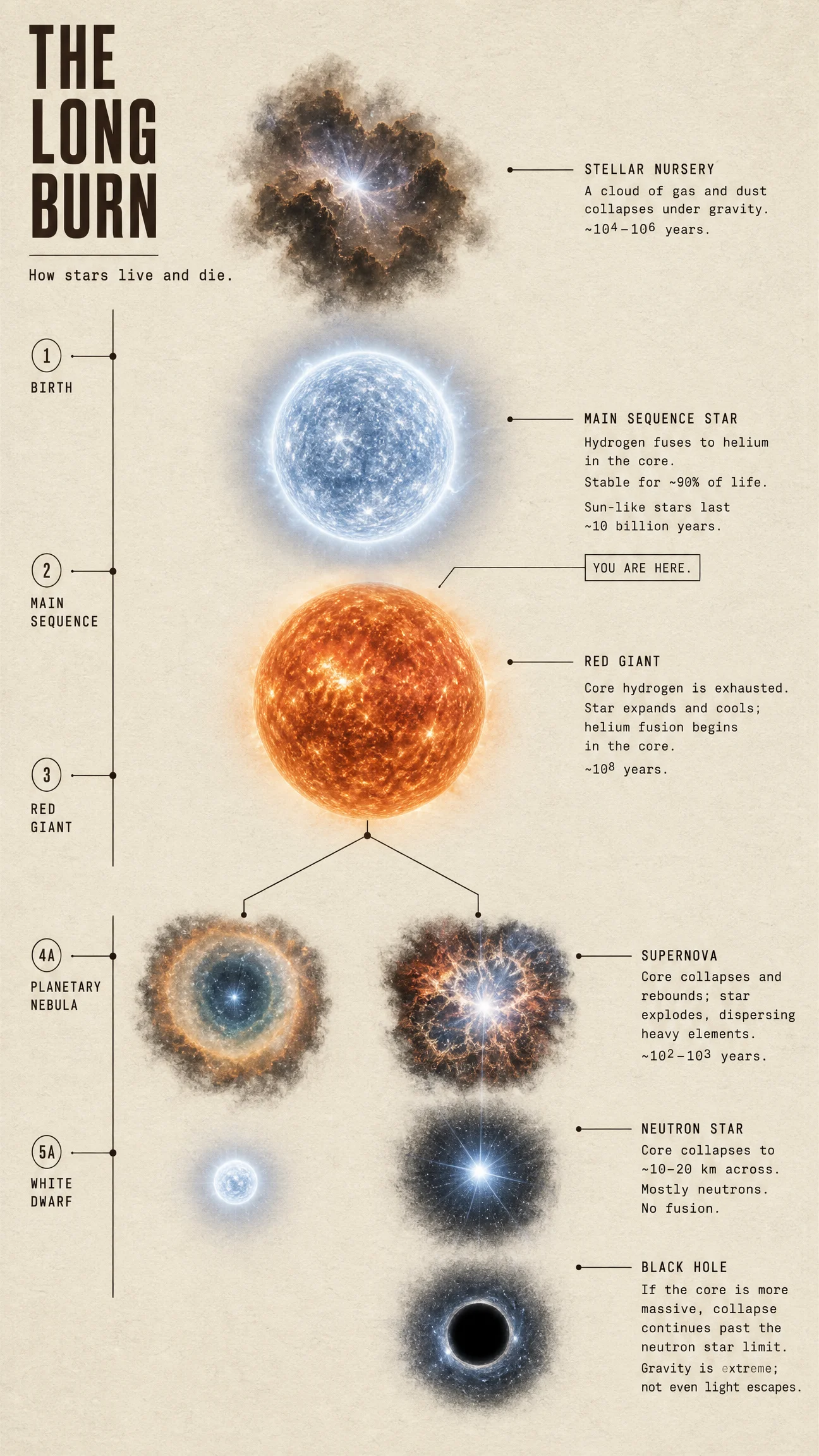
The source is THE LONG BURN from Vol.21, or any science poster of yours with a real palette and real figures. Upload it to Seedance 2.5 as a visual reference, never as a first frame.
Settings for this episode: element2video, 16:9, 720p, 30 seconds, audio on.
One note on resolution before you spend anything. 720p is the right ceiling for this work. 1080p costs roughly two and a half times as much per second, and on a course page or a social feed the visible difference is small. Spend the difference on re-rolls instead, because a second attempt at 720p improves a film far more than the same film at 1080p.
You also need the data off the poster, because the narrator says it out loud, and a documentary that gets its numbers wrong is worthless.
The Full Prompt
Block By Block: What Every Line Is Doing
Block 1: The Register Line
The first line sets the entire visual register, and naming real reference points is the fastest way to get there. "NASA science film" and "Discovery Channel special" are precise instructions to a model trained on the internet, far more precise than "cinematic" or "high quality" on their own. Then "photoreal, not illustrated" closes the escape hatch, because a science subject will otherwise drift toward diagram art.
Block 2: The Scoped Reference
Covered above, and worth repeating because it is the hinge of the method. Scope with ONLY, then ban the source explicitly. Two sentences turn your poster from a set into an art director.
Block 3: Six Beats In Three Acts
This is the block that changes when you move from short clips to thirty seconds.
A ten second clip is one idea. Thirty seconds is a film, and it needs a shape:
Six ranges carry that. Seedance 2.5 wants whole seconds, no gaps, and one event per range. Not "0 to 4.5s". Not a jump from 5s to 9s with nothing in between. Each range contains a location, an action and a camera behaviour, which is what a director means by a shot.
The most common mistake at this length is writing six ranges of atmosphere. Look at what each one here actually contains: something changes state in every single block.
Block 4: The Event Verbs
IGNITES. SWELLS. COLLAPSES. DETONATES. Capitalised deliberately, because the verb decides whether you get video or an expensive still. "The star is bright" gives you nothing. "The protostar IGNITES in a hard white bloom that BLOWS a shockwave ring of dust outward past the camera" gives you a cause, an effect, and a reason for the camera to be there.
If the lead verb of a range is drifts, glows, shimmers or sits, rewrite the range.
Block 5: One Unbroken Move With A Shape
Three jobs. "One unbroken move" stops the model cutting, and it will cut if you leave the door open. The shape matches the story: push IN while the star is small and being born, pull BACK when it swells, because the pull back is what sells scale. And "settling to a hold" gives the film an ending rather than a stop, which is the single easiest upgrade available at this length.
Note this differs from Seedance 2.0. In the earlier volumes the advice was to stack compound moves. 2.5 is cleaner when you name one move per beat and let it breathe.
Block 6: The Narrator
Three separate jobs in three lines. "Unseen" and "no person appears on screen" stop the model inventing a presenter, which it will do the moment you ask for speech. The voice description sets delivery. The braces carry the words, and in 2.5 braces are reserved for spoken lines specifically.
Budget about two and a half words per second. Thirty seconds means roughly seventy five words, and the script above is sixty eight. Write ninety and the narrator either rushes or gets cut off mid sentence.
Write it as an argument, not a caption. Three or four sentences that lead somewhere. The script here opens with a rule, applies it to our own Sun, then turns at "then the fuel runs out". That turn is what makes it feel written rather than labelled.
Block 7: The Audio Brackets
Seedance 2.5 separates audio by bracket type, and mixing them up is a common way to lose your sound design:
Give the score an emotional arc rather than a genre, "building patiently across the whole piece to the detonation, then opening into something vast and still", so it lands with your picture instead of running underneath it. Audio costs nothing extra, so there is no reason to leave it off.
Block 8: The Clean Plate Ban
The most important line on the page, and it gets its own section.
The Clean Plate Rule
Never let the model type your data.
My first documentary test asked Seedance to render the labels itself. The footage came back gorgeous and the typography came back reading STELLAR NURSRY and MAIN SERENCE. Beautiful shot, unusable, and a re-roll costs credits with no guarantee the next one spells it correctly either.
So the rule for this whole volume: generation is for photography, typography is for post. Ban every form of on screen text in the prompt, take delivery of a clean plate, then add your labels afterwards as real rendered type in your own font. Every figure exact, every word correct, first time, every time.
That is also why the labels in this film match the Vol.21 poster’s monospace. They are not an approximation of your brand. They are your brand.
The Method In One Box
Pick the mode by intent. image2video animates a picture. element2video shoots a subject. Documentaries are always element2video.
Scope the reference with ONLY, then ban the source explicitly. The ban is the instruction.
Name a real visual register in the first line. NASA, Discovery, a named film stock. Precision beats adjectives.
Build thirty seconds as six beats in three acts: setup, event, consequence. End on a hold.
Whole second ranges, no gaps, one event each. Something must change state in every range.
Lead every range with an event verb in capitals. If the lead verb is atmosphere, you have written a still.
Give the camera one unbroken move whose shape matches the story.
For narration: unseen narrator, no person on screen, a described voice, words in braces, about seventy five words for thirty seconds. Write an argument, not a caption.
Score in round brackets with an emotional arc, effects in angle brackets. Audio is free.
Ban all on screen text. Take the clean plate. Add your own type afterwards.
Shoot at 720p. Spend the saving on re-rolls.
Variations To Try
Change the register, keep the structure. Swap the first line for "shot on 16mm film, 1970s science documentary, warm grain and slight gate weave" and the same six beats come back as a period piece.
Change the lens. "Macro lens, extreme close on the plasma surface" turns the same star into a texture study.
Change the scale anchor. Add "the Earth drifts through frame for scale as the red giant swells" and the sequence gains a gut punch it did not have.
Change the ending. This film ends on a neutron star. End on a black hole instead and the same structure becomes a different story.
Change the subject, keep the file. Point the identical prompt shape at any Vol.21 poster. That is the entire volume.
Common Issues And Fixes
The poster shows up in the video. The reference was scoped but not banned. Fix: add the full ban, no poster, no paper, no printed page, no text, and name the specific artefact you keep seeing.
Words on screen are misspelled. The model was allowed to type. Fix: the clean plate rule.
A presenter appears. Asking for speech makes the model reach for a speaker. Fix: "unseen narrator", "voice over", "no person appears on screen", plus a visible person, a presenter and a face in the DO NOT list.
The narrator gets cut off. The script is too long. Fix: about two and a half words per second, count them before generating.
The model cuts to a new shot. Nothing told it not to. Fix: "one unbroken cinematic move" plus jump cuts in the DO NOT list.
The footage is pretty but nothing happens. The ranges describe conditions rather than events. Fix: rewrite each range to lead with an event verb that has a physical consequence.
It looks like a game cinematic. Fix: name a real optical system, anamorphic lens, shallow depth of field, film grain, and add video game rendering and plastic CGI to the DO NOT list.
The render fails on a moderation flag. It happens, and it is usually the generated audio rather than your picture. Fix: reword the narration slightly, change the seed, and run it again. One of the six films in this vault needed exactly that.
The film just stops. No hold was written. Fix: give the last range a settle, and end the camera line with "settling to a hold".
Next Step
Run this prompt on your own poster before you change a thing, then change exactly one block and run it again so you can see what that block controls. That is the fastest way to learn this system.
Post your before and after in the community.
Episode 2 keeps the method and changes the physics. THE BIG SPLASH is not a process, it is an event, and the prompt has to change shape to survive it. The camera stops observing and starts getting hit.
Section 02
THE BIG SPLASH
The Data Documentary, Poster To Screen
Episode 1 was a process. This one is an event. The prompt has to change shape to survive it.
The life of a star is a sequence of states, and it can be shot as a slow accumulation. A planetary collision is one violent moment with a before and an after. Write it the same way you wrote Episode 1 and you get a handsome shot of two planets sitting near each other, doing nothing.
This page is about writing the impact, and about the four seconds either side of it that actually make it land.
Where This Image Came From
The source poster is THE BIG SPLASH, built in Vol.21 | The Shortcut Codes, Decoded:
That sheet came from the shortcut code space infographic of how the Moon formed, wrapped in the locked prompt system taught in that course: a kraft paper ground, a single molten ember accent, a four panel sequence, and a data carry that demanded real figures and banned invented ones.
The three facts this film inherits from it are all verified: about 4.5 billion years ago, an impactor roughly the size of Mars known as Theia, and debris thrown into orbit that gathered into the Moon. Three facts is the entire budget for a thirty second film, and having them already checked is why this one can be shot instead of researched.
The Lesson Before The Prompt: Give The Camera Something To Survive
The most useful idea in this episode is that the camera is a character.
In Episode 1 the camera observed. It pushed in because the subject was small and pulled back because the subject grew, and nothing ever happened to it. Here it gets hit:
"The camera shuddering back from the blast front" does three jobs at once. It gives the explosion a direction, toward the lens. It gives the frame a physical reaction, so the viewer feels scale instead of being told about it. And it justifies the jump in energy between a calm approach and sudden chaos.
Write the camera as something the event happens TO, and a static prompt becomes a shot.
The second idea is the aftermath. Amateur impact prompts stop at the bang. The interesting part of this story is the twelve seconds afterwards, when the debris organises itself into a ring and then into a world. That is the actual science, and it is where this earns the word documentary rather than explosion.
What You Need
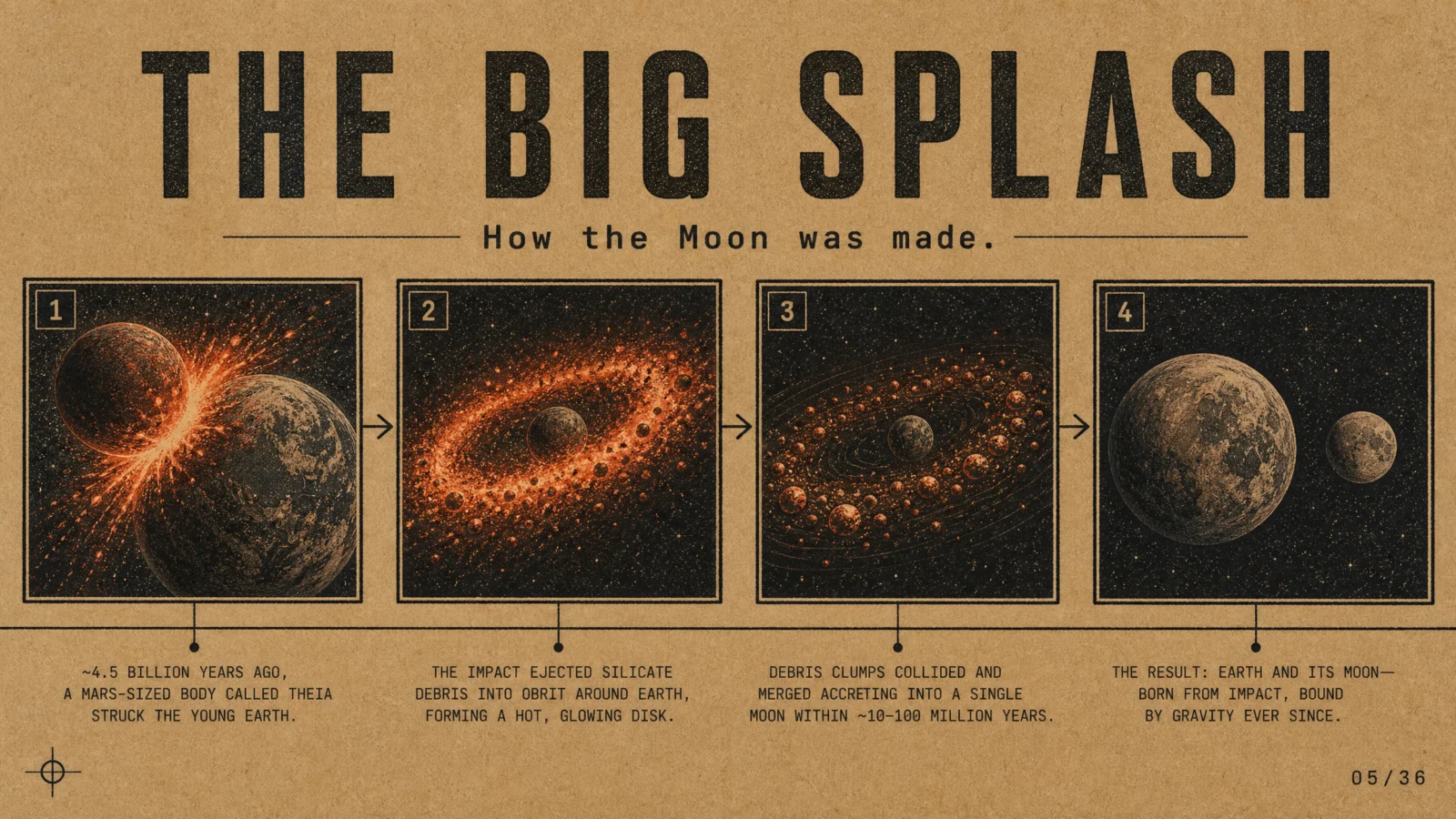
Any poster of yours built around a single event will work. Upload it as a visual reference, never as a first frame.
Settings: element2video, 16:9, 720p, 30 seconds, audio on.
The Full Prompt
Block By Block: What Is New In This One
The register line, the scoped reference, the audio brackets and the clean plate ban all carry over unchanged from Episode 1. Read that page first if you skipped it. Three things changed shape.
The Approach Beat
Nine seconds before anything explodes, and that is deliberate. An impact with no approach has no weight.
Two instructions carry it. "Holds wide and still" tells the camera to stay put and let the subject move, which is the opposite of the restless drifting most prompts produce. "Enters frame from the left" gives the model a direction to work with instead of an arrangement to compose.
Describe The State, Not The Name
Write "Earth" and you get the modern Earth, blue and cloudy, and your four and a half billion year old story is instantly wrong. Every subject in a documentary exists at a moment in time, so describe the state it was in, then ban the familiar version in the DO NOT list. Note "modern Earth with blue oceans" sitting there.
Consequence Outweighs Event
Twelve of the thirty seconds happen after the collision, which is the ratio that separates a documentary from a disaster clip:
"Cooling from white through orange into dull red" is doing quiet work. It is a physical process with a visible colour signature, which gives six seconds of ring footage a reason to keep changing. Without it the ring just sits there and spins.
The Method Update
Everything from Episode 1 holds. This episode adds four rules.
- Match the prompt shape to the story shape. A process wants accumulating beats. An event wants approach, impact, consequence.
- Write the camera as a character. Give it something to survive, and describe its physical reaction.
- Spend more time on the aftermath than the bang. The explanation lives there, and so does the science.
- Describe subjects by their state at that moment in time, not by their familiar name, then ban the familiar version.
Variations To Try
Change the vantage. Add "shot from the surface of the young Earth looking up" and the same collision becomes terrifying instead of majestic.
Change the pace. Compress the impact to two seconds and give the extra time to the ring. The event turns brutal and quick, the consequence gets room to breathe.
Change the ending. End on the modern Earth and Moon as they are today and the film becomes a story about where we came from.
Swap the event. The same four part shape fits any impact. Point it at Episode 5’s asteroid mission and only the data changes.
Common Issues And Fixes
The impact is disappointing. The approach is too short. Fix: give it eight or nine seconds, hold the camera wide, and let the impactor cross real distance before contact.
The planet looks like modern Earth. Fix: describe the state, then ban the familiar version by name.
The debris ring just spins. Nothing in the range changes over time. Fix: give the process a visible signature, in this case cooling colour.
A label lands on the white flash and cannot be read. The impact blowout is nearly pure white and even bordered text struggles. Fix: retime the label rather than fight the frame. Ours moved onto the moment of contact, which is a better frame anyway.
The narrator sounds rushed. Sixty nine words in thirty seconds is comfortable. Ninety is not. Fix: cut the script, not the duration.
Next Step
Take the four part shape on this page, approach, impact, consequence, resolution, and point it at any event you have a poster for. Keep three facts, not ten.
Post your before and after in the community.
Episode 3 removes the one thing every prompt so far has relied on. THE POINT OF NO RETURN is about a subject that is, by definition, invisible.
Section 03
THE POINT OF NO RETURN
The Data Documentary, Poster To Screen
How do you film something that is, by definition, invisible?
A black hole emits nothing. There is no surface, no texture, no light. Every other episode in this vault points a camera at a thing. This one points a camera at an absence, and the entire film has to be built out of what surrounds it.
That constraint makes this the most useful page in the volume, because the technique generalises. Any time your subject cannot be photographed, an idea, a force, a risk, a market, you film its effect on everything nearby.
Where This Image Came From
The source poster is THE POINT OF NO RETURN, built in Vol.21 | The Shortcut Codes, Decoded:
It came from the shortcut code space infographic of inside a black hole, then wrapped in the locked system: a deep midnight navy ground chosen deliberately because the subject is darkness itself and the sheet has to stay one shade richer than the hole, a single ember accent reserved for the photon ring, and a callout cap of five.
That cap matters here. When the bare code was run without it, the default drew the familiar pop science funnel and stuffed it with five zones, and in the crowding it placed the photon sphere inside the event horizon, which is exactly backwards. The controlled poster fixed that. This film inherits the corrected version.
The Lesson Before The Prompt: Film The Effect, Not The Thing
Look at what the six beats actually photograph. Not one of them photographs a black hole.
The subject only becomes visible in the last beat, and only because the previous twenty five seconds built a frame around it. That is the whole method: surround the absence until its shape is obvious.
The second lesson is the opening move. The film starts on an ordinary star field and lets it distort:
"Light bending where nothing is visible" is the single most important line in the prompt. It tells the model that the centre of frame must be empty AND that everything around it must respond. Without it you get a glowing ball, which is the opposite of the subject.
What You Need
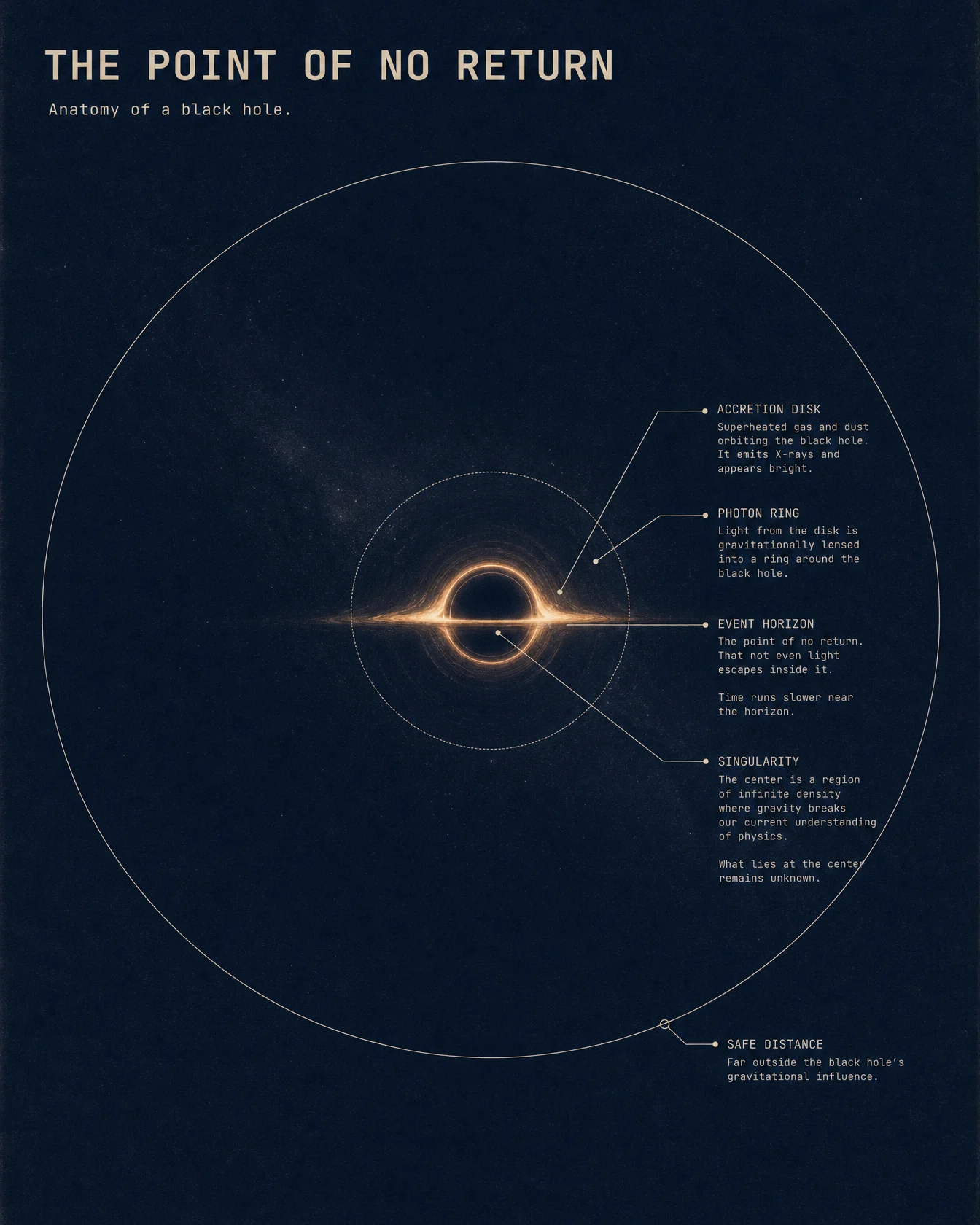
Settings: element2video, 16:9, 720p, 30 seconds, audio on.
The Full Prompt
Block By Block: What Is New In This One
The Negative Subject
Covered above. The centre of frame stays empty, everything around it reacts. Say it explicitly in the first beat or the model will fill the hole for you.
Banning The Cliché By Shape
This is a new kind of ban, and it is worth understanding why it is there. Most black hole imagery online is the funnel diagram, a stretched cone with a plughole at the bottom. It is wrong, it is everywhere, and the model will reach for it.
Banning it by describing its SHAPE rather than naming it is the trick. "Funnel", "whirlpool" and "tunnel" are geometry words, and geometry words are what the model actually acts on. Anytime a subject has a famous wrong picture attached to it, ban the shape.
One Optical Effect, Applied Throughout
Most camera lines describe movement. This one also describes a lens behaviour that has to persist for the whole clip. Naming it once in the camera block is more reliable than repeating it in every range, and it is what makes the disk bend up and over the top of the sphere instead of sitting flat like a hat.
The Narration Carries The Physics
This script does something the others do not. It corrects a misconception in its first sentence, "a black hole is not a hole", then builds from there. When your subject is widely misunderstood, spend the opening line on the correction. It buys you the rest of the film.
The Method Update
- When the subject cannot be photographed, film its effect on everything nearby, and reveal the subject itself only at the end.
- State explicitly that the centre is empty, or the model will fill it.
- Ban famous wrong imagery by its shape, not its name. Funnel, whirlpool, tunnel.
- Name persistent optical effects once in the camera block rather than in every range.
- If the subject is commonly misunderstood, open the narration with the correction.
Variations To Try
Change the distance. Add "the camera crosses the photon ring" and the film becomes a descent rather than an observation. Expect it to fail more often, which is part of the fun.
Add a scale anchor. "Our entire solar system would fit inside the disk" spoken over the wide shot lands harder than any number.
Change the object. Point the same six beats at a neutron star, a magnetar, or the moment two black holes merge.
Kill the disk. A black hole with nothing falling into it is genuinely invisible, and a film about trying to see one is a different and stranger piece.
Common Issues And Fixes
A glowing ball appears in the centre. The absence was not stated. Fix: "an absolute black sphere", "light bending where nothing is visible", and a hard ban on the funnel shapes.
The disk looks like a flat hat. Lensing was not requested. Fix: "gravitational lensing distortion throughout" in the camera block, plus "the disk visibly bending up and over the top of the sphere".
It looks like the movie. That is the archive doing its job. Fix: if you want distance from it, change the palette away from warm orange and specify a colder disk.
Nothing happens for thirty seconds. Lensing and glow are conditions, not events. Fix: every range still needs a verb. RESOLVES, STREAMS, IGNITES, STRETCHES.
Next Step
Pick something you cannot photograph, then list the five things it visibly affects. That list is your shot list.
Post your before and after in the community.
Episode 4 leaves physics behind for history. THE GRAND TOUR has to cross four planets and twelve years in one unbroken move, and its hardest problem is time.
Section 04
THE GRAND TOUR
The Data Documentary, Poster To Screen
Four planets, twelve years, one unbroken shot. This episode is about compressing time.
Every film so far has covered a single place. This one has to cross the solar system, visit four worlds in order, and make twelve years of travel feel like a journey rather than a slideshow. It is the hardest structural problem in the vault, and the solution is simpler than it looks.
Where This Image Came From
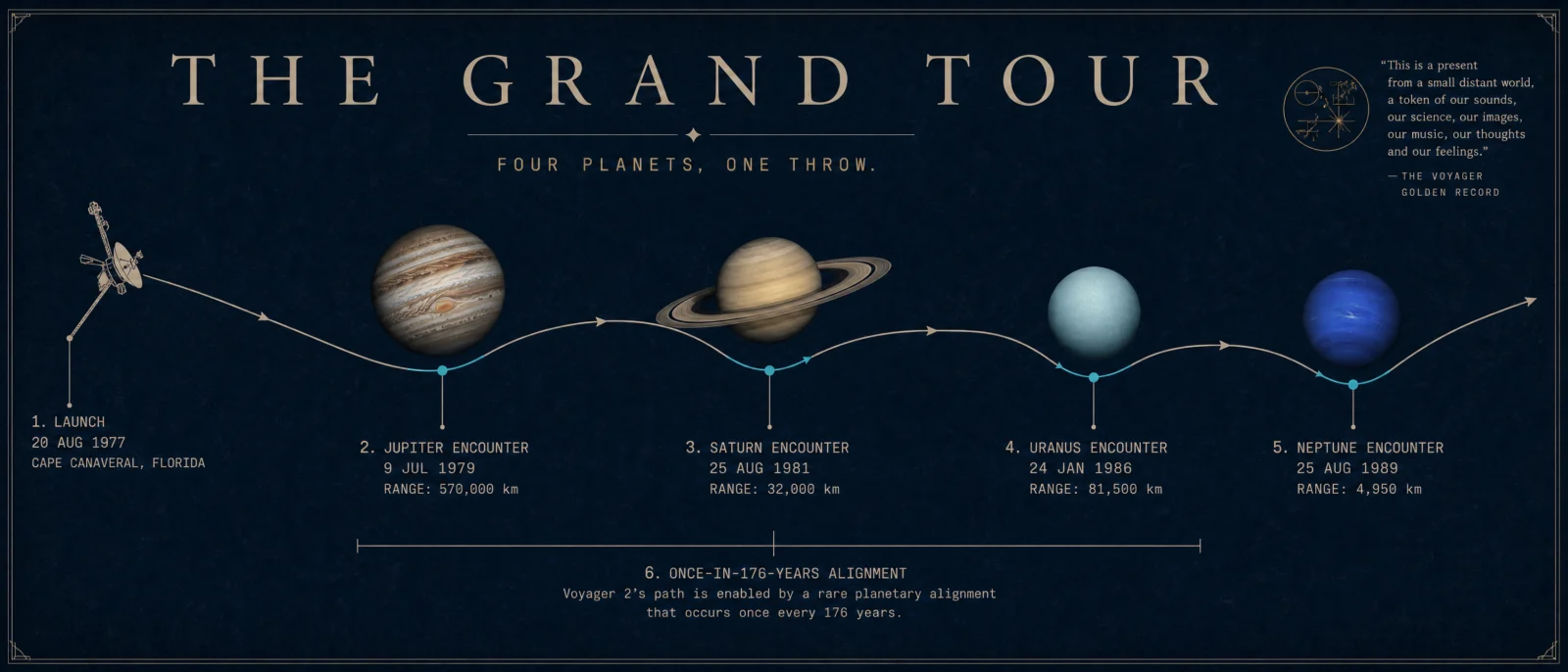
The source poster is THE GRAND TOUR, built in Vol.21 | The Shortcut Codes, Decoded:
It came from the shortcut code mission profile of the Voyager 2 grand tour, on a deep navy museum wall sheet with four photoreal planets standing along a single bone ink trajectory.
That poster taught the vault its most valuable data lesson, and it is worth repeating here because this film depends on it. Every encounter date on that sheet was pinned inside the prompt, Jupiter 1979, Saturn 1981, Uranus 1986, Neptune 1989, and every one came back correct. One number was left unpinned, Saturn’s flyby distance, and that was the only number the model got wrong.
The dates in this film are correct because they were pinned in the poster first. Verified data is the thing you are actually reusing.
The Lesson Before The Prompt: The Travelling Camera Solves Time
The obvious way to cover four planets is four shots. Do that and you get a slideshow, and Seedance will happily cut between them, which breaks the one rule that keeps these films feeling cinematic.
The fix is to make the CAMERA the continuous element and let the world change around it:
Read that again, because it is the whole episode. The camera never stops and never cuts. It flies alongside one object for thirty seconds. The planets arrive, fill the frame and depart, exactly as they would from a window.
Twelve years passes and the viewer never notices, because the shot never breaks. Continuity of camera buys you discontinuity of time. That is the trick, and it works for a factory line, a career, a supply chain, anything that has to move through stages.
The second decision is subtler. Look at how the light changes:
Distance is abstract. Light is not. Telling the model that the Sun stops being a disc and becomes a star is how you make four billion kilometres felt rather than stated.
What You Need
Settings: element2video, 16:9, 720p, 30 seconds, audio on.
The Full Prompt
Block By Block: What Is New In This One
One Camera, Six Locations
The camera block above is the structural spine. "Each planet entering and leaving frame as the craft passes" is what turns six locations into one journey.
Numbers Spelled As Words
Written out, not as digits. Narration is read aloud by a speech model, and digits get mangled or read strangely. Spelling numbers phonetically is how you control delivery. It also stops the model from trying to put them on screen.
The Ownership Ban
Real missions carry real insignia, and the archive remembers them. A product you sell cannot carry another organisation’s marks, so every real mission film in this vault bans them explicitly. The craft is described by its parts, "a large dish antenna and a long boom", which gives the model enough to build an accurate machine without reaching for a badge.
Light As A Distance Meter
Covered above. Change the quality of light across the journey and distance becomes something the viewer feels.
The Method Update
- To cross many places in one shot, make the camera the continuous element and let the world arrive and depart around it.
- Never write four locations as four shots. Seedance will cut, and the cut kills it.
- Convey distance and time through light quality, not through stated numbers.
- Spell narration numbers as words, always.
- Ban logos, patches, flags and lettering on any real vehicle, and describe the machine by its parts instead.
Variations To Try
Reverse it. Fly the same route inward, from the dark toward the Sun, and the film becomes about arrival instead of departure.
Change the companion. Remove the spacecraft and make the CAMERA the traveller. Lonelier, stranger, and cheaper to get right.
Change the register. Swap the first line for "shot on 16mm, 1979 broadcast documentary, warm grain" and the same journey becomes a period artefact.
Add the ending it deserves. Voyager took a photograph of Earth from six billion kilometres away. A final beat holding on a single pale dot is the strongest ending available to this subject.
Common Issues And Fixes
The model cuts between planets. The default behaviour when locations change. Fix: "one unbroken cinematic move" plus "each planet entering and leaving frame", plus jump cuts in the DO NOT list.
The planets look wrong. Generic gas giants appear if you do not specify. Fix: name the identifying feature. Banded belts and the Great Red Spot. A razor thin ring plane. A featureless pale disc. Storm streaks on deep blue.
The spacecraft grows a logo. Fix: the ownership ban, plus describe it by parts.
The film ends on pure black. Ours very nearly does, which is honest to the story but weak as a final frame. Fix: if you want a stronger ending, hold on the receding craft rather than on empty space, or add the pale dot beat.
The journey feels flat. All six ranges are shot at the same distance and energy. Fix: vary the framing. One planet should FILL the frame, another should be crossed in silhouette.
Next Step
Take one process that moves through stages and film it as a single travelling shot. A product down a line, a season across a landscape, a career across four cities.
Post your before and after in the community.
Episode 5 goes back to a real mission, but this time the mission is a deliberate collision, and the entire film is built around three seconds of impact.
Section 05
THE NUDGE
The Data Documentary, Poster To Screen
The whole film exists to sell three seconds. Everything else is setup or aftermath.
This is a real event, recent, documented, and it has the cleanest dramatic structure of anything in the vault. A spacecraft was deliberately flown into an asteroid to see whether we could change its path. It worked.
The craft approaches, the craft hits, the orbit changes. Your only real decision is how much of the thirty seconds you spend on each.
Where This Image Came From
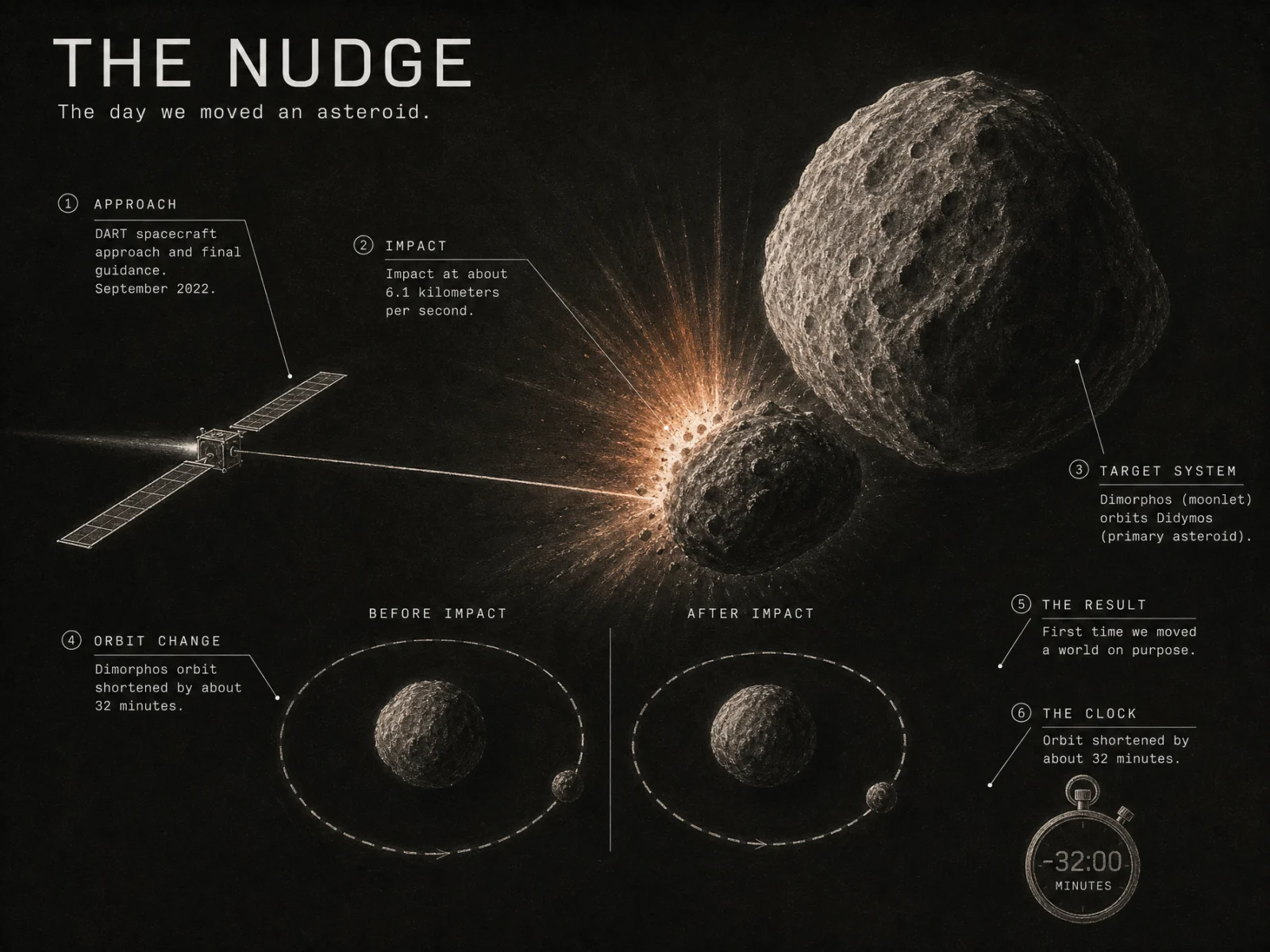
The source poster is THE NUDGE, built in Vol.21 | The Shortcut Codes, Decoded:
It came from the shortcut code mission profile of the DART asteroid deflection test, drawn as chalk on a near black board because the impact happened in deep night and the plume is the only light in the frame.
The verified figures it carries into this film: September 2022, impact at about 6.1 kilometres per second, Dimorphos orbiting Didymos, and an orbital period shortened by about 32 minutes.
That poster also produced one of the vault’s best warnings. Its bare default came back with real spacecraft specifications and then quietly invented two instruments, one of them borrowed by name from an entirely different mission. Real missions are exactly where a model sounds most confident and is most likely to be making things up. Pin what matters.
The Lesson Before The Prompt: Earn The Impact
Fifteen of these thirty seconds happen before contact. That is not padding, it is the entire mechanism by which the impact lands.
Beat three is the one most people skip, and it is the best beat in the film:
That is the real DART footage, and everyone who watched it live remembers it: a grey blur resolving into rocks, faster and faster, then nothing. Putting the camera in the spacecraft’s position for those four seconds is what makes the audience flinch at the cut to white.
If your event has a famous point of view, use it.
What You Need
Settings: element2video, 16:9, 720p, 30 seconds, audio on.
The Full Prompt
Block By Block: What Is New In This One
Hard Single Source Light
Stated twice, once in the scene and once in the camera block, because it is the entire look. In deep space there is no atmosphere to scatter light, so there is no fill. One side of a rock is lit and the other side is genuinely black.
Most AI space footage gets this wrong and lights everything softly, which instantly reads as fake. Naming hard single source light is the cheapest realism upgrade in this whole volume.
The Shape Of The Plume
Not a cloud, not a fireball. Straight rays. In vacuum with almost no gravity, ejecta travels in straight lines, and the real images looked like a starburst. Describing the geometry rather than the drama is what makes the impact look researched instead of imagined.
The Result Made Visible
The point of the mission is an orbital period change of thirty two minutes, which is not a filmable thing. The final beat translates the abstract result into something the eye can read: a tighter, faster path. When your payoff is a number, find its visible consequence.
Excluding The Obvious
The model wants to put Earth in an asteroid film because that is the emotional frame it has learned. It is eleven million kilometres away and would ruin the scale. Ban things that are wrong for your specific scene, not just things that are wrong in general.
The Method Update
- In space, name hard single source light and no fill. It is the fastest route to believable.
- Describe the geometry of an effect, not just its drama. Straight rays, not a fireball.
- If your event has a famous point of view, put the camera there.
- When the payoff is a number, film its visible consequence instead.
- Ban what is wrong for this scene specifically, not only the universal list.
Variations To Try
Stay on the craft. End the film at the moment of impact, from the craft’s view, and cut to black. Shorter, colder, and arguably better.
Add the witness. A second spacecraft filmed this impact from nearby. A beat that reveals an observer watching changes the whole tone.
Change the stakes. Same structure, but the asteroid is on course for Earth. It becomes a thriller instead of a documentary, and you should say clearly that it is a scenario.
Run it as the sequel. A follow up mission went back years later to survey the crater. That is a quieter, stranger film about consequences.
Common Issues And Fixes
Everything is softly lit and looks fake. Fix: hard single source light, no fill, stated in the scene and in the camera block.
The impact looks like a fireball. There is no oxygen out there. Fix: describe straight rays and a starburst fan, and avoid the word explosion.
The asteroid looks like a smooth potato. Fix: "rubble pile", "boulders and craters resolving out of grey". These objects are loose piles of rock, not solid stones.
Earth appears. Fix: ban it by name.
The approach has no tension. Fix: put the camera in the craft’s position and let the surface rush up. Tension is a point of view choice.
Next Step
Find an event with a famous camera position and rebuild it. The view from inside the thing that is about to be destroyed is almost always the strongest available shot.
Post your before and after in the community.
Episode 6 closes the vault with the hardest job of all: not an event, but an explanation. THE GREAT COINCIDENCE has to teach a geometric idea in thirty seconds, and it is the one film that failed its first render.
Section 06
THE GREAT COINCIDENCE
The Data Documentary, Poster To Screen
The other five films showed you something happening. This one has to teach you an idea.
An eclipse is not really an event, it is a coincidence. The Sun is about four hundred times wider than the Moon, and it also happens to sit about four hundred times further away, so from Earth the two discs appear almost exactly the same size. Everything else follows from that one fact.
You cannot photograph a ratio. So this film has to build the idea visually, then pay it off, and it is the best example in the vault of a prompt doing genuine teaching work.
This is also the film that failed its first render, and the fix is on this page.
Where This Image Came From
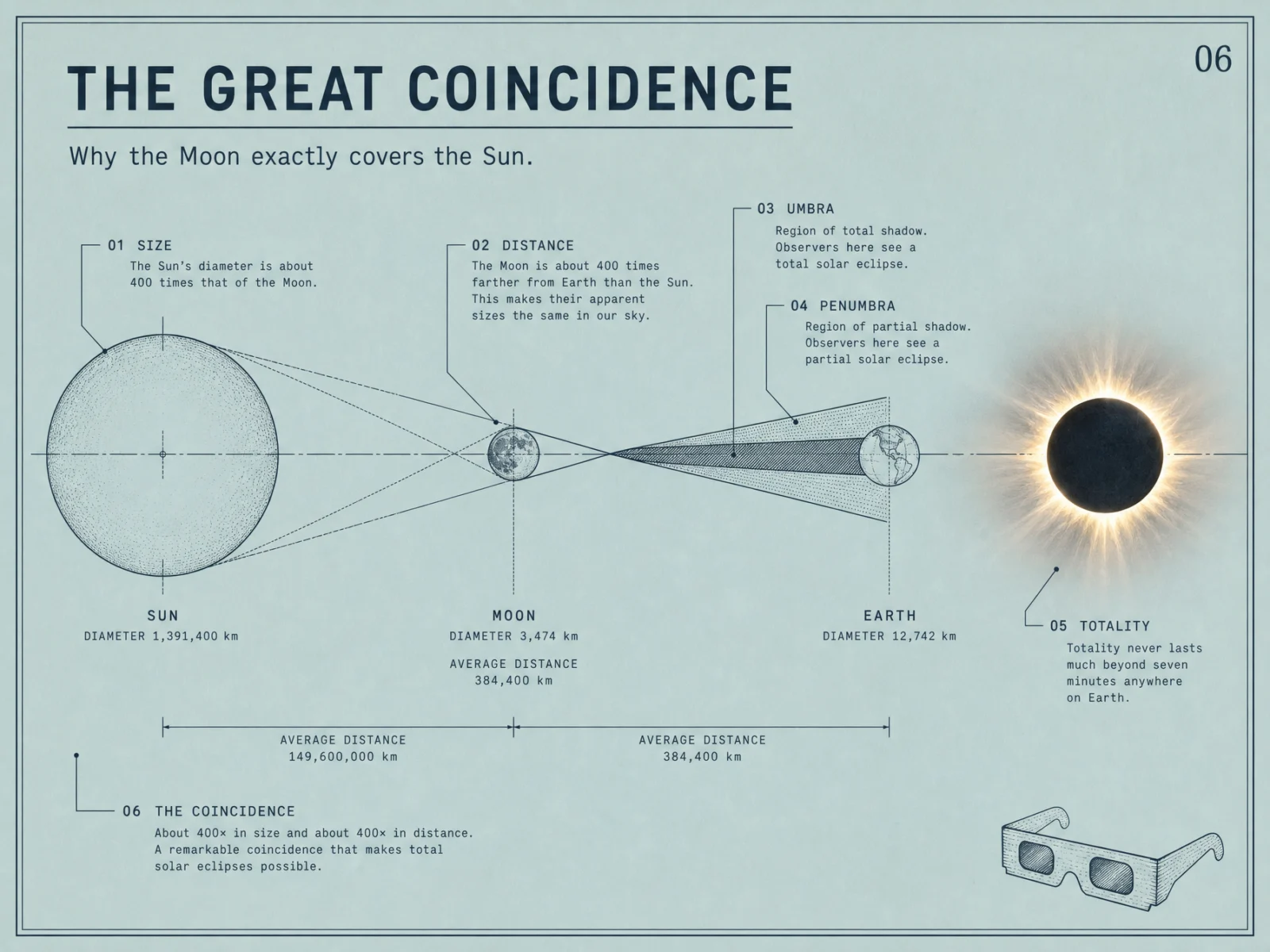
The source poster is THE GREAT COINCIDENCE, built in Vol.21 | The Shortcut Codes, Decoded:
It came from the shortcut code space infographic of how a total solar eclipse works, laid out on calm duck egg paper in hairline Japanese manual style, with gold reserved for the corona and nothing else.
Its figures are exact rather than rounded: the Sun at 1,391,400 kilometres across, the Moon at 3,474, Earth at 12,742, and the two distances at 149,600,000 and 384,400. That precision is what makes the four hundred and four hundred claim land instead of sounding like a slogan, and it is why the labels in this film can be specific.
Worth noting what the bare code did with the same subject: it produced a handsome sheet that printed "The Son is completely covered" in the middle of its showcase panel. Knowledge is cheap, proofreading is design.
The Lesson Before The Prompt: Build The Idea Before You Use It
Watch the order of the first three beats:
Beat one establishes that the Sun is enormous. Beat two reveals, physically, that the small Moon matches it in the sky. Beat three only works because beats one and two happened.
That is a taught idea, not a shown one. The prompt line doing the work is this:
The word "apparent" is the whole lesson. The discs are not the same size, they appear to be, and the film has to demonstrate the difference between those two statements without a single word of on screen text.
The second technique is the vantage change:
Halfway through, the film leaves the ground and looks back from orbit. It is the only episode in the vault that changes vantage inside a continuous shot, and it is what turns a local experience into a planetary one. Some ideas can only be shown from a different place, so move the camera there.
What You Need
Settings: element2video, 16:9, 720p, 30 seconds, audio on.
The Full Prompt
Block By Block: What Is New In This One
The Comparative Reveal
Covered above. Establish scale, then reveal the match. The word "apparent" carries the idea.
Changing Vantage Without Cutting
Three positions in one unbroken move. The word doing the work is "turn". It reads as a camera behaviour rather than an edit, so the model rotates the view instead of cutting to a new shot. If you need to change vantage mid film, describe the transition as a physical camera action.
Light As The Emotional Track
Notice how many ranges describe light rather than motion. "The light around the frame subtly cooling." "A disc of darkness sweeping." "Light floods back." Totality is a lighting event, so the light is the performance, and describing it is how the film gets its feeling.
The Audio Arc Mirrors The Picture
Sound follows the same curve as the light. Anyone who has stood in a total eclipse will tell you the silence is the part you remember. Building that into the sound design is a small thing that makes the film feel authored.
The Failed Render, And The Fix
This is the one episode that failed on its first attempt. The error was not the picture:
The generated AUDIO tripped a filter. Nothing in the prompt was unsafe, and the picture was never the problem. This happens occasionally with narration, and it is worth knowing before it happens to you at thirty seconds a render.
What fixed it: I reworded the narration slightly, simplified the sound effect line, set a fixed seed, and ran it again. It passed clean. Do not assume a moderation failure means your idea was rejected. Change the words, change the seed, run it again.
The Method Update
- To teach an idea rather than show an event, build it in sequence. Establish, reveal, then use.
- Precision beats rounding. Exact figures make a claim land.
- To change vantage inside a continuous shot, describe it as a physical camera action, a turn, a rise, a fall.
- When the subject is a lighting event, write the light as the performance.
- Give the sound design the same arc as the picture.
- Moderation failures are usually audio. Reword, reseed, rerun.
Variations To Try
Stay on the ground. Cut the orbital beat and hold the whole film in one place as the light changes. Quieter, and closer to how it actually feels.
Explain why it is rare. Add a beat showing the Moon’s tilted orbit and the film answers the obvious question of why this does not happen every month.
Change the coincidence. The Moon is drifting away from us, so in the far future total eclipses stop happening. That is a genuinely moving ending.
Change the planet. Run the same structure for an eclipse seen from another world, and use it to show how unusual ours is.
Common Issues And Fixes
The two discs are obviously different sizes. Fix: "revealed at almost exactly the same apparent size", stated in the beat where the match happens.
The corona looks like a lens flare. Fix: "delicate white streamers" plus "accurate corona structure", and specify extreme dynamic range in the camera block.
The model cuts when the vantage changes. Fix: describe the change as a camera turn, and keep jump cuts in the DO NOT list.
A crowd of eclipse watchers appears. The archive is full of them. Fix: ban a crowd, a face, and eclipse glasses by name.
The render fails on moderation. Fix: reword the narration, simplify the effects line, set a fixed seed, rerun.
Next Step
You now have the whole method. Six films, six problems: a process, an event, an invisible subject, a journey, an impact, and an idea. Whatever you want to make next is a version of one of those.
Go back to your own poster vault and pick the sheet you are proudest of. Work out which of the six problems it is. Then use that episode’s page as your template.
Post your best one in the community. The strongest film from this vault gets featured in the next volume.