

Section 01
🎬 Build Your Own AI Influencer
Resources & Prompts – Full Workflow
This page contains all the resources and prompt placeholders used in the tutorial video.
You can copy, reuse, and adapt these prompts for your own AI influencer projects.
WORKFLOW OVERVIEW
In this tutorial, we created a complete AI video using:
- One consistent AI character
- A fixed environment
- Scene-by-scene planning
- First & last frame animation
- Reusable assets (AI + custom)
The final video is built using 4 main scenes (+ 1 closing scene).
SCENE & STORY STRUCTURE
Before creating anything, we defined:
- Voice over per scene
- Character action per scene
- Objects used per scene
Scene breakdown used in the video:
SCENE 1 – INTRO / PROOF
Okay. Before we start, I need to tell you something.
I am not a real person.
I was created from a single prompt.
Action:
The character starts seated in a neutral position.
She begins speaking naturally.
She picks up a sheet of paper from the table.
The paper contains visible text that looks like an AI prompt.
She briefly shows the paper to the camera, then lowers it.
Objects:
The paper is created separately as a reference image and linked to this scene.
SCENE 2 – CAPABILITY / REUSE
But once a character like me exists,
I can be reused.
I can explain things.
I can speak for a brand.
Action:
Subtle hand movements while speaking.
The character slowly stands up.
She picks up a small product box, for example an iPhone box.
She holds it up to the camera and presents it naturally, like a social media influencer.
Objects:
The iPhone box is created separately as a reference image and linked to this scene.
SCENE 3 – SCALE / MULTIPLE PRODUCTS
This is where it gets interesting.
You take one character.
You take one product.
Action:
She puts the small product box down to the side.
She then picks up a larger box, for example Custom logo / card
She holds it up and presents it to the camera in the same influencer-style manner.
Objects:
The iPad box is created separately as a reference image and linked to this scene.
SCENE 4 – SYSTEM REVEAL
This is not one video.
This is a system.
And I will show you how to build it.
Action:
The product is lowered or set aside.
The character relaxes her posture.
She gives a small nod or a calm, confident smile.
Objects:
No objects in hand at the end of this scene.
SCENE 5 – CLOSING (NO VOICE OVER)
Action:
The character’s facial expression returns to a completely natural, neutral state.
She moves closer to the camera.
She reaches forward and gently takes something toward herself.
The movement feels casual and realistic, then stops.
Objects:
No objects used in this scene.
BASE CHARACTER PROMPT
This prompt defines the character, environment, lighting, and camera.
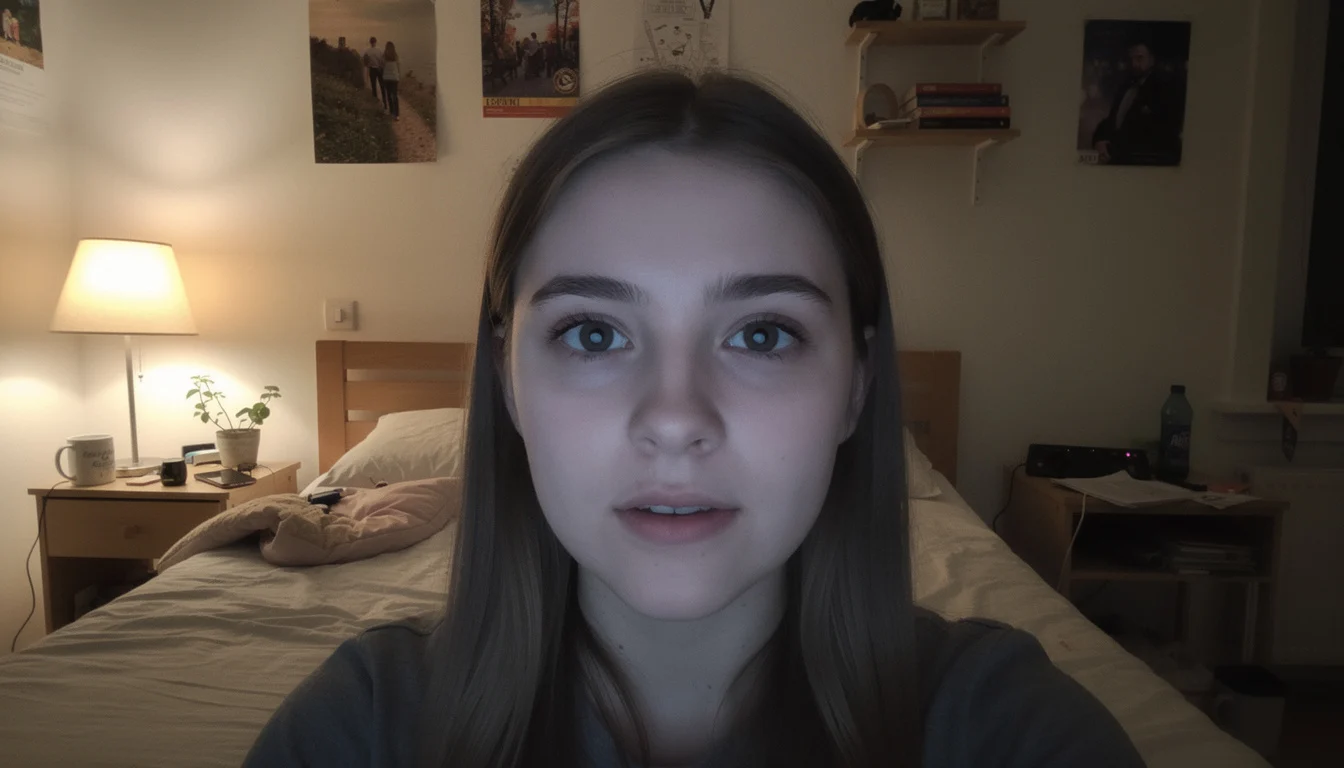
This image is reused as a reference across all scenes.
Create a highly realistic, photorealistic image of a young woman, early 20s, in a casual home environment.
This image will be used as the base character for multiple scenes and animations.
ENVIRONMENT
She is inside a real, lived-in bedroom.
A bed is visible behind her, slightly unmade.
There are subtle personal details in the room such as posters, shelves, or small everyday items.
Nothing looks staged or studio-like.
The room feels authentic, slightly imperfect, and natural.
LIGHTING
Lighting is natural and realistic, coming from a single warm household lamp positioned slightly to one side.
Soft shadows are visible on her face and in the room.
Lighting is uneven and imperfect, not cinematic.
No rim lights, no dramatic contrast, no studio lighting.
Overall lighting feels like a real person recording at night in their bedroom.
CAMERA AND FRAMING
The camera looks like a smartphone front camera.
Eye-level angle, fixed and centered.
Medium framing: head and upper torso visible.
No camera movement.
Slight softness and mild digital noise, like a real phone recording.
Aspect ratio suitable for vertical video.
CHARACTER APPEARANCE
She looks like a real person, not a model.
Natural facial proportions with subtle imperfections.
Natural skin texture with pores and minor blemishes.
No heavy makeup, very minimal and realistic.
Casual clothing, such as a simple t-shirt or hoodie.
Hair is natural and slightly imperfect, not styled.
POSE AND EXPRESSION
She is seated casually, facing the camera.
Posture is relaxed and natural.
Facial expression is neutral and calm, as if she has just pressed record and is about to speak.
Hands are lowered and mostly out of frame.
No exaggerated emotion.
SYLE AND MOOD
Photorealistic, smartphone video realism.
Casual, believable, everyday feeling.
No cinematic look, no polished influencer style.
The image should feel like a real person starting a casual video recording at home.
SCENE 1 – PROMPTS
Scene 1 First Frame Prompt

Create a short photorealistic video using the provided first frame and last frame images.
GENERAL STYLE
- Smartphone front-camera video look
- Indoor bedroom at night
- Single warm household lamp from the side
- Soft shadows, uneven lighting
- Slight softness and mild digital noise
- No cinematic lighting
- No camera movement
- Eye-level, fixed camera
ACTION AND MOTION (INTERPOLATED BETWEEN FRAMES)
- The character starts seated, neutral, facing the camera
- She begins speaking naturally
- While speaking, she raises a sheet of paper toward the camera
- The paper is shown briefly and clearly
- She lowers the paper by the end of the clip
- Movements are subtle, realistic, and human
- No exaggerated gestures or fast motion
CONSTRAINTS
- Do not change the character’s identity
- Do not change the room, background, lighting, or camera angle
- Only the character and the paper move
- Motion should feel casual and believable, like a real person recording at home
VOICE OVER (SYNC NATURALLY TO SPEECH)
"Okay. Before we start, I need to tell you something.
I am not a real person.
I was created from a single prompt."
GOAL
The final video should feel like a real person casually recording a short phone video at  h o me, with natural motion, realistic timing, and convincing human presence.
Scene 1 Last Frame Prompt
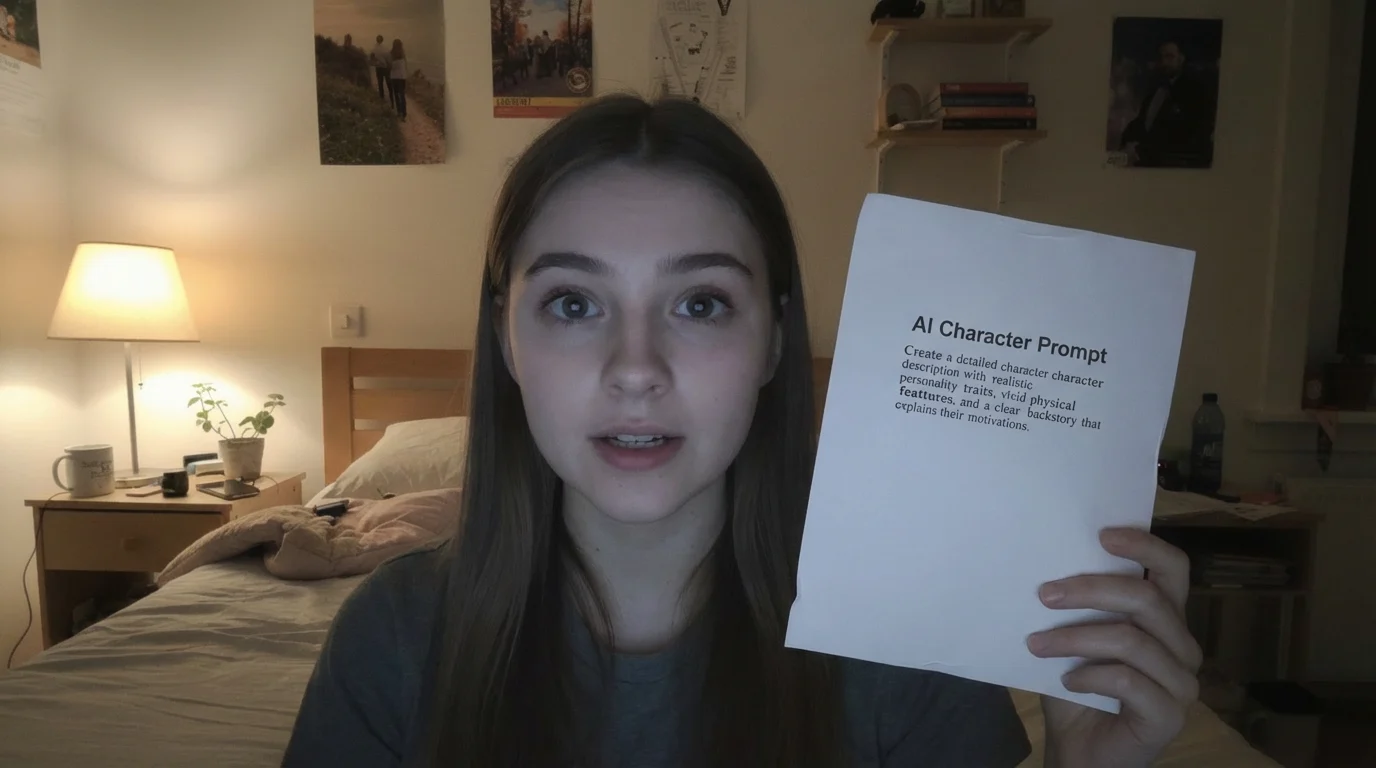
Use the original base character image as the reference. Do NOT change environment, lighting, or camera.
Keep the same character identity, same bedroom, same lighting, same camera position, and same framing as the reference image.
The character is seated naturally, facing the camera.
Her posture is relaxed and neutral.
Her facial expression is calm and attentive, as if she has just started recording.
Both hands are lowered and not visible in the frame.
No objects are being held.
Do not change clothing, hairstyle, background, lighting, camera angle, or image style.
Photorealistic smartphone front-camera look.
Natural skin texture, subtle imperfections, casual realism.Keep the same character identity, same bedroom, same lighting, same camera position, and same framing as the reference image.
The character is seated naturally, facing the camera.
Her posture is relaxed and neutral.
Her facial expression is calm and attentive, as if she has just started recording.
Both hands are lowered and not visible in the frame.
No objects are being held.
Do not change clothing, hairstyle, background, lighting, camera angle, or image style.
Photorealistic smartphone front-camera look.
Natural skin texture, subtle imperfections, casual realism.
Prompt Paper – Image Prompt

A realistic white sheet of paper held vertically.
On the paper, there is visible printed text that looks like an AI prompt.
The text is formatted like a paragraph or short instructions, not handwritten.
The text is readable but not perfectly sharp, like a normal home printout.
The paper has slight bends or imperfections, not perfectly flat.
Photorealistic lighting.
Neutral background.
No hands visible in this image.
This paper will be used as a reference object and integrated into the character scene.
Scene 1 – Google Veo 3.1 Video Prompt
Create a short photorealistic video using the provided first frame and last frame images.
GENERAL STYLE
- Smartphone front-camera video look
- Indoor bedroom at night
- Single warm household lamp from the side
- Soft shadows, uneven lighting
- Slight softness and mild digital noise
- No cinematic lighting
- No camera movement
- Eye-level, fixed camera
ACTION AND MOTION (INTERPOLATED BETWEEN FRAMES)
- The character starts seated, neutral, facing the camera
- She begins speaking naturally
- While speaking, she raises a sheet of paper toward the camera
- The paper is shown briefly and clearly
- She lowers the paper by the end of the clip
- Movements are subtle, realistic, and human
- No exaggerated gestures or fast motion
CONSTRAINTS
- Do not change the character’s identity
- Do not change the room, background, lighting, or camera angle
- Only the character and the paper move
- Motion should feel casual and believable, like a real person recording at home
VOICE OVER (SYNC NATURALLY TO SPEECH)
"Okay. Before we start, I need to tell you something.
I am not a real person.
I was created from a single prompt."
GOAL
The final video should feel like a real person casually recording a short phone video at  h o me, with natural motion, realistic timing, and convincing human presence.
SCENE 2 – PROMPTS (IPHONE BOX)
Apple iPhone Box – Image Prompt

A realistic Apple iPhone product box.
Minimalist white Apple packaging.
The Apple logo is clearly visible on the box.
Clean, modern Apple design with subtle text and branding.
Rectangular box with a slim profile.
Photorealistic product lighting.
Neutral, clean background.
Sharp focus.
No hands visible.
No reflections blocking the Apple logo.
This object will be used as a reference image and integrated into a character animation.
Scene 2 Last Frame Prompt

Keep the same character identity, same bedroom, same lighting, same camera position, and same framing as the reference image.
The character is now siting naturally in the same spot.
The paper is no longer present. instead she holding the smart phone
She is holding a small Apple iPhone product box with both hands, raised toward the camera.
The box is clearly visible and presented confidently, similar to how a social media influencer shows a product.
The Apple logo is clearly visible on the box.
The box has a clean white Apple-style design with minimal text.
Her posture is relaxed but engaged.
Her facial expression is attentive and confident, as if she is explaining or presenting the product.
The pose feels natural and realistic, not staged or exaggerated.
Do not change clothing, hairstyle, background, lighting, camera angle, or image style.
Photorealistic smartphone front-camera look.
Natural skin texture and casual realism.
Scene 2 – Google Veo 3.1 Video Prompt
STYLE AND CAMERA (LOCKED)
- Smartphone front-camera video look
- Indoor bedroom at night
- Same room, same background, same framing as reference images
- Single warm household lamp from the side
- Soft, uneven lighting with gentle shadows
- Slight softness and mild digital noise
- Eye-level, fixed camera
- No camera movement
- No cinematic lighting
ACTION AND MOTION (INTERPOLATED BETWEEN FRAMES)
- The character starts seated, neutral, facing the camera
- She begins speaking naturally
- While speaking, she stands up smoothly
- She removes the paper from the previous scene (paper is no longer present)
- She picks up a small Apple iPhone product box
- She holds the box toward the camera in a natural influencer-style presentation
- Movements are subtle, realistic, and human
- No exaggerated gestures, no fast motion
OBJECT CONTINUITY
- The paper object must not appear in this scene
- The Apple iPhone box must be the only object used
- The Apple logo on the box must remain visible and unobstructed
- The box size, orientation, and design must remain consistent
- Only the character and the iPhone box move
IDENTITY AND ENVIRONMENT CONSTRAINTS
- Do not change the character’s identity, face, body, or clothing
- Do not change hairstyle, background, lighting, or camera angle
- No new objects introduced
- No environment changes
VOICE OVER (SYNC NATURALLY TO SPEECH)
"But once a character like me exists,
I can be reused.
I can explain things.
I can speak for a brand."
TIMING
- Speech pacing should feel natural and conversational
- Motion should align subtly with speech beats
GOAL
The final video should feel like a real person casually recording a short phone video at home, smoothly standing up and presenting an Apple iPhone box while speaking, with believable human motion, clear branding, and realistic timing.
SCENE 3 – PROMPTS (LOGO CARD)
Logo Card

(Custom asset created separately and uploaded)
Scene 3 Last Frame Prompt
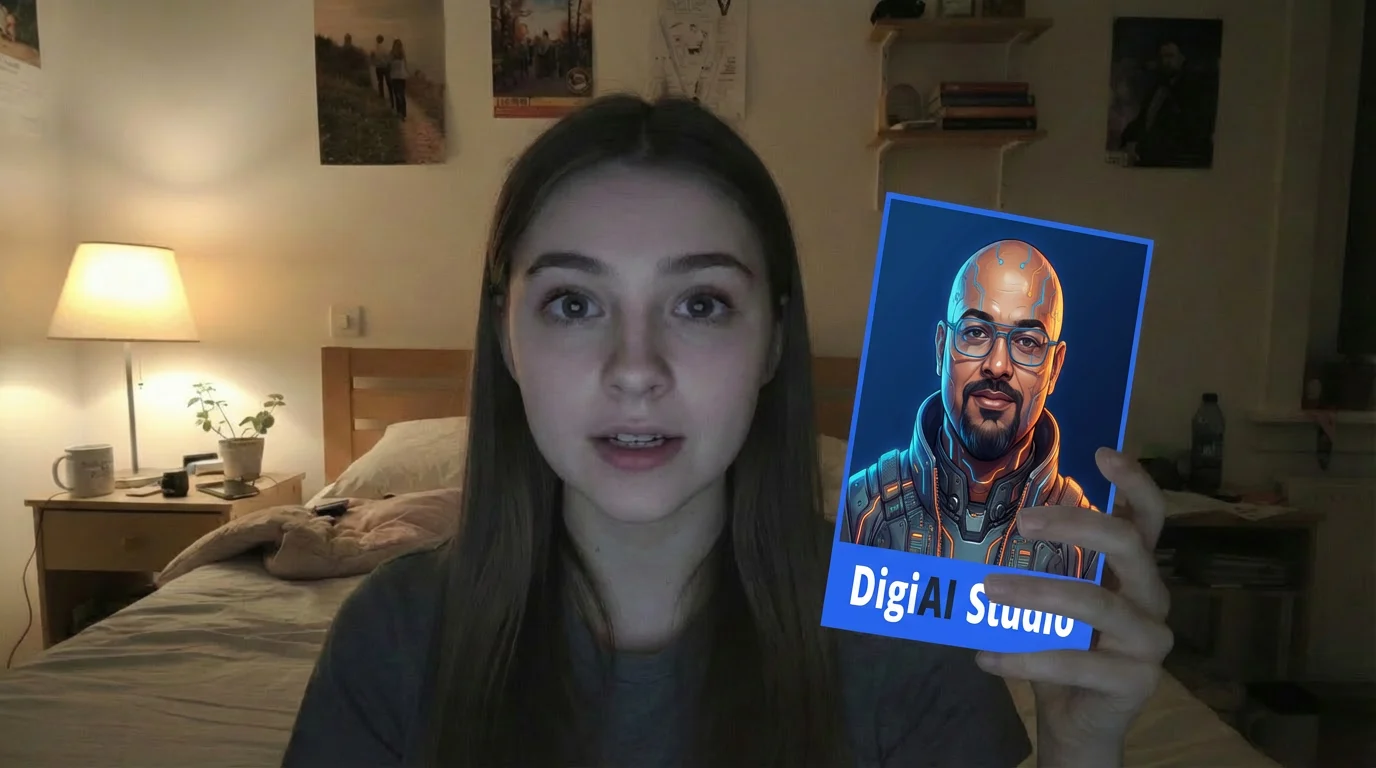
Keep the same character identity, same bedroom, same lighting, same camera position, and same framing as the reference image.
The character is now seated naturally in the same spot.
The Apple iPhone product box from the previous scene is no longer present.
She is holding a rectangular logo card with both hands, raised toward the camera.
The card should look like a real printed card or thick paper, not a digital overlay.
The card is affected by the room lighting, with soft shadows, slight highlights, and natural light falloff matching the environment.
The card maintains its original aspect ratio from the reference image.
Its size is approximately half the size of the previous iPhone box.
The edges of the card are clean but not perfectly sharp, like a real physical card.
The logo is clearly visible and centered on the card, using the provided logo card reference image.
No distortion or stretching of the logo.
Her posture is relaxed but engaged.
Her facial expression is confident and intentional, as if presenting a brand or idea rather than a physical product.
The pose feels natural and realistic, not staged or exaggerated.
Do not change clothing, hairstyle, background, lighting, camera angle, or image style.
Photorealistic smartphone front-camera look.
Natural skin texture and casual realism.
Scene 3 – Google Veo 3.1 Video Prompt
INPUT
- Use the LAST FRAME from Scene 2 as the FIRST FRAME for this scene
- Use the provided Scene 3 LAST FRAME image (logo card) as the ending frame
- Use the logo card reference image for object consistency
STYLE AND CAMERA (LOCKED – DO NOT CHANGE)
- Smartphone front-camera video look
- Indoor bedroom at night
- Same room, same background, same framing as reference images
- Single warm household lamp from the side
- Soft, uneven lighting with natural shadows
- Slight softness and mild digital noise
- Eye-level, fixed camera
- No camera movement
- No cinematic lighting
ACTION AND MOTION (INTERPOLATED BETWEEN FRAMES)
- The character starts seated, holding the Apple iPhone box from the previous scene
- While speaking, she lowers and removes the iPhone box from view
- She then raises a rectangular logo card toward the camera
- The logo card is held naturally with both hands, like a real printed card
- The card is affected by the room lighting, with realistic shadows and highlights
- Movements are subtle, smooth, and human
- No exaggerated gestures or fast motion
OBJECT CONTINUITY
- The Apple iPhone box must be removed early in the animation
- The logo card must be the only object visible by the end
- The logo card must keep its original aspect ratio
- The logo card size is approximately half the size of the iPhone box
- The logo card must not glow or appear digitally overlaid
- Only the character and the logo card move
IDENTITY AND ENVIRONMENT CONSTRAINTS
- Do not change the character’s identity, face, body, or clothing
- Do not change hairstyle, background, lighting, or camera angle
- No new objects introduced
- No environment changes
VOICE OVER (SYNC NATURALLY TO SPEECH)
"This is where it gets interesting.
You take one character.
You take one product."
TIMING
- Total duration: 6 to 8 seconds
- Speech pacing should feel natural and conversational
- Motion should align subtly with speech beats
GOAL
The final video should feel like a real person casually recording a short phone video at home, smoothly transitioning from a product to a brand card while speaking, with believable human motion, consistent lighting, and clear visual storytelling.
SCENE 4 – PROMPTS (SYSTEM CLOSE)

Scene 4 Last Frame Prompt
Keep the same character identity, same bedroom, same lighting, same camera position, and same framing as the reference image.
The character is now seated naturally in the same spot.
The logo card from the previous scene is no longer present.
Her hands are lowered and relaxed, resting naturally and mostly out of frame.
Her posture is calm and open.
Her facial expression is relaxed, confident, and composed, with a subtle calm smile or neutral assurance.
She looks directly toward the camera, as if she has just finished explaining something important.
No objects are being held.
No props are visible.
The scene feels settled and complete.
Do not change clothing, hairstyle, background, lighting, camera angle, or image style.
Photorealistic smartphone front-camera look.
Natural skin texture, soft imperfections, casual realism.
Scene 4 – Google Veo 3.1 Video Prompt
STYLE AND CAMERA (LOCKED – DO NOT CHANGE)
- Smartphone front-camera video look
- Indoor bedroom at night
- Same room, same background, same framing as reference images
- Single warm household lamp from the side
- Soft, uneven lighting with natural shadows
- Slight softness and mild digital noise
- Eye-level, fixed camera
- No camera movement
- No cinematic lighting
ACTION AND MOTION (INTERPOLATED BETWEEN FRAMES)
- The character starts seated, holding the logo card from the previous scene
- While speaking, she lowers the logo card and removes it from view
- Her hands relax briefly out of frame
- She settles into a calm, composed posture
- Near the end of the clip, she raises one hand and gives a small, natural bye-bye wave
- The wave is subtle and friendly, not exaggerated
- She maintains eye contact with the camera
- Movements are slow, smooth, and realistic
OBJECT CONTINUITY
- The logo card must be removed early in the animation
- No objects should be visible by the end of the clip
- Only the character moves
IDENTITY AND ENVIRONMENT CONSTRAINTS
- Do not change the character’s identity, face, body, or clothing
- Do not change hairstyle, background, lighting, or camera angle
- No new objects introduced
- No environment changes
VOICE OVER (SYNC NATURALLY TO SPEECH)
"This is not one video.
This is a system.
And I will show you how to build it."
TIMING
- Total duration: 6 to 8 seconds
- Speech pacing should feel calm and confident
- Motion should align subtly with speech beats
GOAL
The final video should feel like a real person finishing a casual explanation on camera, smoothly setting aside the brand card and ending in a composed, confident posture, with believable human motion and consistent realism.
SCENE 5 – PROMPTS (POV ENDING)
————————————————–
Scene 5 – Google Veo 3.1 Video Prompt
(No voice over, POV-style camera ending)
CAMERA AND PERSPECTIVE (CRITICAL)
- Single smartphone front-camera perspective
- The camera is fixed in space, like a phone placed on a table or tripod
- The viewer is the camera
- There is NO other phone, NO other camera, NO recording device visible at any time
STYLE AND ENVIRONMENT (LOCKED)
- Same bedroom
- Same lighting
- Same framing at the start
- Single warm household lamp
- Soft shadows, mild digital noise
- Natural, imperfect smartphone realism
- No cinematic lighting
ACTION AND MOTION (DO NOT DEVIATE)
- The character starts seated and relaxed
- She stands up naturally
- She walks forward toward the camera
- As she gets close, her movement causes the camera to shake slightly
- The camera tilts or shifts as if being picked up or adjusted
- The character partially exits the frame as the camera moves
- The motion ends abruptly, as if the recording was stopped
IMPORTANT CONSTRAINTS (VERY IMPORTANT)
- Do NOT show any phone, screen, camera, or recording device in her hands
- Do NOT show her tapping or holding another device
- The camera movement comes from physical interaction, not button pressing
- Only one character in the scene
- No new objects introduced
GESTURE AND EXPRESSION
- No speaking
- Natural, casual expression
- No acting or exaggerated motion
- Feels unplanned and human
DURATION
3 to 5 seconds
GOAL
The final video should feel like a real person standing up and walking toward a phone that was recording, causing the camera to shake and shift naturally before the recording ends, with no visible secondary devices and no artificial gestures.
IMPORTANT NOTES
- Always link the original base character image as a reference
- Create objects (paper, product boxes, logo cards) as separate assets
- Use first + last frame animation for consistency
- Do NOT allow a second phone or camera to appear
- The camera is always POV (the viewer is the phone)