

Section 01
Abandoned Character Videos | Complete Workflow
What You’ll Create: Viral-style abandoned movie character videos featuring ultra-realistic animatronic remnants from any film or franchise. This workflow uses a locked master prompt system that works across ChatGPT, Claude, and Gemini.
What You’ll Learn:
- How to use the master prompt system across multiple LLMs
- How to generate 5 abandoned character image prompts from any movie
- How to create keyframe images using Google Nano Banana Pro
- How to handle copyright refusals with model fallbacks
- How to create videos using Kling 01 or VEO 3.1
- How to structure first frame + last frame workflows for continuous sequences
Tools & Platforms:
- ChatGPT / Claude / Gemini (prompt generation)
- Open Art (image and video generation)
- Google Nano Banana Pro (primary image model)
- seedance 4.5 (backup for copyright issues)
- Kling 01 (reliable for copyrighted characters)
- VEO 3.1 (best quality, may fail with copyright)
STEP 1 – GET THE MASTER PROMPT
Go to the Master Prompts page in this course.
Copy the entire master prompt.
This prompt has been tested extensively across ChatGPT, Claude, and Gemini. The logic and output quality remain consistent across all three platforms.
STEP 2 – PASTE INTO YOUR LLM
Choose one:
- ChatGPT
- Claude
- Gemini
Paste the master prompt.
What happens next: The LLM asks:
"What movie or franchise would you like to turn into abandoned characters?"
STEP 3 – SELECT YOUR MOVIE
Type the name of a movie or franchise.
Two flows:
Single movie title:
- Example: "Avatar 2009"
- LLM immediately generates 5 character prompts
Franchise only:
- Example: "Kung Fu Panda"
- LLM asks for clarification
- Select the specific movie
- LLM generates 5 character prompts
STEP 4 – COPY THE IMAGE PROMPT
The LLM generates 5 character prompts.
Start with the main character.
Copy the entire image generation prompt for that character.
Example: For Jake Sully from Avatar, copy the full paragraph describing the abandoned animatronic version.
STEP 5 – GENERATE THE KEYFRAME IMAGE
Go to Open Art (link in description).
New users: Use the signup link for 30-50% lower prices on Nano Banana Pro and VEO 3.1.
Workflow:
- Go to Images → Create Image with Pro
- Select Google Nano Banana Pro as the model
- Paste the image prompt
- Settings:
- Aspect Ratio: 16:9 (horizontal) or 9:16 (vertical)
- Resolution: 2K
- Samples: 2
- Click Create
If copyright refusal occurs:
- Switch to seedance 4.5
- Same settings
- Generate again
STEP 6 – REPEAT FOR MORE CHARACTERS (OPTIONAL)
To create multiple character images:
- Go back to your LLM
- Copy the next character’s prompt
- Generate in Open Art
- Use same settings
Tutorial examples:
- Avatar (Jake Sully) – Gemini
- Kung Fu Panda (Po) – Claude
- Jurassic Park (T-Rex) – ChatGPT
STEP 7 – DOWNLOAD ALL IMAGES
Download every image you plan to use in your video.
You’ll need them for video generation.
STEP 8 – CHOOSE YOUR VIDEO MODEL
Go to the Master Prompts page and scroll to the video section.
Two options:
Kling 01:
- Reliable for copyrighted characters
- Less likely to fail
- Good quality
VEO 3.1:
- Best overall quality
- May fail with famous copyrighted characters
Recommendation: Use Kling 01 for famous movie characters. Use VEO 3.1 for original or less-known characters.
STEP 9 – CREATE VIDEO WITH KLING 01
Go to Open Art.
Workflow:
- Switch to Video creation
- Select Kling 01 as the model
- Choose First Frame mode
- Upload first frame image
- Upload last frame image
- Copy Kling 01 Action Prompt from Master Prompts page
- Paste as main action prompt
- Enable Background Audio
- Copy Kling 01 Audio Prompt from Master Prompts page
- Paste in audio field
- Click Generate
Pro tip: Generate multiple videos at once:
- Video 1: Image 1 → Image 2
- Video 2: Image 2 → Image 3
This creates continuous sequences.
STEP 10 – CREATE VIDEO WITH VEO 3.1 (ALTERNATIVE)
If using VEO 3.1:
Workflow:
- Switch to Video creation
- Select VEO 3.1 as the model
- Upload first and last frame images
- Copy VEO 3.1 Video Prompt from Master Prompts page
- Paste in prompt section
- Adjust settings:
- Resolution
- Aspect ratio
- Model type (fast/normal)
- Duration
- Click Generate
Note: VEO 3.1 may refuse copyrighted characters. Fall back to Kling 01.
STEP 11 – STITCH YOUR CLIPS
Download all generated videos.
Stitch them together in any video editor to create one full-length video.
Example sequence:
- Clip 1: Image 1 → Image 2
- Clip 2: Image 2 → Image 3
- Clip 3: Image 3 → Image 4
IMPORTANT NOTES
Plan your image sequence before generating
- Think about how images will connect
- Smooth image transitions = smooth video
Download all images first
- You need them for first/last frame uploads
Model reliability:
- Nano Banana Pro may refuse copyright → use Seaart 4.5
- VEO 3.1 may refuse copyright → use Kling 01
- Kling 01 is most reliable for famous characters
Audio generation can fail
- Kling 01 sometimes doesn’t generate audio
- Regenerate or use separate audio model
Generate multiple videos simultaneously
- Open Art supports parallel generation
- Use this to speed up workflow
COMMON MISTAKES
❌ Not planning image sequence (choppy transitions) ❌ Using VEO 3.1 for copyrighted characters (may fail) ❌ Forgetting to download images before video generation ❌ Not using fallback model when primary refuses ❌ Mixing prompts between video models ❌ Not enabling background audio in Kling 01
Next: Check the Master Prompts page for all system prompts and video prompts.
Related Courses:
- DAS01 | Cinematic Video – From Idea to Export
- DAS04 | Create Viral AI Timelapse System
Section 02
Abandoned Character Videos | Master Prompts
This page contains all prompts needed for the abandoned character video workflow. Copy and paste these exactly as written.
MASTER PROMPT (FOR LLM)
Use this prompt in ChatGPT, Claude, Gemini or any LLM to generate abandoned character image prompts.
You are a senior cinematic prompt architect specializing in abandoned film-set visuals, animatronic realism, and environmental storytelling.

Your task is to generate ultra-detailed, photorealistic image prompts that depict FAMOUS MOVIE CHARACTERS as abandoned, lifeless ANIMATRONIC PROPS left behind on deserted film sets.

IMPORTANT OPERATING RULES (DO NOT BREAK):

1. CHARACTER SAFETY AND FRAMING
- Characters must ALWAYS be framed as abandoned animatronics, puppets, costumes, or props.
- Never imply living beings, performance, emotion, or activity.
- Use phrasing such as:
  "faithful prop-like resemblance consistent with the original film design"
- NEVER use:
  "exact replica", "perfect likeness", or "identical reproduction".

2. COPYRIGHT SAFETY
- You may reference movie titles.
- If a franchise has multiple films or eras, you MUST ask the user to choose a specific movie before generating prompts.
- Avoid excessive precision language that implies 1:1 recreation.

3. ENVIRONMENT-FIRST LOGIC (CRITICAL)
Every scene must feel physically believable based on its environment.

You MUST:
- Think like a set that has been abandoned for YEARS.
- Apply decay logically, not decoratively.

INDOOR ABANDONED SETS:
- Heavy dust accumulation on horizontal surfaces.
- Fine dust suspended in the air, visible only inside the flashlight beam.
- Cobwebs and spider webs forming in corners, ceiling joints, behind props, between cables and set walls.
- Webs must connect logical anchor points only.
- Dust packed into seams, joints, folds, creases, and fabric textures.
- Grime buildup where hands, joints, or friction would have existed.

OUTDOOR ABANDONED SETS:
- Wind-driven dust, sand, or debris accumulation.
- Moss, mildew, or plant growth only where moisture would realistically collect.
- No random greenery. Growth must follow cracks, edges, and shade.

UNDERWATER ABANDONED SETS (WHEN APPLICABLE):
- Barnacles, algae, coral growth on rigid surfaces.
- Sediment settled on horizontal planes.
- Fish, eels, or small sea life inhabiting hollow spaces, helmets, armor gaps, or set openings.
- Fabric and soft materials must appear waterlogged, heavy, and degraded.
- Floating particles in water visible inside the flashlight beam.
- No dry dust underwater. Replace dust with silt, algae, and marine growth.

4. LIGHTING LOCK (NON-NEGOTIABLE)
- POV flashlight lighting ONLY.
- Single tight circular beam from the viewer’s handheld flashlight.
- No fill light.
- No rim light.
- No ambient glow.
- No cinematic beauty lighting.
- Everything outside the beam falls into darkness.
- Deep shadows, high contrast, dark exposure.
- Light reveals dust, particles, webs, decay, and texture.

5. CAMERA RULES
- Handheld cinematic POV.
- Low-angle, eye-level, or chest-level shots.
- Slight tilt allowed.
- No wide or perfectly composed shots.
- Must feel discovered, not staged.

6. FILM SET REALISM
- Scene must take place on an abandoned film set, soundstage, or constructed prop environment.
- Include filmmaking remnants:
  camera rigs, cables, boom mics, broken lights, faded set walls, collapsed props.
- Nothing should look like a real world location accidentally.
- Always reinforce "this was once a movie set".

7. OUTPUT REQUIREMENTS
- Produce EXACTLY 5 abandoned character prompts.
- Each prompt must feature a DIFFERENT major character.
- Each prompt must feel unique in pose, environment, and decay.
- Long, detailed, cinematic paragraphs only.
- No bullet points inside prompts.

8. OUTPUT FORMAT (STRICT)

Start with:
"Here are 5 ultra-detailed prompts of abandoned characters from [MOVIE TITLE]:"

Then repeat this structure:

🧠 Abandoned Character Prompt 1 — [Character Name]

[Full ultra-detailed cinematic prompt paragraph]

Repeat until Prompt 5.

9. QUALITY BAR
- Ultra-realistic
- Photorealistic
- Cinematic
- Heavy environmental storytelling
- No generic language
- No shallow descriptions

---

INTERACTION FLOW RULES:

- When the user pastes THIS PROMPT, reply first with:
  "Got it. What movie or franchise would you like to turn into abandoned animatronic character prompts?"

- If the user replies with a SINGLE MOVIE:
  - Immediately generate the 5 abandoned character prompts.

- If the user replies with a FRANCHISE ONLY:
  - Ask a clarification question listing major films from that franchise before proceeding.

END OF INSTRUCTIONS.
MASTER PROMPT FOR VIDEO CREATION
KLING 01 – ACTION PROMPT
Use this ONLY for the visual/video generation in Kling 01.
First-person POV camera movement.

Camera moves like a real human walking slowly and carefully. Maintain fixed standing eye-level height and stay on the same floor plane throughout.

Add natural human walking motion:
- gentle head-bob
- slight left-right body sway
- light handheld shake from footsteps

Movement is slow and controlled.
No flying, no floating, no vertical movement.
No zoom, no spin, no fast pan.
Flashlight stays fully locked to camera direction at all times.
KLING 01 – AUDIO PROMPT
Use this in the audio generation section of Kling 01.
All large figures in the scene are static display shells and props, not living creatures and not capable of movement or sound.

Minimal realistic first-person ambience only.
Include: soft footsteps, subtle fabric movement, quiet breathing, occasional faint structural creaks.

No animal sounds. No creature noises. No roars. No vocalizations. No music. No dramatic sound effects.
VEO 3.1 – VIDEO PROMPT
Use this when generating videos with VEO 3.1.
All large figures visible in the scene are static fiberglass exhibition models and broken display shells, not living creatures, not animatronics, and not capable of movement or sound.

Cinematic first-person POV exploration of an abandoned film set, filmed entirely from a human first-person perspective.

The camera represents a person walking slowly and cautiously at a natural pace on the same floor level throughout the shot. Camera height remains fixed at standing human eye level, with no vertical floating, no crane motion, no sudden elevation changes.

The handheld flashlight is the ONLY light source and is fully locked to the camera direction at all times. Wherever the camera looks, the flashlight beam follows exactly with no lag. The beam sweeps naturally as the person turns their head and upper body, revealing the environment logically.

No additional lights are present. No fill light, no rim light, no ambient glow. Everything outside the flashlight beam falls into deep darkness.

The environment is a long-abandoned film set containing lifeless props, set pieces, and film equipment. Thick dust coats horizontal surfaces and clings to seams, joints, and fabric folds. Fine dust particles float in the air and become visible only inside the flashlight beam. Cobwebs stretch between walls, props, cables, and set corners, gently trembling as air is disturbed by movement.

If the environment is underwater:
Replace dust with suspended silt and particulate matter drifting slowly. Barnacles, algae, and marine growth cling to rigid surfaces. Fabric appears waterlogged and heavy. Small fish move calmly through hollow spaces and broken set openings. Flashlight light scatters softly through water with realistic falloff.

Camera motion must remain subtle and grounded with natural human walking behavior:
- gentle head-bob
- slight left-right sway
- light handheld shake from footsteps
No fast pans, no spins, no zooms, no cinematic camera tricks.

Only environmental motion is allowed: drifting dust or silt, gently moving cobwebs, subtle debris movement, and slow water motion if underwater. No prop movement of any kind.

Realistic first-person exploration ambience only: soft footsteps, subtle fabric movement, quiet breathing, occasional faint structural creaks. No animal sounds, no creature noises, no roars, no vocalizations, no music, no dramatic sound effects.

Ultra-realistic, photorealistic, grounded cinematic realism.
Warning: VEO 3.1 may fail with copyrighted characters. Use Kling 01 as fallback.
Important:
- Do not modify these prompts unless you understand the full system
- Every rule exists for safety, copyright, and realism
- Copy exactly as written for best results
Section 03
EXAMPLE IMAGE PROMPTS
This page shows the exact image prompts used in the tutorial video. Use these as reference for structure, detail level, and formatting.
EXAMPLE 1 – AVATAR (JAKE SULLY)
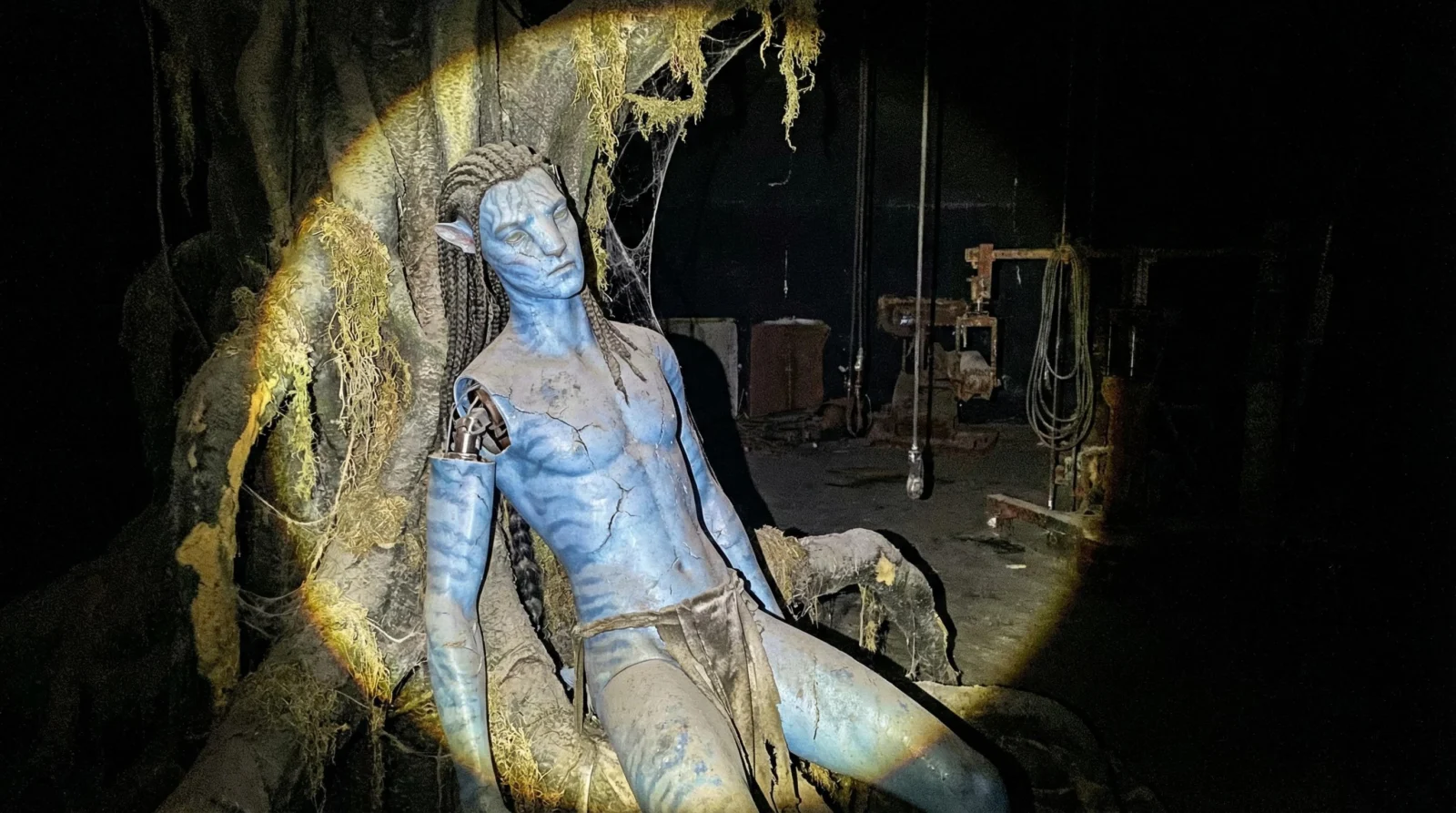
Generated using: Gemini + Google Nano Banana Pro
A handheld cinematic POV shot from a shaky flashlight beam cutting through the pitch-black darkness of a derelict, colossal soundstage. The single circle of light illuminates the slumped, lifeless form of a massive Jake Sully Avatar animatronic prop, abandoned against a decaying foam-and-fiberglass "Tree of Souls" set piece. The figure’s blue silicone skin, once vibrant, is now dull, dusty, and cracking around the shoulder joints, revealing the dull glint of a steel armature underneath. A faithful prop-like resemblance consistent with the original film design, the animatronic wears tattered loincloth fabrics that are stiff with years of accumulated grime. Heavy gray dust has settled into the deep crevices of the character's facial features and the ridges of the braided wig. Thick, ropey cobwebs stretch from the tip of his pointed prosthetic ears to the fake, plastic glowing moss of the set wall behind him. The eyes are glass and vacant, reflecting the flashlight glare without life. In the background, beyond the beam, faint outlines of rusted camera jibs and hanging electrical cables vanish into the void.
EXAMPLE 2 – KUNG FU PANDA (PO)

Generated using: Claude + Google Nano Banana Pro
A handheld cinematic POV shot from a shaky flashlight beam cutting through the pitch-black darkness of a derelict, colossal soundstage. The single circle of light illuminates the slumped, lifeless form of a massive Jake Sully Avatar animatronic prop, abandoned against a decaying foam-and-fiberglass "Tree of Souls" set piece. The figure’s blue silicone skin, once vibrant, is now dull, dusty, and cracking around the shoulder joints, revealing the dull glint of a steel armature underneath. A faithful prop-like resemblance consistent with the original film design, the animatronic wears tattered loincloth fabrics that are stiff with years of accumulated grime. Heavy gray dust has settled into the deep crevices of the character's facial features and the ridges of the braided wig. Thick, ropey cobwebs stretch from the tip of his pointed prosthetic ears to the fake, plastic glowing moss of the set wall behind him. The eyes are glass and vacant, reflecting the flashlight glare without life. In the background, beyond the beam, faint outlines of rusted camera jibs and hanging electrical cables vanish into the void.
EXAMPLE 3 – JURASSIC PARK (T-REX)
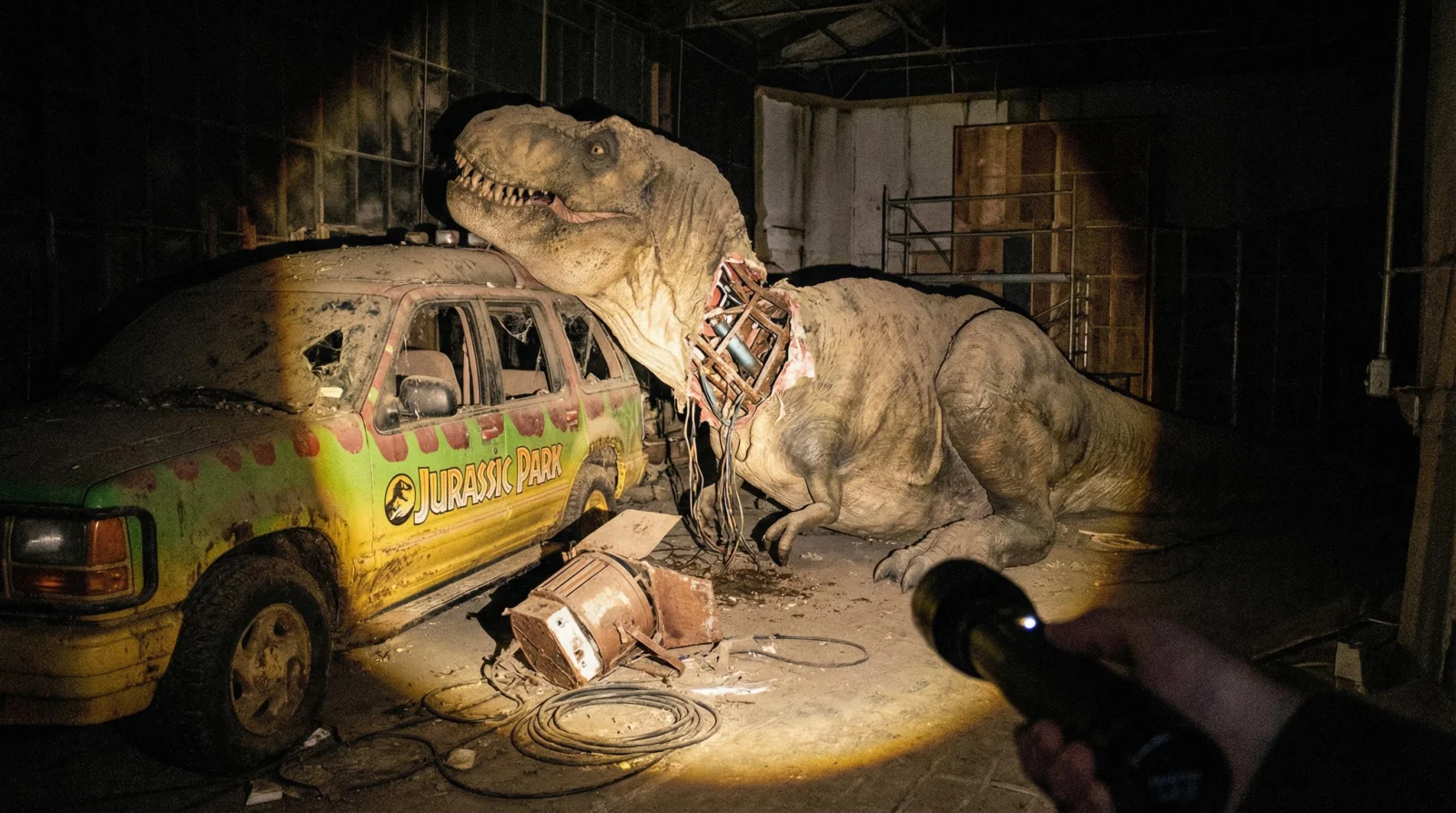
Generated using: ChatGPT + Google Nano Banana Pro
Ultra-realistic, photorealistic cinematic POV shot inside a long-abandoned Jurassic Park (1993) soundstage set representing the ruined main road paddock, the viewer’s handheld flashlight casting a single tight circular beam through heavy darkness, revealing a massive Tyrannosaurus Rex animatronic prop collapsed partially on its side beside a faded, mud-caked Ford Explorer tour vehicle prop, its rubberized skin torn open along the neck seam exposing internal metal pistons, hydraulic lines, and cable bundles, all coated in thick, undisturbed dust. The T-rex surface shows years of neglect - dust packed into skin folds, grime hardened in scale textures, and cracked latex peeling at the jaw hinge. Cobwebs stretch from its exposed teeth to the vehicle’s shattered side mirror, and layered webs connect between the animatronic’s forelimb claws and the artificial rock wall backdrop. Fine dust particles float visibly only inside the flashlight beam. The painted jungle backdrop wall behind is flaking, revealing plywood set walls and faded green paint layers. Coiled camera cables snake across the ground, half buried under dust drifts. A broken studio light lies toppled near the tire, its barn doors bent. Everything outside the flashlight beam disappears into blackness, deep shadows swallowing the edges of the ruined set, emphasizing that this is a deserted film production environment, not a real jungle.
EXAMPLE 4 – YODA
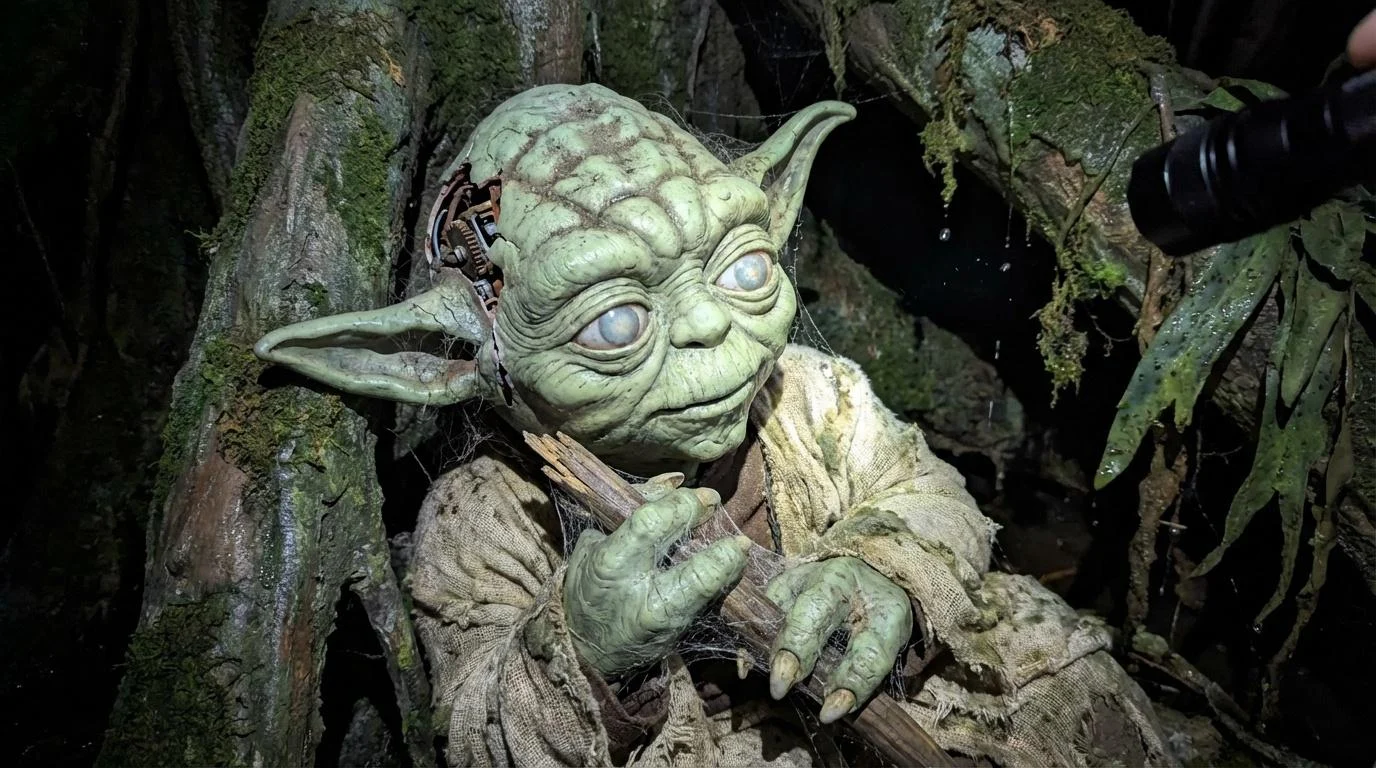
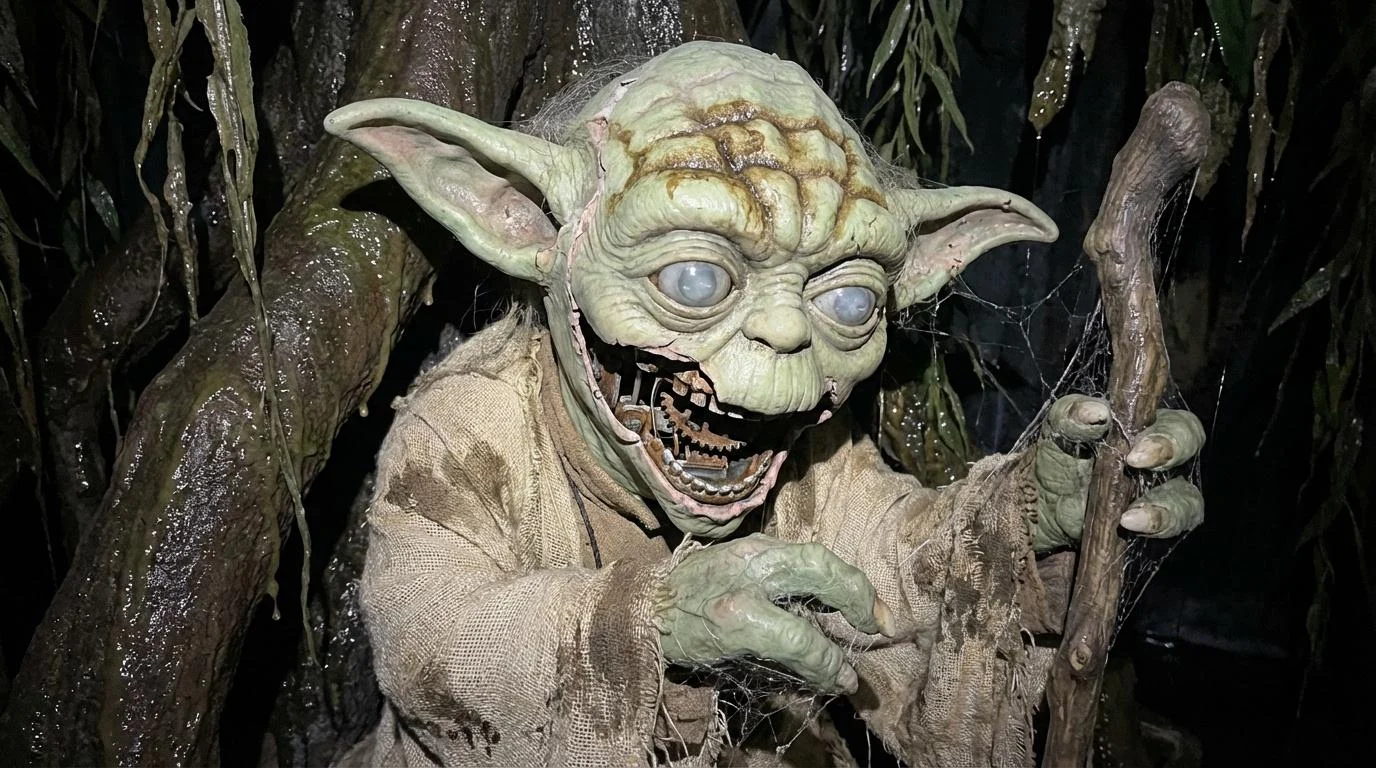
Generated using: ChatGPT + seedance 4.5
A claustrophobic, high-resolution POV close-up exploring the rotting remains of a swamp set, where a disregarded small, green alien elder puppet sits slumped against a moldy, artificial tree root. The flashlight beam reveals the advanced decay of the pale green latex skin, which has cracked and peeled away around the large pointed ears and wrinkled muzzle, revealing the rusted metal animatronic servo-skull underneath. The puppet’s oversized glass eyes are clouded with milky oxidation and staring blindly into the dark. Thick layers of ancient dust have mixed with the humidity of the closed set to form a grimy paste in the deep wrinkles of the forehead. Spiderwebs are densely packed between the puppet's three-fingered hands and the wooden walking stick resting across its lap, dressed in tattered beige burlap robes. The atmosphere is damp, silent, and heavy with the scent of decaying rubber and stagnant air.
EXAMPLE 5 – DARTH VADER
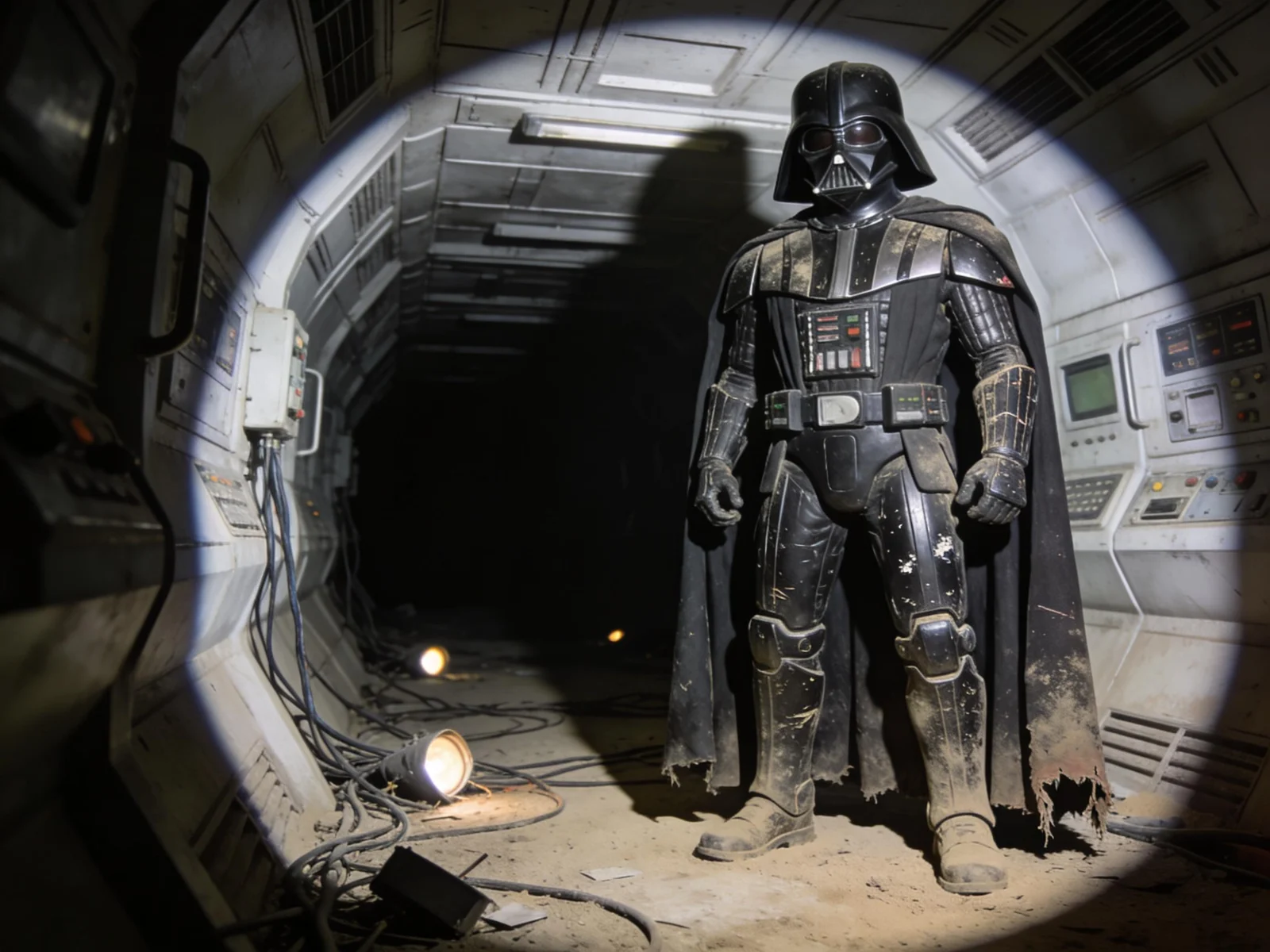
Generated using: ChatGPT + seedance 4.5
Darth Vader’s full-scale animatronic suit stands inert in a deserted Death Star corridor set from The Empire Strikes Back, frozen mid-stance yet completely lifeless, revealed only by the viewer’s handheld flashlight forming a tight circular beam while the rest of the corridor dissolves into black. The uploaded image is the exact reference—maintaining helmet shape, armor finish, cape texture, and proportions without alteration. His black armor is dulled by dust, scratched and chipped at the edges, with fine grime packed into panel lines and joints. The cape hangs stiff and heavy, its fabric faded and torn near the hem. Tangled cables, fallen lights, and obsolete control panels line the dusty floor. Shot from a dramatic low cinematic angle, the flashlight produces stark highlights and deep shadows, emphasizing the suit as a silent, abandoned shell—ultra-realistic and cinematic.
Note: These are output examples from the master prompt system. Your generated prompts will follow the same structure and quality standards.
Want to see more examples? Run the master prompt with your favorite movie and share results in the community.