

Section 01
Create Cinematic AI Trailers Using Kling Canvas
What You’ll Create
A fully cinematic 5-scene AI trailer built entirely inside Kling Canvas – where each scene flows seamlessly into the next using the Start & End Frame chaining technique. The result is a smooth, continuous visual journey that looks like it was shot by a professional film crew.
Example theme used in this lesson: A descent through ancient Egypt – from aerial desert to buried sanctum.
You will learn the system. The theme is yours to apply to any concept.
Tools Used
Tool Purpose Kling Canvas Main production environment – image generation + video Google Imagen 4 Pro (Nano Banana Pro) Key frame image generation inside Canvas Google AI Studio Fallback image generation if Canvas is unstable Kling 2.5 Turbo Video clip generation – Start & End Frame mode Video Editor (CapCut or Premiere) Final assembly of all 5 clips
The Core Technique – Start & End Frame Chaining
This is the foundation of the entire workflow. Understand this before touching any tool.
Every scene in this trailer is generated as a video clip using two images – a Start Frame and an End Frame. Kling generates the motion between them.
The chain works like this:
Scene 01:  [Start Frame A] ──► [End Frame B]
Scene 02:  [End Frame B]   ──► [End Frame C]   ← B is reused as Start
Scene 03:  [End Frame C]   ──► [End Frame D]   ← C is reused as Start
Scene 04:  [End Frame D]   ──► [End Frame E]   ← D is reused as Start
Scene 05:  [End Frame E]   ──► [End Frame F]   ← E is reused as Start
This means after Scene 01, you only ever generate one new image per scene – the new End Frame. Every previous End Frame automatically becomes the next Start Frame.
This is what keeps the sequence smooth, connected, and cinematic.
Step 1 – Lock Your Story First
Before you open any tool, you need one thing: a story concept divided into 5 scenes.
This is not complicated. You do not need a script or a voiceover. You need a concept and a rough camera direction for each scene.
For this lesson, the story is:
A cinematic descent through 5000 years of lost civilization – from high above Egypt to the secret heart buried beneath it.
THE STORYBOARD – "ECHO OF ETERNITY"
SCENE 01 – THE DESCENT World: Aerial Egypt | Golden Hour
The camera opens high above the Sahara. The Great Pyramid dominates the frame, golden light raking across ancient stone at sunset. The camera holds, then dives – accelerating toward the pyramid apex. The stone surface rushes up to fill the frame entirely.
- Camera movement: High altitude → steep focused dive → extreme close-up on stone
- Mood: Vast, epic, ancient
- Transition out: Stone surface fills frame completely – the camera punches through
SCENE 02 – THE PASSAGE World: Ancient Egyptian Burial Corridor | Torchlight
Darkness breaks into amber torchlight. The camera is inside a narrow limestone corridor, ground level, centered. Hieroglyphics cover every wall. Torches flicker on both sides. The passage opens ahead into a vast underground chamber with a mirror-still black water floor. A cold blue light shaft descends from above. The camera advances, locks onto the water reflection below, and plunges through.
- Camera movement: Ground-level forward push → slow toward water → plunge through reflection
- Mood: Sacred, claustrophobic opening to vast
- Transition out: Camera tilts down into water reflection – plunges through
SCENE 03 – THE DEEP World: Submerged Ancient Temple | Underground Lake
The camera breaks through the water surface from below, emerging underwater inside a colossal submerged Egyptian temple. Massive hieroglyph-covered columns rise into darkness above. Bioluminescent blue light shafts pierce down from ceiling cracks. A school of luminescent fish drifts past. At the far wall – a colossal pharaoh face carved into stone, 20 meters tall, staring forward. The camera advances and locks onto the pharaoh’s eye.
- Camera movement: Upward burst from below → stabilize mid-water → forward push toward pharaoh face
- Mood: Reverent, breathtaking, ancient silence
- Transition out: Camera closes in on the pharaoh’s eye socket – punches through
SCENE 04 – THE LOST KINGDOM World: Hidden Underground Civilization | Crystal Cavern
The camera bursts from stone into open air inside an impossibly vast underground cavern. Below: an entire ancient Egyptian city – perfectly preserved, lit by thousands of crystal formations embedded in the cavern ceiling like stars. Obelisks, temple complexes, sphinx-lined avenues. At the center – a grand temple with four colossal seated pharaoh statues, warm amber light glowing from its entrance. The camera sweeps wide, then descends toward the temple gate.
- Camera movement: Burst into open cavern → wide sweeping crane arc → descend toward temple entrance
- Mood: Awe-inspiring, impossible scale, discovery
- Transition out: Camera descends through the temple gate into amber light
SCENE 05 – THE HEART World: Inner Sanctum | The Golden Scarab
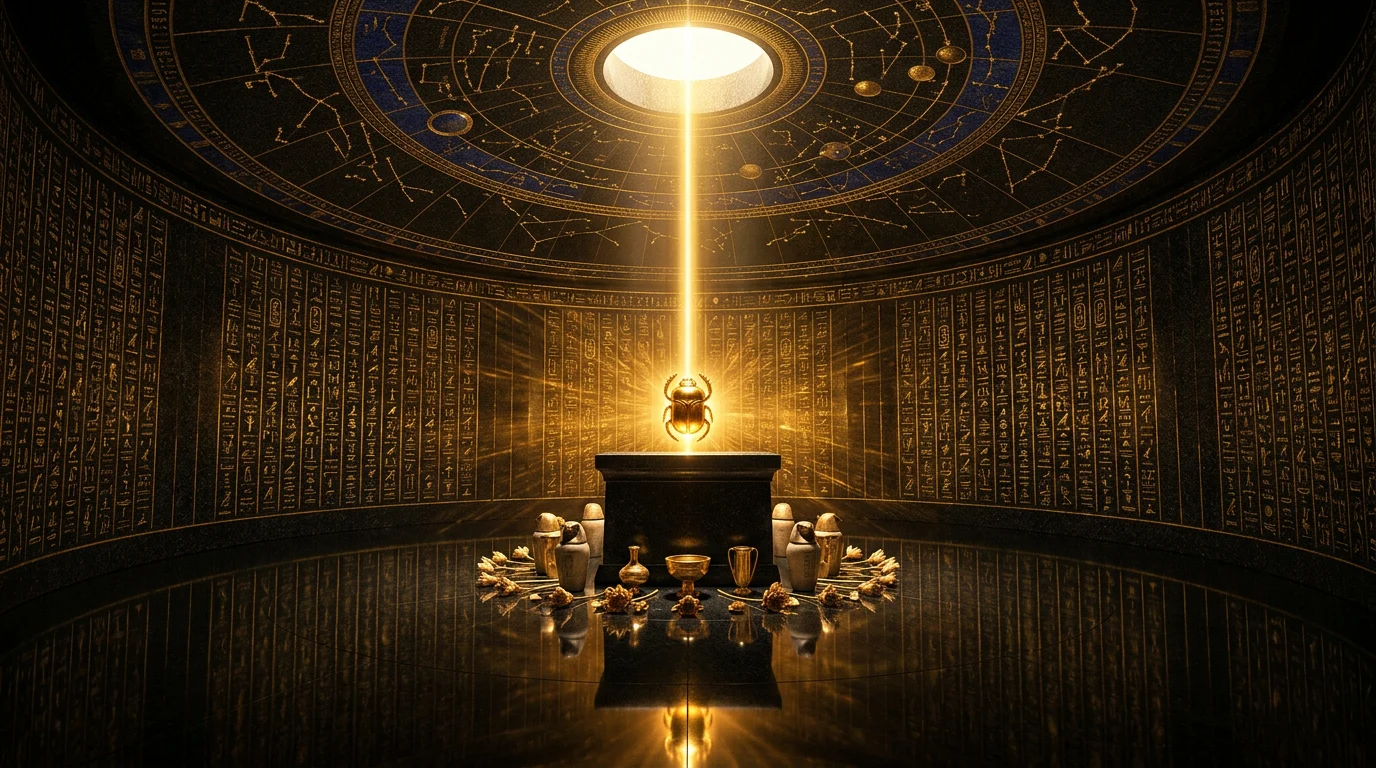
The camera enters the innermost circular chamber. Black granite walls covered in gold-inlaid hieroglyphics. A domed ceiling carved with a full astronomical map in lapis lazuli and gold. At the center – a single stone altar. On it: a golden scarab artifact, radiating a warm pulsing glow. A single beam of pure golden light falls from a circular ceiling opening, striking the scarab and scattering light rays across every surface. The camera advances slowly, reverently, locking onto the artifact. The journey ends here.
- Camera movement: Slow forward push into chamber → closing descent toward altar → final lock on scarab
- Mood: Sacred, still, the payoff of the entire journey
- Transition out: Final hold on the scarab – fade to black or logo
Step 2 – From Story to Image Prompts
This is the section most tutorials skip. Here is exactly how to convert a storyboard scene into a production-grade image prompt.
Every image prompt in this workflow follows the same structure. Learn this structure once and apply it to any concept.
THE IMAGE PROMPT STRUCTURE
[SHOT TYPE + CAMERA POSITION]
[SUBJECT DESCRIPTION — what fills the frame]
[SCALE + SPATIAL RELATIONSHIP — how big, how far]
[ATMOSPHERE — mood, air quality, implied sound]
[LIGHTING — source, direction, color, intensity]
[CAMERA SPECS — lens, focus, movement hint]
[TECHNICAL QUALITY — camera body, resolution]
[COLOR GRADE — overall palette and contrast]
[STYLE — always end with the realism enforcement line]
HOW TO READ YOUR SCENE AND EXTRACT EACH ELEMENT
Step 1 – Identify the shot type from the camera movement note.
Your storyboard says: "High altitude → steep focused dive → extreme close-up on stone"
That gives you two image frames:
- Start Frame = high altitude aerial shot
- End Frame = extreme close-up macro shot on stone surface
Each frame gets its own prompt built from scratch.
Step 2 – Describe what fills the frame center first.
For the Start Frame aerial shot, the center of frame is the pyramid apex catching golden sunlight. Start there. Build outward – what surrounds it, what is in the background, what is at the edges.
For the End Frame close-up, the center of frame is pure ancient limestone – stone blocks, cracks, chisel marks. The desert floor is only visible as a tiny distant glow at the bottom edge.
Step 3 – Add scale and spatial relationship.
Scale is what makes cinematic prompts work. Do not just say "the pyramid." Say:
"The pyramid fills 60% of the frame. The other two pyramids of the Giza complex are partially visible at the lower edge, showing true scale."
Scale context gives the AI a reference point. Without it, scale becomes ambiguous and results look flat.
Step 4 – Define the atmosphere in one or two sentences.
Atmosphere is not just lighting – it is the implied mood, the quality of the air, the feeling of the space.
"Late golden hour – 10 minutes before sunset. The warmth of 4000 years of desert sun baked into the surface. Dust particles suspended in the last light beam."
This tells the model what kind of world this is. A sacred underground chamber feels different from a windswept desert even before you specify any light source.
Step 5 – Specify lighting precisely.
Every great image prompt has a clear, singular lighting logic. One primary source. One secondary source maximum. More than that creates visual confusion.
For the aerial pyramid: "Primary – golden hour sunlight raking across stone at near-horizontal angle. No secondary source."
For the underground corridor: "Primary – flickering amber torchlight from two wall-mounted torches. Secondary – a single cold blue-white shaft from above the chamber."
The contrast between the two light sources in Scene 02 is what makes that frame work cinematically. Warm foreground, cold distance. This is intentional and it should be in the prompt.
Step 6 – Lock the camera specifications.
Always specify:
- Lens focal length (24mm wide for environment shots, 35mm for chambers, 50mm for close-ups)
- Camera height (ground level, mid-height, elevated, aerial)
- Focus behavior (deep focus = everything sharp, or specify where softness begins)
- Any implied motion (slight motion blur at edges suggesting movement)
"Ground level, 24mm wide lens, deep focus – foreground corridor texture and distant chamber both razor sharp. Centered composition, no tilt."
Step 7 – Specify technical quality like a photographer, not a designer.
This is the line that pushes results from good to exceptional:
"Hasselblad H6D photographic realism. Every hieroglyph, every stone grain, every torch flame in ultra-fine detail. 8K resolution."
Naming a specific professional camera body tells the model to aim for photographic realism rather than rendered or illustrated quality. Always pair this with the style enforcement line at the end.
Step 8 – Define the color grade.
State the dominant color palette and the contrast behavior:
"Deep warm amber in the foreground corridor bleeding into cold dark blue-black in the vast chamber beyond. Extreme contrast, cinematic, high dynamic range."
Color grade is what creates visual cohesion across all 5 scenes. Decide your palette early and keep it consistent across every prompt.
Step 9 – Always end with the style enforcement line.
This is non-negotiable. End every single image prompt with:
"STYLE: Hyper-realistic photography. Cinematic. NOT illustration, NOT CGI render, NOT digital art, NOT painting. Pure photographic realism."
Without this line, models default toward illustrated or rendered outputs. This line anchors every prompt to photographic realism.
PROMPT WRITING – QUICK REFERENCE CHECKLIST
Before submitting any image prompt, check these:
✅ Shot type and camera position stated at the top
✅ Center of frame described first, then surroundings
✅ Scale reference included
✅ Atmosphere described in 1-2 sentences
✅ Lighting source, direction, and color specified
✅ Camera specs – lens, height, focus, implied motion
✅ Camera body named (Hasselblad, Phase One, etc.) + resolution
✅ Color grade stated – palette and contrast behavior
✅ Style enforcement line at the end
✅ Aspect ratio specified – 16:9 for landscape video
Step 3 – Production Workflow Inside Kling Canvas
Open Kling Canvas. Go to app.klingai.com → AI → Canvas. Create a new project. Name it immediately – keep it organized from the start.
Generating Images Inside Canvas
Go to the Image section. Select Text to Image. The node appears on the canvas.
Select Google Imagen 4 Pro (Nano Banana Pro) as the model. Set aspect ratio to 16:9.
Copy the Scene 01 Start Frame prompt from the Key Frame Prompts page. Paste it into the node. Generate.
Review carefully. If you are happy – rename the node properly (e.g., "S01 Start"). If not – regenerate. You can create multiple versions until it reads right.
Once approved, duplicate the node (Ctrl+C → Ctrl+V). Replace the prompt with the Scene 01 End Frame prompt. Generate.
You now have both frames for Scene 01.
⚠️ If Canvas Image Generation Fails
Kling Canvas is not always stable. If the Banana Pro model throws errors or fails to generate:
Go directly to Google AI Studio. Open Imagen 4 Pro there. Copy the same prompt from the Skool page. Generate the image. Download it. Go back to Kling Canvas and upload it manually into your project.
The workflow is identical from that point forward. The image source does not matter – Canvas handles both generated and uploaded images the same way.
Generating the Video Clip
Go to Tools → Video → Frames. Three nodes appear automatically.
Delete the Reference Image node – you do not need it.
Connect the Start Frame image to the Start input. Connect the End Frame image to the End input.
Select Kling 2.5 Turbo as the model.
⚠️ Do not use Kling 3 if you want to add audio later. Kling 3 does not support audio generation. Stick to 2.5 Turbo.
Copy the Scene 01 video motion prompt from the Video Motion Prompts page. Paste it into the video prompt section. Set duration to 5 seconds. Do not add a Camera Movement setting – the prompt drives all motion. Generate.
Review the clip. If approved – move to Scene 02.
Building Scene 02 Onwards
Do not generate a new Start Frame for Scene 02.
The End Frame from Scene 01 automatically becomes your Scene 02 Start Frame. Connect it directly.
Generate only the new End Frame image for Scene 02. Connect it. Add the Scene 02 video motion prompt. Generate the clip.
Repeat this exact structure for Scenes 03, 04, and 05.
Always confirm: The previous scene’s End Frame is the next scene’s Start Frame. This is what keeps the sequence smooth.
Step 4 – Final Assembly
Once all 5 clips are approved, bring them into your editor – CapCut, Premiere, or any editor you use.
Arrange in order: Scene 01 → 02 → 03 → 04 → 05.
Trim if needed. Add your BGM. Add the DigiAI Studio logo end card if applicable.
Export at the highest quality setting available.
Common Mistakes
Generating all images first before doing any video. Always validate Scene 01 clip before building Scene 02. If the chain breaks early you rebuild from scratch.
Adding a Camera Movement setting inside Kling. The motion prompt handles all movement. Adding a setting creates a conflict and produces inconsistent results. Leave it off.
Using Kling 3 when you want audio. Kling 3 does not support audio generation. Use 2.5 Turbo for any project where you plan to add sound.
Re-generating the End Frame instead of reusing it. Every time you regenerate an image, it changes. The End Frame of Scene 01 must be the exact same file used as the Start Frame of Scene 02. Export and reuse – do not regenerate.
Writing vague atmosphere descriptions. "Dark and moody" is not a prompt. Specify the light source, the color temperature, the direction, and the quality. Vague instructions produce vague results.
Skipping the style enforcement line. Without the NOT illustration / NOT CGI line at the end of every prompt, models default toward rendered outputs. Always include it.
Next Steps
Get all image and video prompts from the pages below:
📄 Key Frame Image Creation Prompts – All 6 image prompts with generation settings
📄 Video Motion Prompts – All 5 Kling Canvas motion prompts with production tracker
Apply this system to your own concept. The Egypt theme is an example. The workflow is universal – any cinematic journey with clear scene-to-scene transitions can be built this way.
Share your results in the community. If you run into issues with Canvas stability or image quality, post your prompt and output and we will look at it together.
Section 02
KEY FRAME IMAGE CREATION PROMPTS
Echo of Eternity | Cinematic Egypt Journey
What this page is: All 6 key frame image prompts used to build the visual foundation of this cinematic sequence. Each prompt is production-ready for Google Imagen 4 Pro inside Kling Canvas or Google AI Studio.
How to use this page: Generate each image in order. Each End Frame becomes the Start Frame of the next scene – do not skip ahead. Quality on these images directly determines the quality of your final video.
GENERATION SETTINGS (Apply to All)
Setting Value Tool Google Imagen 4 Pro Aspect Ratio 16:9 Widescreen Quality Mode Ultra High Style Hyper-realistic photography
Negative Prompt (use on every generation):
cartoon, illustration, painting, digital art, CGI, 3D render,
anime, people, tourists, modern objects, overexposed, blurry,
low quality, flat lighting
SCENE 01 – THE DESCENT

Aerial Egypt | Golden Hour
Start Frame
Hyper-realistic aerial photograph, shot from extreme altitude
looking straight down at a slight angle. The Great Pyramid of
Giza dominates the center of frame — massive, ancient, every
stone block visible in ultra-sharp detail. The capstone apex
catches the last rays of direct golden sunlight, fracturing
light into a warm halo across the peak.

The surrounding Sahara desert stretches to every horizon —
vast rolling dunes casting long deep shadows in the late
afternoon light. The Nile valley is a faint dark green ribbon
visible far in the distance. The sky is a deep gradient —
rich burnt orange and amber at the horizon transitioning to
deep cerulean blue directly above. A few thin high-altitude
clouds catch the golden light.

The pyramid casts an enormous triangular shadow across the
desert floor to the east — sharp edged, dramatic. The other
two pyramids of the Giza complex are partially visible at the
lower edge of frame, showing true scale. The Sphinx is a tiny
figure at the base.

ATMOSPHERE: Late golden hour — 10 minutes before sunset.
Warm amber and gold light raking across every surface at
low angle, creating extreme depth and texture contrast on
the ancient stone blocks.

CAMERA: Shot as if from a drone at 800 meters altitude,
slight forward tilt, 24mm wide lens. The pyramid fills
60% of the frame.

TECHNICAL QUALITY: Shot on Phase One IQ4 150MP medium
format camera. RAW file quality. Extreme fine detail on
every stone surface. No lens distortion. Photojournalism
grade sharpness. 8K resolution.

COLOR GRADE: Warm golden hour grade — deep amber highlights,
rich blue shadows, high dynamic range sky. National
Geographic quality.

STYLE: Hyper-realistic photography, NOT illustration, NOT
painting, NOT digital art. Pure photographic realism.
Cinematic wide format ratio.
End Frame
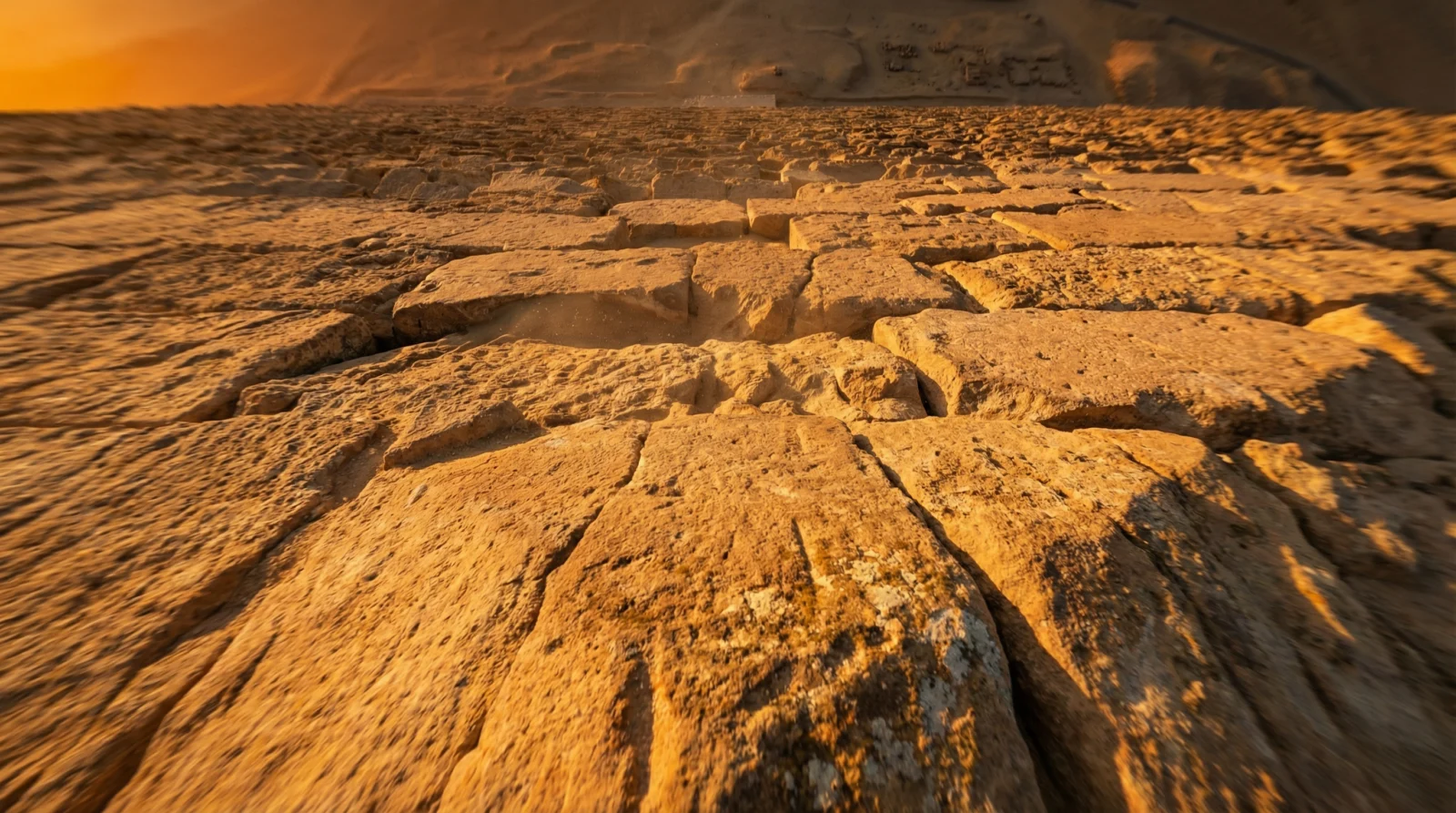
⚠️ This frame is also the Start Frame for Scene 02
Hyper-realistic extreme close-up shot, camera positioned
just inches above the apex capstone of the Great Pyramid,
looking straight down the steep angled stone face. The
ancient limestone blocks fill the entire frame — every
crack, chisel mark, grain of sand, and weathered edge
captured in extreme macro detail.

The stone surface is warm golden-orange from the raking
sunset light hitting it at near-horizontal angle. Deep
sharp shadows fall into every crevice between the
massive stone blocks, creating a dramatic geometric
texture pattern that stretches down the pyramid face
toward the desert floor far below.

At the very bottom edge of frame, the desert floor is
visible — tiny, impossibly far below — with the faint
warm glow of the setting sun casting one final beam
across the sand. A thin sliver of deep orange sky is
visible at the extreme lower edge.

The center of frame is pure ancient stone — filling
everything. The camera is so close the surface feels
like it is about to consume the lens entirely.

ATMOSPHERE: Final second of direct sunlight on the
stone. Dust particles suspended in the last light beam.

CAMERA: Macro close-up, 50mm equivalent, positioned
2 meters above the apex stone, angled straight down
the pyramid face. Slight motion blur at the edges
suggesting downward movement.

TECHNICAL QUALITY: Hasselblad H6D-400C. 400 megapixel
resolution. Every grain of limestone visible.

COLOR GRADE: Deep warm amber stone, extreme contrast
shadows, final golden light.

STYLE: Hyper-realistic photography. Cinematic. NOT
digital art, NOT illustration. Pure photographic realism.
SCENE 02 – THE PASSAGE
Ancient Egyptian Burial Corridor | Torchlight
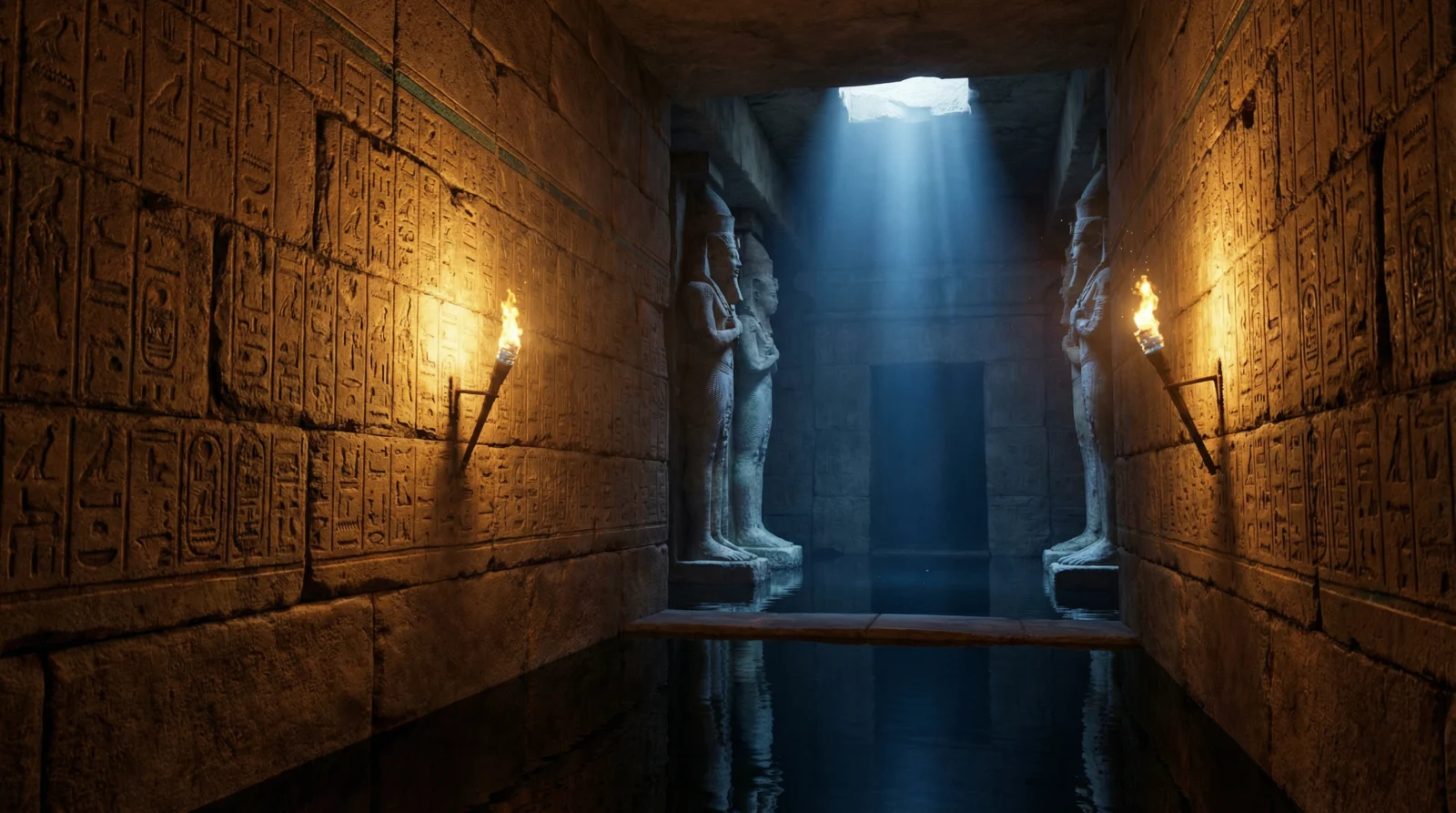
End Frame
⚠️ Start Frame = Scene 01 End Frame
Hyper-realistic 8K cinematic wide shot. Ultra-low
ground-level camera positioned at floor level, perfectly
centered on the corridor axis, shooting straight forward.

A narrow ancient Egyptian limestone burial corridor
stretches ahead — walls, floor and ceiling cut from solid
stone, every surface worn smooth by millennia. Deep-carved
hieroglyphics cover both walls floor to ceiling, remnants
of original gold and turquoise pigment still clinging to
the carved grooves, glowing warmly under flickering
torchlight.

Two stone-mounted torches burn on either side of the
corridor, casting long dramatic amber shadows down the
passage. Dust motes suspended in the torch beams.
The air feels ancient, undisturbed, sacred.

The corridor opens suddenly into a vast cathedral-scale
underground chamber. The chamber ceiling disappears
entirely into pure darkness above. The floor is a
perfectly mirror-still black water surface, reflecting
the distant torchlight in scattered gold ripples.

Two colossal pharaoh statues flank the chamber entrance,
stretching upward and vanishing into the darkness. A
single cold blue-white light shaft descends vertically
from high above, striking the water surface.

CAMERA: Ground level, 24mm wide lens, deep focus —
foreground corridor texture and distant chamber both
razor sharp. Centered composition, no tilt.

TECHNICAL QUALITY: Hasselblad H6D photographic realism.
Every hieroglyph, every stone grain, every torch flame
in ultra-fine detail. 8K resolution.

COLOR GRADE: Deep warm amber in the foreground corridor
bleeding into cold dark blue-black in the vast chamber
beyond. Extreme contrast, cinematic, high dynamic range.

ASPECT RATIO: 16:9 widescreen.

STYLE: Hyper-realistic photography. NOT illustration,
NOT CGI, NOT digital art, NOT 3D render.
SCENE 03 – THE DEEP
Submerged Ancient Temple | Underground Lake
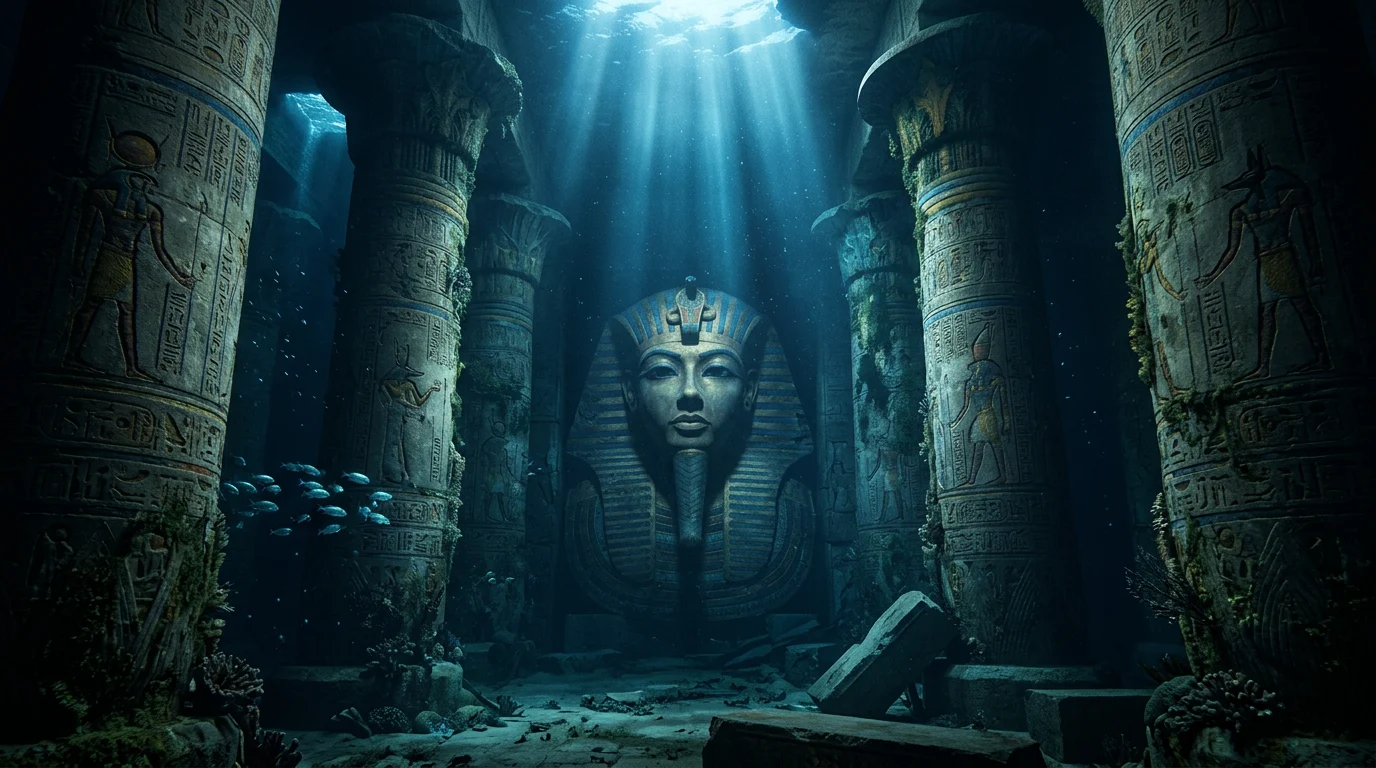
End Frame
⚠️ Start Frame = Scene 02 End Frame
Hyper-realistic cinematic wide shot, 16:9 aspect ratio.

A colossal ancient Egyptian temple completely submerged
in a vast underground lake. Camera positioned at
mid-water level, looking forward and slightly upward.

Enormous stone columns rise from the flooded temple
floor, stretching upward and disappearing into darkness
above. Each column is covered in deeply carved
hieroglyphics and ancient Egyptian relief carvings —
every detail preserved perfectly beneath the water for
thousands of years. Ancient algae and deep-water coral
cling to the lower sections of each column.

The temple floor is fully submerged under crystal-clear
dark blue water — visibility extending 30 meters before
fading into deep blue-black darkness. Fine silt particles
drift slowly through the water column.

Dominating the far wall — a colossal pharaoh face carved
directly into the stone. 20 meters tall. Features
perfectly preserved: strong jaw, ceremonial headdress,
almond-shaped eyes staring forward with absolute
authority. Ancient paint traces still visible in carved
recesses — deep ochre, lapis blue, gold leaf remnants.

Multiple shafts of bioluminescent blue-white light pierce
down through the water from cracks in the ceiling above.
A school of faintly luminescent deep-water fish drifts
silently past one of the columns in mid-ground.

CAMERA: Mid-water level, 24mm wide lens, slight upward
tilt toward the pharaoh face. Deep focus throughout.

LIGHTING: Cold bioluminescent blue shafts from above.
Faint warm amber glow from ancient moss on column bases.

TECHNICAL QUALITY: Hasselblad photographic realism, 8K.
Underwater cinematography quality — BBC Planet Earth grade.

COLOR GRADE: Deep blue-black water, cold blue-white
light shafts, faint warm amber on stone surfaces.

ASPECT RATIO: 16:9 widescreen.

STYLE: Hyper-realistic photography. NOT illustration,
NOT CGI render, NOT digital art, NOT painting.
SCENE 04 – THE LOST KINGDOM
Hidden Underground Civilization | Crystal Cavern
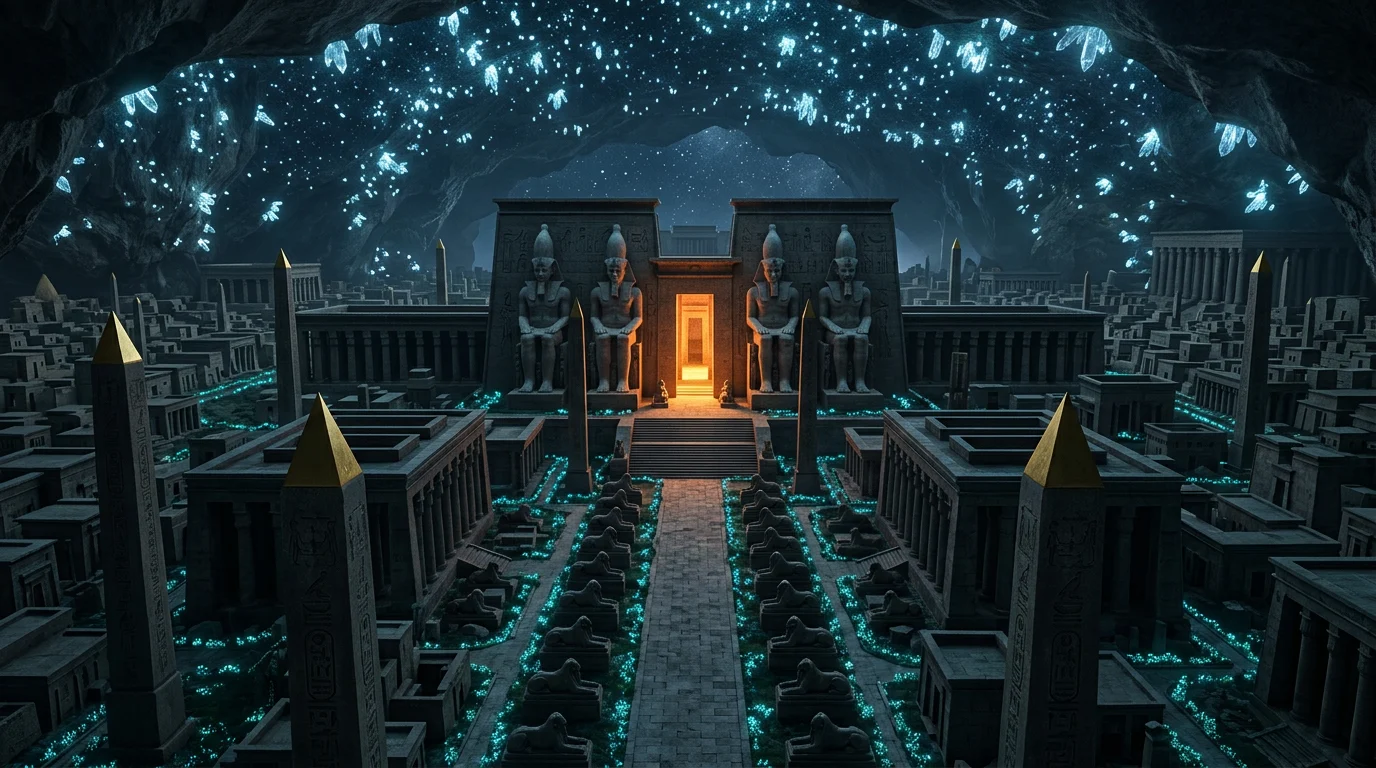
End Frame
⚠️ Start Frame = Scene 03 End Frame
Hyper-realistic cinematic wide shot, 16:9 aspect ratio.

An impossibly vast underground cavern containing an entire
ancient Egyptian city — perfectly preserved, completely
hidden from the world above for thousands of years.
Camera positioned at mid-height elevation, looking forward
and downward across the full scale of the lost city below.

The cavern ceiling stretches hundreds of meters above —
embedded throughout with thousands of luminescent crystal
formations acting as artificial stars, casting a soft
diffused blue-white glow across the entire city below.

The city spreads across the entire cavern floor. Dense
ancient Egyptian architecture — towering obelisks carved
with hieroglyphics and capped with gold, massive temple
complexes, wide ceremonial avenues flanked by sphinx
statues. Every structure carved from dark charcoal-grey
and deep ochre stone, immaculately preserved.

The central grand temple dominates the far center of
frame — fronted by four colossal seated pharaoh statues
each 40 meters tall. Warm amber light glows from within
the temple entrance. Wide ceremonial steps lead up to it.

Ancient bioluminescent plants grow along the base of
structures — soft blue-green glow tracing the street
patterns from above like circuit lines.

CAMERA: Elevated mid-height, 24mm wide lens, slight
downward tilt. Central temple perfectly centered in
frame. Deep focus throughout.

LIGHTING: Cold blue-white crystal ceiling glow. Warm
amber from the central temple entrance. High contrast.

TECHNICAL QUALITY: Hasselblad realism, 8K. Scale must
feel genuinely overwhelming.

COLOR GRADE: Deep blue-black cavern, cold crystal
light, warm amber temple glow at center.

ASPECT RATIO: 16:9 widescreen.

STYLE: Hyper-realistic photography. NOT illustration,
NOT CGI render, NOT digital art, NOT painting.
SCENE 05 – THE HEART
Inner Sanctum | The Golden Scarab
End Frame
⚠️ Start Frame = Scene 04 End Frame
Hyper-realistic cinematic shot, 16:9 aspect ratio.

The innermost sacred chamber of the ancient underground
temple. Camera positioned at mid-height, centered,
looking straight forward into the heart of the room.

The chamber is perfectly circular — walls carved from
solid black granite, polished smooth, every surface
covered in ultra-fine hieroglyphic inscriptions filled
with gold leaf that catches and fractures the light.
The ceiling is a perfect dome carved with an enormous
astronomical map — constellations, planetary bodies,
sacred geometry — all inlaid with lapis lazuli and gold.

At the absolute center of the chamber — a single stone
altar, waist height, carved from one solid block of
deep black granite. On the altar sits a single ancient
artifact — an ornate golden scarab radiating an intense
warm pulsing golden glow that illuminates the entire
chamber from its center outward.

From directly above the altar, a perfect circular
opening in the dome allows a single vertical beam of
pure golden light to fall straight down — striking the
scarab and scattering into hundreds of refracted golden
light rays across every wall, ceiling and floor surface.

The floor is polished black granite — perfectly
reflective — mirroring the altar and the golden beam
as a crisp inverted image below.

Around the base of the altar: carved stone canopic
jars, gold ceremonial vessels, dried lotus flowers —
all arranged in a perfect circle.

CAMERA: Centered, eye-level with the altar, 35mm lens.
Perfect symmetrical composition. Deep focus throughout.

LIGHTING: Single source — the golden beam from above
striking the scarab. No other light. The entire chamber
lit purely by the artifact's radiance.

TECHNICAL QUALITY: Hasselblad realism, 8K. Every
hieroglyph inlay, every gold leaf flicker, every
refracted light ray in extreme fine detail.

COLOR GRADE: Deep black chamber, intense warm gold
radiating outward, lapis blue in the ceiling map.

ASPECT RATIO: 16:9 widescreen.

STYLE: Hyper-realistic photography. NOT illustration,
NOT CGI render, NOT digital art, NOT painting.
FRAME CHAIN – QUICK REFERENCE
Scene Start Frame End Frame 01 Generate new Generate new 02 = S01 End Frame Generate new 03 = S02 End Frame Generate new 04 = S03 End Frame Generate new 05 = S04 End Frame Generate new
Next Step: Once all frames are approved → go to the Video Motion Prompts page
Section 03
VIDEO MOTION PROMPTS
Echo of Eternity | Cinematic Egypt Journey
What this page is: All 5 Kling Canvas motion prompts for the complete cinematic sequence. Each prompt is written to drive specific camera movement between the Start and End Frames you generated on the previous page.
How to use this page: Work scene by scene. Do not generate all clips at once. Approve each clip before moving to the next – the End Frame of each approved clip becomes your Start Frame for the next scene.
VIDEO GENERATION SETTINGS (Apply to All Scenes)
Setting Value Tool Kling Canvas Model Kling 2.5 Turbo Mode Start & End Frame Duration 5 seconds Camera Movement None – prompt drives all movement CFG Scale 0.5
⚠️ Important: Do not add any Camera Movement setting inside Kling. The motion prompt controls all camera behavior. Adding a setting will conflict with the prompt and produce inconsistent results.
SCENE 01 – THE DESCENT
Start: Aerial pyramid view → End: Extreme close-up on stone surface
Beginning with a wide aerial view of the Great Pyramid of Giza
at golden hour, the camera holds still for one breath — taking
in the full scale of the ancient structure against the vast
Sahara desert, the warm amber light raking across every stone
surface, the long dramatic shadow stretching across the sand.

The camera then begins a slow deliberate descent, tilting
downward and pushing forward toward the pyramid apex. The
movement builds speed gradually — the surrounding desert
shrinking away as the pyramid fills more and more of the frame.
The Nile valley and distant horizon disappear as the stone
surface rushes closer.

The descent accelerates into a focused high-speed dive, aimed
directly at the apex capstone. Motion blur begins creeping in
at the edges of frame. The warm golden stone texture becomes
increasingly detailed — individual block edges, ancient chisel
marks, weathered limestone grain all sharpening as the camera
closes in.

The final frames lock onto the extreme close-up of the stone
surface — the pyramid face filling every inch of the frame,
the desert floor a faint warm glow at the very bottom edge.
The camera is seconds away from penetrating the stone entirely.
SCENE 02 – THE PASSAGE
Start: Extreme close-up stone surface → End: Corridor opening into flooded chamber
Beginning at the extreme close-up of the ancient pyramid
stone surface — warm golden limestone filling the entire
frame, the last light of sunset catching every weathered
edge and chisel mark.

The camera punches forward into the stone with sudden
force, the surface rushing up to consume the lens entirely.
A brief moment of pure darkness — then a burst of warm
amber torchlight explodes into frame as the camera emerges
inside the burial corridor.

The camera is now at ground level, low and centered,
shooting straight down the narrow limestone passage.
It begins a steady deliberate forward push — smooth,
controlled, unhurried. The hieroglyph-covered walls
slide past on both sides, torchlight flickering across
the carved gold and turquoise pigments.

As the camera advances, the corridor ahead reveals
itself gradually — the tight passage slowly giving way
to open space beyond. The two pharaoh statues emerge
from the darkness flanking the entrance, and the cold
blue-white light shaft becomes visible descending from
above into the chamber.

The camera slows as it reaches the threshold — the
mirror-still black water surface appearing at the base
of frame, perfectly reflecting the blue light shaft
and the distant torch glow. The camera tilts down
slightly, locking onto the water reflection directly
below. It holds on this reflection for one final
breath before plunging through.
SCENE 03 – THE DEEP
Start: Corridor water reflection → End: Submerged temple pharaoh face
Beginning at the threshold of the ancient burial corridor —
the camera holds at ground level, locked on the mirror-still
black water surface directly ahead. The pharaoh statues flank
the entrance, the cold blue light shaft descends from above,
torchlight flickers from behind.

The camera tilts slowly downward, focusing entirely on the
water reflection below — the corridor, the statues, the blue
light, all mirrored perfectly in the still surface. The
reflection sharpens and deepens as the camera moves closer
to the water.

Then with sudden force the camera plunges straight down
through the water surface — a brief explosion of bubbles
and refracted light as it breaks through. The world
inverts. Darkness and deep blue water replace the amber
corridor entirely.

The camera descends through deep blue-black water,
particles and fine silt drifting upward past the lens.
Speed increases. Cold bioluminescent light sources begin
appearing below — growing larger as the camera drops.

The descent slows as the submerged temple comes into
view. The camera stabilizes at mid-water level, pushing
forward steadily between the massive hieroglyph-covered
columns. The colossal pharaoh face on the far wall
emerges from the deep blue darkness ahead — monumental,
perfectly preserved, staring forward through thousands
of years of silence. The camera closes in, locking
onto the pharaoh's face as the final frame.
SCENE 04 – THE LOST KINGDOM
Start: Submerged pharaoh face → End: Underground lost city
Beginning close on the colossal submerged pharaoh face —
the camera positioned directly in front of the stone
features, cold blue light shafts descending from above,
ancient carved details filling the frame.

The camera begins pushing forward slowly, closing the
distance to the pharaoh's right eye. The carved stone
surface grows larger and larger — the eye socket filling
more of the frame, every ancient chisel mark and
water-worn edge sharpening in extreme detail.

The camera accelerates into the eye — stone rushing up
to consume the lens entirely. A split second of complete
darkness — then an explosion of open space as the camera
bursts through into vast open air.

The sudden transition from stone to enormous space is
dramatic and disorienting — the camera emerges at
elevation inside the colossal underground cavern.
It sweeps wide in a smooth crane arc, revealing the
impossible scale of the hidden city below — the
crystal ceiling stars above, the bioluminescent
street lines tracing the city grid, the obelisks,
the temple complexes.

The camera settles into its final position — elevated,
centered, looking forward and slightly downward across
the full breadth of the lost city. The central grand
temple with its four colossal pharaoh statues sits
perfectly centered in frame, warm amber light glowing
from its entrance, drawing the eye inward.
SCENE 05 – THE HEART
Start: Underground lost city → End: Inner sanctum golden scarab
Beginning at elevation above the underground lost city —
the camera centered on the grand central temple, its
four colossal pharaoh statues flanking the entrance,
warm amber light glowing from within, crystal ceiling
stars scattered above.

The camera begins a slow purposeful descent — dropping
straight toward the temple entrance below. The city
spreads out on all sides as the camera falls, obelisks
and temple rooftops rising past the frame. The
ceremonial avenue leading to the temple entrance
comes into focus — the wide stone steps, the sphinx
statues lining the approach.

The descent accelerates as the camera passes between
the colossal pharaoh statues flanking the gate —
their faces passing on either side of frame. The
amber glow from within the temple intensifies,
flooding the lens with warm light as the camera
crosses the threshold.

Inside — the camera slows immediately. The tight
confines of the entrance corridor give way to the
circular inner sanctum. The camera pushes forward
gently, unhurried and reverent, the circular
hieroglyph walls and astronomical dome ceiling
revealing themselves as it advances.

The golden light beam from above grows stronger,
pulling the camera toward the center. The altar
emerges from the darkness — and on it, the golden
scarab radiating its warm pulsing light outward
across every surface. The camera slows to a final
stop, centered perfectly on the artifact.
The journey ends here.
FULL SEQUENCE – PRODUCTION TRACKER
Scene Title Start Frame End Frame Clip Status 01 The Descent ✅ Generated ✅ Generated ⬜ Pending 02 The Passage = S01 End ✅ Generated ⬜ Pending 03 The Deep = S02 End ✅ Generated ⬜ Pending 04 The Lost Kingdom = S03 End ✅ Generated ⬜ Pending 05 The Heart = S04 End ✅ Generated ⬜ Pending
COMMON MISTAKES
Kling ignores the camera movement described. Lower the CFG Scale to 0.4 and regenerate. A high CFG locks too tightly to the frames and restricts motion.
The transition between scenes feels abrupt. Your End Frame and the next scene’s Start Frame are the same image – they should match exactly. If they don’t, the transition breaks. Always use the exact exported frame, not a re-generated version.
Motion blur looks wrong or too heavy. Remove the line referencing motion blur from the prompt and regenerate. Some scenes handle it better without explicit instruction.
The clip looks good but the camera barely moves. Increase duration to 7 seconds and regenerate. More time gives the model room to execute the full movement arc described.
Next Step: Once all 5 clips are approved → proceed to the final edit assembly and the main lesson info page.