

Section 01
The Full Workflow and All Prompts
➜ Try Seedance 2.5 in CapCut Web: Capcut
What this course is
This is the complete production system behind The Last Light, the AI short film from the tutorial. One paragraph went in, a finished film came out, all inside CapCut Web Video Studio running Seedance 2.5. This page holds the full workflow and every text prompt used in the video. The pages after this one hold the reference images, each finished clip with its prompt explained, and the reusable custom skill file so you can build your own episode with the same characters and the same consistency.
Copy the prompts exactly first. Get one clean result. Then start swapping in your own story. That order matters. You learn the machine before you fight it.
The two modes and when to use them
Video Studio has two agent modes and they solve different problems.
- Standard mode is for one clip. You paste a prompt, it generates. This is where the 30 second single pass lives. Use it when you want one strong continuous shot with no story around it.
- Director mode is for a story. It plans with you in chat: script, storyboard, characters, scenes, then you generate piece by piece with full control. Use it the moment your idea needs more than one clip or more than one character.
The whole film workflow runs in Director mode. The quick wow clip at the start of the video runs in Standard mode. Same model underneath, different amount of steering.
The seven step film pipeline
This is the exact order used in the video. Do not shuffle it. Each step feeds the next one.
- Open Video Studio on CapCut Web, select Video, and set the model to Seedance 2.5. Check the model chip before anything else.
- Set the agent to Director and paste your one paragraph story brief.
- Upload your custom skill file so the agent knows your characters, world, and rules. The full skill file and how to build it is on the final page of this course.
- Ask for the script and storyboard first, then generate the character and environment reference images.
- Generate the opening scene as one continuous 30 second clip with your references attached. This is the hero take.
- Extend the scene twice. Extension one and extension two take you up to 90 seconds of connected story.
- Fix details with timestamp edits and localized edits, then assemble everything on the multi track timeline and export.
The story brief that started everything
This is the entire input. One paragraph.
The Last Light. An old lighthouse keeper named Elias has climbed the tower and lit the lamp every night for eleven years, ever since his daughter Mara left home. Tonight the worst storm in years hits the coast and the lamp dies. Far out in the swell, one small fishing boat is still fighting to reach the harbor. Elias battles to bring the light back, remembering the golden evenings when little Mara used to light it with him. When the beam finally cuts through the rain, it guides the boat home. At dawn, the woman who steps off the boat is Mara, coming home at last.
Why this paragraph works, piece by piece:
- Both characters are named. Named characters survive across scenes far better than "an old man" and "a woman," because every later prompt and every reference image hangs on those names.
- The stakes are physical and visible. A dead lamp, a boat in a storm. The model can film physical stakes. It cannot film "he feels regret."
- The memory is planted inside the brief. That one line about golden evenings is what makes the flashback scene feel planned instead of bolted on.
- The ending is a reveal with an image. A woman steps off a boat at dawn. That is a shot, not a summary.
When you write your own brief, copy this shape: names, a physical crisis, one planted memory, and an ending you can point a camera at.
The Standard mode showcase: the water drop to Earth
This is the 30 second one pass demo from the start of the video. One unbroken zoom from a rain drop on a leaf to the whole planet.
ONE SINGLE CONTINUOUS SHOT FOR 30 SECONDS. NO CUTS. NO SHOTS. NO SCENE CHANGES. ONE UNBROKEN CAMERA PULL BACK FROM START TO END.

WHAT HAPPENS: The camera starts at extreme macro on a single rain drop clinging to the tip of a green leaf, the jungle refracted inside it. The drop FALLS, and in the same breath the camera begins ONE SLOW CONTINUOUS PULL BACK that never stops for the rest of the shot. The leaf stays in frame and SHRINKS as the branch appears around it, the branch shrinks into the whole tree, the tree shrinks into the rainforest canopy where birds BURST upward, the canopy shrinks into green hills with a silver river CUTTING through, the hills shrink into a coastline where storm clouds ROLL in, the clouds shrink into white swirls as the land curves, and the pull back finally eases off in space with the full Earth turning slowly, city lights GLITTERING on the night side.

CAMERA: One continuous accelerating pull back, macro to orbit, like a single motion control move. Every scale grows out of the previous one on screen. The camera never stops, never cuts, never jumps.

Lush green to deep space black. SFX: rain and birds fading into wind rush, then near silence with a low hum. 30s, 16:9. 4K, Ultra HD, rich details, sharp clarity, stable picture.

DO NOT: cuts, hard cuts, shot changes, scene changes, multiple shots, timestamps, jumping between scales, map graphics, Google Earth style, warping terrain, on-screen text, dialogue.
The lesson inside this prompt, and it is the most important prompting lesson on this page: the first version of this prompt described the journey in stages, the drop, then the forest, then the clouds. The model read the stages as a shot list and cut between them. The fix was writing every transition as one object shrinking into the next, the leaf shrinks into the branch, the branch shrinks into the tree. That is interpolation language. It forces the model to travel between scales instead of jumping. If your continuous shots keep cutting, this is almost always why. Format beats words, and staged descriptions produce staged cuts.
Also notice the DO NOT list blocks map graphics and Google Earth style by name. That is this concept’s most common failure, the model swapping to satellite imagery at altitude, so it gets blocked explicitly.
The hero scene: 30 seconds in one pass
This is the opening of the film, generated as a single continuous clip with three reference images attached: Elias present day, the lighthouse exterior, and the lantern room interior. The reference images themselves are on page 2.
Use the attached references: Elias present day as the character, the lighthouse storm exterior for the tower, the lantern room interior for the lamp room.

ONE SINGLE CONTINUOUS 30 SECOND SHOT. NO CUTS.

WHAT HAPPENS: Night storm. Rain LASHES the stone lighthouse, waves BURST against the rocks below. The camera pushes through the rain toward the tower, then moves inside. Elias CLIMBS the last spiral stairs, breathing hard, coat soaked at the shoulders. At the top he STRIKES the igniter. Nothing. He strikes again, hands shaking. The lamp stays dead. Through the rain streaked glass, far out at sea, a small boat light rises and falls in the swell. He WRENCHES the lamp housing open and fights to bring the light back.

CAMERA: One continuous move. Slow push through the storm toward the tower, flowing inside into intimate handheld in the lamp room, ending close on his hands at the dead lamp with the boat light visible beyond the glass.

Cold blue grey storm tones, warm amber accents. SFX: rain, wind, waves, metal, his breathing. No music. Cinematic realism, rich detail, sharp and stable.

DO NOT: cuts, scene changes, timestamps, dialogue, speech, lip movement, on-screen text, morphing, face distortion.
What each block is doing:
- The reference line at the top assigns a job to every attached image. Never attach an image without telling the model what it is for. An unnamed reference gets ignored or misused.
- WHAT HAPPENS leads with events, not atmosphere. Every capitalized verb is an action the model can render: LASHES, BURST, CLIMBS, STRIKES, WRENCHES. If your lead verb is something like shimmers or drifts, you get a moving photograph, not a scene.
- The failed ignition is written twice on purpose. He strikes, nothing, he strikes again. Repetition of a physical beat is how you get the model to actually dwell on struggle instead of skipping to success.
- The boat light through the glass plants the stakes inside the frame. The audience sees what the lamp is for without a single word.
- The camera block describes one journey, outside to inside to close up, as a single move. The moment you write "then cut to" you have asked for an edit.
- No music in the SFX line. Natural sound only. Music gets added later in the edit where you control it. Let the storm carry the scene.
- The DO NOT list ends with the dialogue triple lock: dialogue, speech, lip movement. All three words matter. Seedance loves to make characters talk. Blocking only "dialogue" is not enough, you block the mouth movement itself.
Extension one: the memory
Extensions continue the same clip. Same characters, same world, picked up from the final frame. This one carries the film into the flashback.
Continue the scene: the storm softens into a warm memory, years earlier. Same lantern room, golden evening light. Elias younger, dark beard, kneels beside his small daughter Mara in her bright red raincoat. She reaches for the brass crank with both hands, serious with concentration. He places his hand over hers, then lets her do it alone. Together they TURN it and the lamp BLOOMS to life, warm light flooding their faces. She looks up at the turning lens in wonder and LAUGHS. He watches her, quiet pride in his eyes. Golden warmth, gentle camera drift, tender and nostalgic. No dialogue, no speech, no lip movement.
The mechanics you need to know about extensions:
- Extensions append to the end of the clip. There is no way to insert footage at the front or in the middle. Plan your story in the order it will be generated.
- Each extension chains off the previous one. If you regenerate extension one after making extension two, extension two is orphaned and must be regenerated too. Always redo the chain in order.
- The time jump is written as a light change, the storm softens into golden evening. Palette shift is the cleanest way to signal a flashback without a cut. Cold blue means now, warm gold means then. The audience learns the rule in one second.
- The hand detail carries the whole relationship. He places his hand over hers, then lets her do it alone. One physical gesture, an entire father teaching his daughter. When you write emotional scenes, find the one gesture and describe it precisely. Do not write "an emotional moment between them," the model cannot film that sentence.
Extension two: the rescue and the dawn
Continue: back to the storm night. Elias's hand steadies. The flame CATCHES. The great lens begins to TURN and the beam SWEEPS out through the rain. Far out, the small fishing boat TURNS toward the harbor, following the light. The storm eases into calm grey dawn: the boat tied at the dock, adult Mara steps off in her dark waterproof coat. Elias waits on the pier. She stops, then walks to him. Behind them the light still turns in the morning haze. Quiet and emotional. No dialogue, no speech, no lip movement.
What to notice:
- The return from the flashback is again a light change, back to the storm night. Cold palette means we are back in the present. No cut needed, the color does the work.
- The success beat mirrors the failure beat from the hero scene. Earlier he strikes and nothing happens. Now his hand steadies and the flame CATCHES. Payoffs land hardest when they rhyme with the setup.
- The ending is blocked like real filmmaking. She stops, then she walks to him. That pause before the reunion is the emotion. If you write "they run to each other and hug," you get a soap opera. Restraint reads as cinema.
- The final image is described exactly: the light still turning behind them in the morning haze. Always give the model a specific closing frame. Clips that end on a described image feel finished, clips that just run out of prompt feel cut off.
A variation worth stealing: the memory sandwich
If you want the flashback to hit harder, extend the memory clip itself with a return to the present before running the rescue. The structure becomes present sadness, warm memory, present resolve, and the character comes back changed. This is the tail prompt for that variation:
Continue: the golden light slowly FADES back to the cold blue storm night, present day. Old Elias, grey beard, lifts his head at the dead lamp. He turns and stares out through the rain streaked glass at the dark sea, rain hammering the tower, the small boat light far out in the swell. His jaw sets, sadness hardening into resolve. Cold blue grey palette, the last warm amber traces dying out. Slow gentle camera drift. No dialogue, no speech, no lip movement.
The last line of this prompt is character animation gold: his jaw sets, sadness hardening into resolve. You are describing an internal change through a facial change. That is the level of direction that separates AI clips that feel acted from AI clips that feel generated.
Fixing details without regenerating: the two edit commands
This is where Seedance 2.5 saves you real money. Both commands run on a finished clip and change only what you ask.
The timestamp edit targets a time window and leaves the rest of the take untouched:
7 to 14: make the rain heavier and the lamp room darker before the flame attempt. Keep everything else unchanged.
The pattern is simple: the window in seconds, what changes inside it, and the instruction to keep everything else unchanged. That last sentence is not decoration. Without it the model sometimes reinterprets the whole clip. With it, your approved take survives your revision, which used to be impossible. Any window works, 4 to 8, 7 to 14, 20 to 25, name the seconds you can see on the player.
The localized edit targets an object instead of a time window:
Remove the modern lamp from the shelf. Keep lighting, motion, audio, and everything else unchanged.
Use it for anachronisms, wrong props, and wardrobe fixes. Name the object, name the location, lock everything else. One wrong detail no longer costs you a regeneration of a take you already love.
What is on the next pages
Page 2 holds all six reference images and the prompt that generated them. Pages 3 to 6 hold each finished clip with its prompt and the specific lesson it taught. The final page holds the complete custom skill file, how to build one, and how to load it so your next episode starts with the whole world already set up.
Build the film once with these exact prompts. Then change the paragraph and make it yours.
Section 02
Set the agent.
Everything consistent about this film was decided before a single second of video was generated. The six images on this page are the entire cast and world of The Last Light. Every clip on the following pages was generated with these attached, and that is the only reason Elias has the same face in the storm, in the memory, and on the dock at dawn.
The rule is simple: characters and places are locked as images first, video comes second. Fixing a face at the image stage costs one regeneration. Fixing a face after you have generated and extended a 90 second film costs the whole film.
The prompt that generated all six
This was typed into the Director chat after the script and storyboard stage, with the custom skill already loaded. One message, six assets.
Generate the character and environment reference images for this story: Elias present day, Elias in the memory years, Mara as a child in her red raincoat, Mara as an adult, the lighthouse exterior in the night storm, and the lantern room interior. 16:9, realistic film style, consistent with the-last-light skill.
Three things carry this prompt:
- Every asset is named individually. If you ask for "the characters and locations," the agent decides what you need and usually under delivers. Listing them means you get exactly your cast list, nothing missing.
- The style line matches the film. 16:9 and realistic film style, the same frame and register as the clips these images will be attached to. References in a different aspect ratio or a different style fight the video model instead of guiding it.
- It ends with "consistent with the skill." The custom skill file already holds the wardrobe, ages, palette, and world rules, so this prompt does not repeat them. The skill is the single source of truth, and every generation points back at it. That is the whole reason the skill file exists.
The six references, and what to check on each one
Do not approve references on vibes. Each image has a job, and each one gets checked against its job before you move on. Here is the full set with the exact checks used in this build.

Elias, present day. The lead of the film. Checks: late 60s, weathered deeply lined face, short grey beard, heavy dark wool coat. This is the face the whole film must hold onto, so look at it the way the camera will, in close up. If the face reads generic or too smooth, regenerate now, not later.
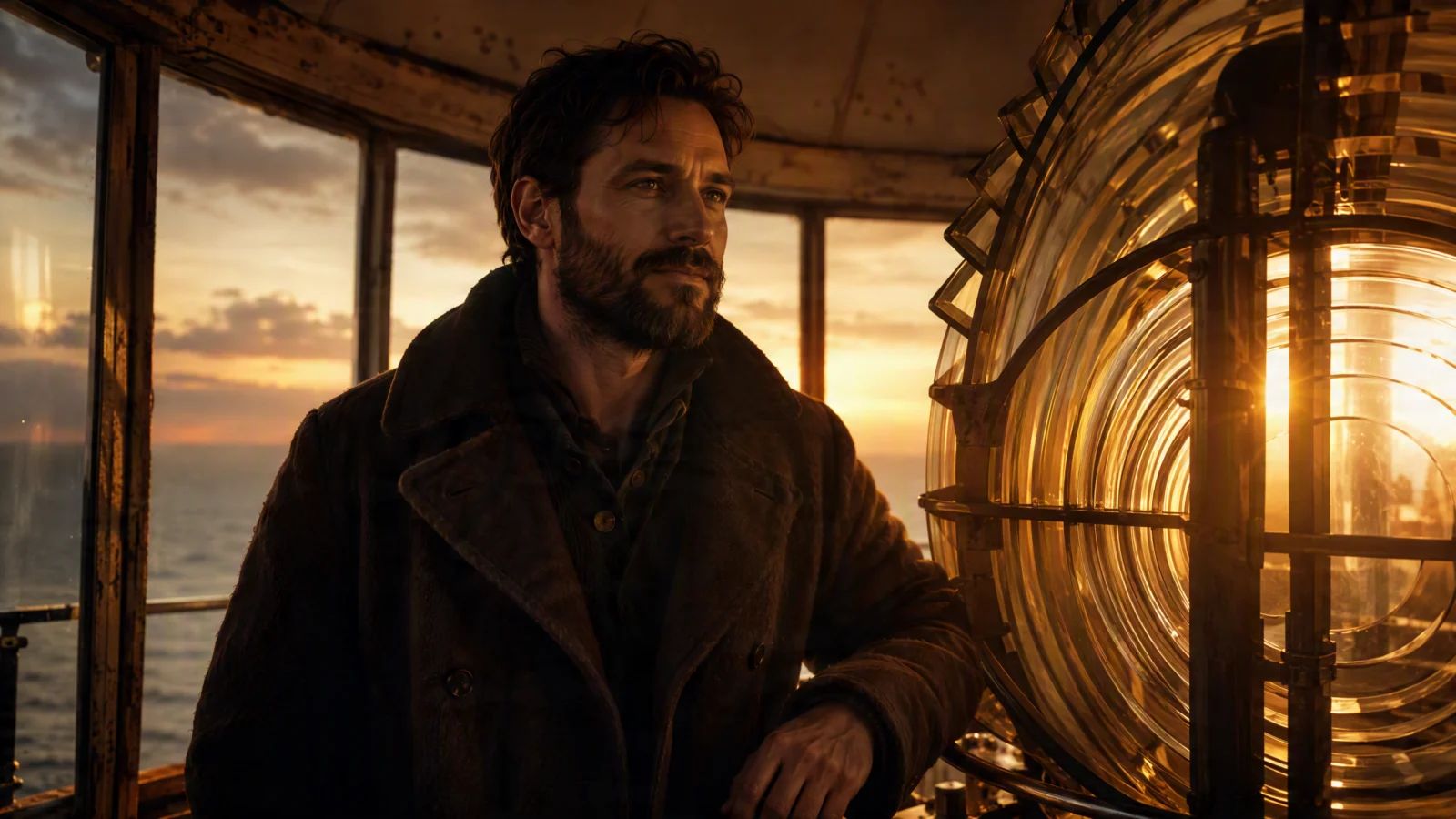
Elias, the memory years. The same man, roughly twenty five years earlier. Checks: the face structure must match the old Elias, same nose, same brow, same eyes, with a dark beard instead of grey and a warmer posture. This is the hardest reference in the set, because "same person at a different age" is exactly where AI drifts. Put the two Elias images side by side and squint. If you cannot see the same man, the flashback will read as a stranger and the emotional core of the film dies.

Mara as a child. Checks: around 7 years old, dark hair, and above everything, the bright red raincoat. The raincoat is the memory anchor of the whole film, the one color accent that survives from the flashback into the audience’s memory. It must be unmissable red, not orange, not faded.
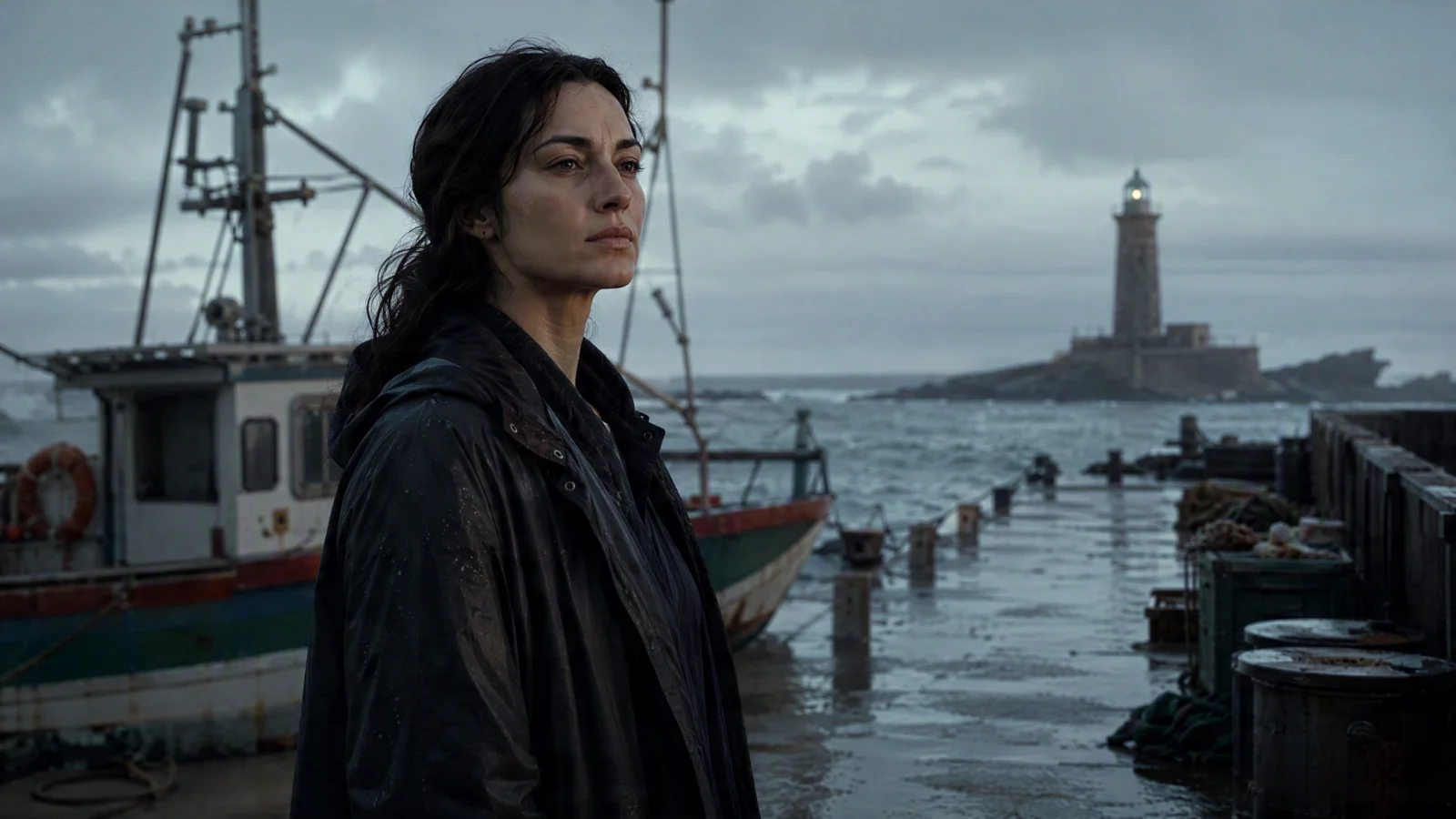
Mara as an adult. Checks: mid 30s, dark hair, dark waterproof coat, calm quiet presence. She should visually echo the child through the hair and the stillness. She appears for only a few seconds at the dock, which means the image has to establish her instantly.
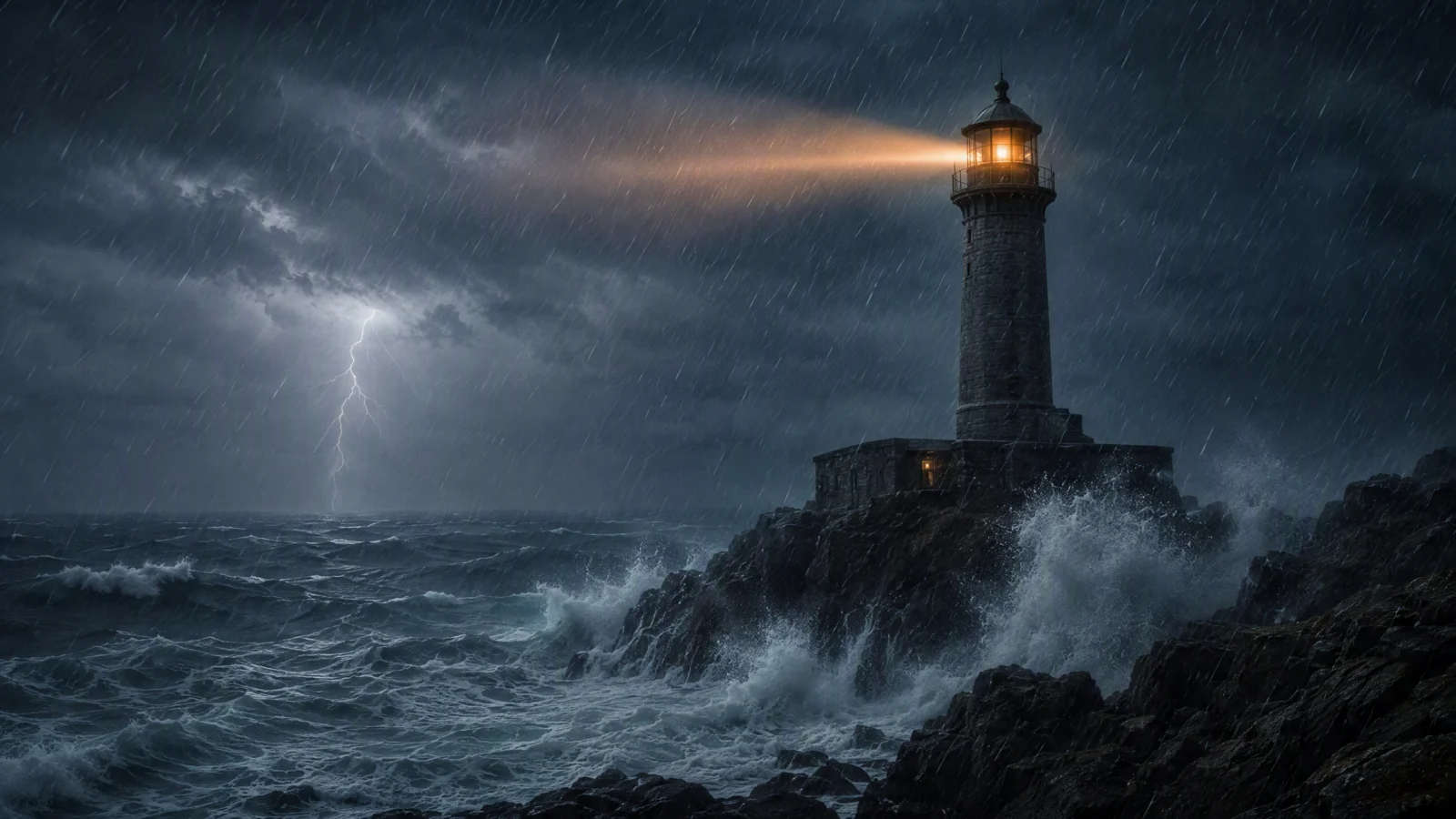
The lighthouse exterior in the storm. The establishing world. Checks: remote stone tower on rocky coast, violent sea, cold blue grey palette, and the scale should feel dangerous and isolated. This image sets the physics of the storm every exterior moment will inherit.
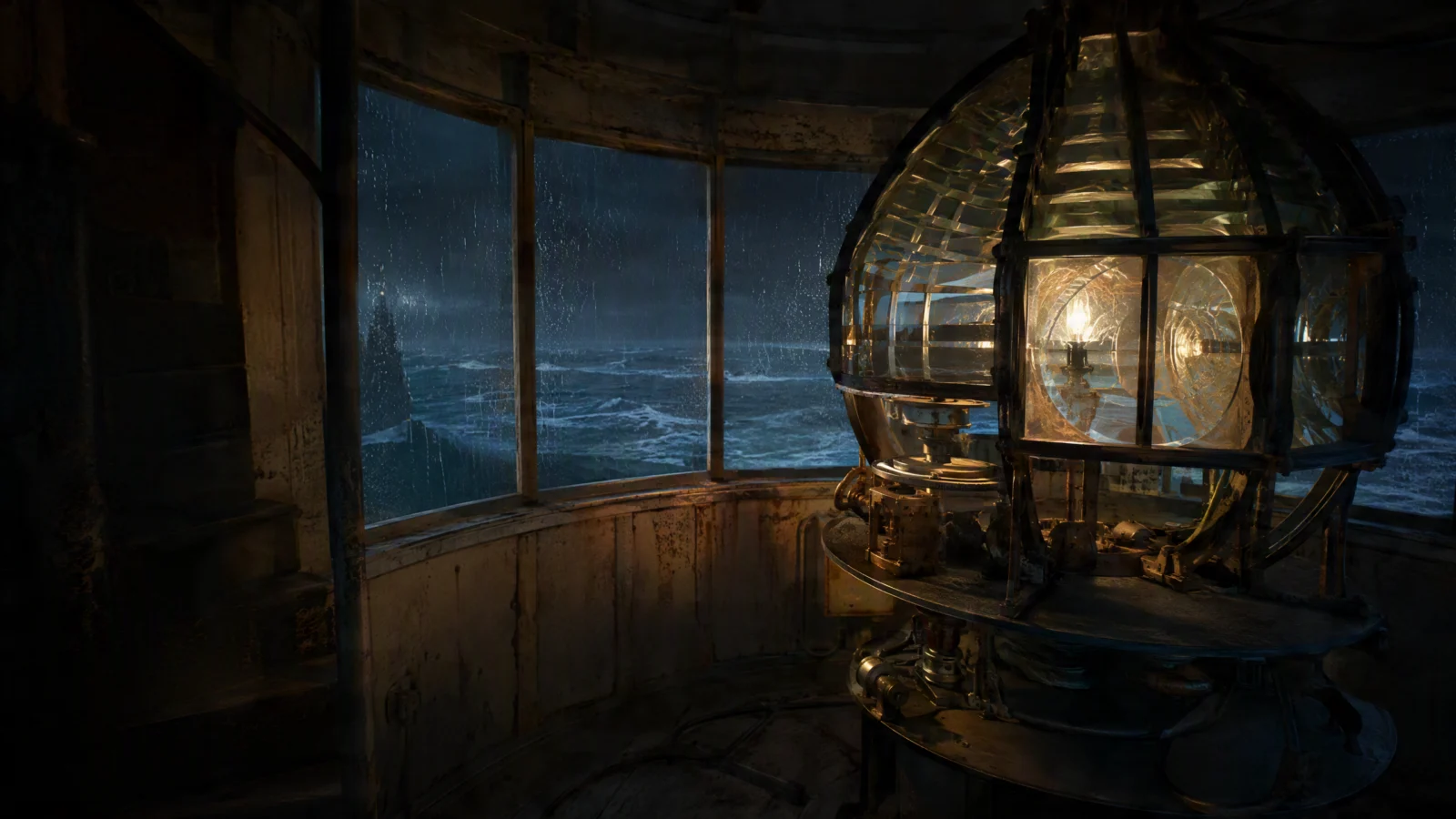
The lantern room interior. Where most of the film happens. Checks: the lamp and lens as the centerpiece, aged metal and glass, room for the warm amber light to live against the cold outside. Both the failure scene and the golden memory play in this room, so it has to work in both palettes.
If one image misses, regenerate only that one
You do not rerun the whole set for one bad result. Name the single asset and what must change:
Regenerate the Elias present day reference: same character, but make the face more weathered and the beard shorter. Keep everything else consistent with the skill.
One asset, one instruction, everything else locked. This is the same surgical mindset as the timestamp edits on page 1, and it is the habit that keeps your credit spend sane.
When the platform blocks your reference, and how to get past it
Real production note from this exact build. The first attempt to generate the hero scene with these references attached came back blocked by an automated copyright and likeness review. Nothing was actually infringing, the images were generated inside the platform itself, but photoreal faces, especially older and distinctive ones, can trip an automated likeness check as a false positive. Credits are returned when it happens, so it costs nothing but time. The fix ladder, cheapest step first:
- Retry once, unchanged. False positives often pass on the second submission. Submitting from the main prompt bar instead of inside the agent chat also helps, one less review layer.
- If it blocks again, regenerate the character reference with anti likeness language built in:
Regenerate the Elias present day reference: an original fictional character, elderly lighthouse keeper, late 60s, weathered face, short grey beard, dark wool coat. Distinct invented face, no resemblance to any real person or actor. 16:9, realistic film style, consistent with the skill.
- If it still blocks, drop the face reference from the video generation entirely and carry the character in the prompt text instead. Attach only the environment references, and open the video prompt with the full character description. The loaded skill plus the fact that extensions continue the same clip will hold the face consistent across the film without the still.
Knowing this ladder in advance is the difference between a five minute detour and a lost afternoon.
How these references get used from here
On the next pages, every video prompt attaches two or three of these images and assigns each one a job in the first line of the prompt: this image is the character, this image is the tower, this image is the room. An attached image with no assigned role gets ignored or, worse, gets invented around. Name the job of every reference, every time.
Seedance 2.5 reads up to 50 references in a single generation. This film needed six. The number is not the point. The discipline is: a small locked cast, checked hard at the image stage, reused everywhere.
Next page: the water drop to Earth clip, and the prompt lesson that turned a cutting mess into one continuous shot.
Section 03
The Water Drop to Earth (30s One Pass)
What this clip proves
This is the Standard mode showcase from the start of the tutorial: one unbroken camera pull back from a rain drop on a leaf to the entire planet, generated in a single 30 second pass. No stitching, no editing, no keyframes. One prompt in, one continuous shot out.
It exists to demonstrate the headline upgrade in Seedance 2.5. The previous generation capped at 15 seconds per clip, which meant any big idea became a stitching job. Thirty continuous seconds is enough room for an idea to actually travel somewhere, and this clip travels about as far as a camera can go.
Settings used: Standard mode, Video, Seedance 2.5, 30 seconds, 16:9, 720p. Nothing attached, no references. Pure text.
The final working prompt
ONE SINGLE CONTINUOUS SHOT FOR 30 SECONDS. NO CUTS. NO SHOTS. NO SCENE CHANGES. ONE UNBROKEN CAMERA PULL BACK FROM START TO END.

WHAT HAPPENS: The camera starts at extreme macro on a single rain drop clinging to the tip of a green leaf, the jungle refracted inside it. The drop FALLS, and in the same breath the camera begins ONE SLOW CONTINUOUS PULL BACK that never stops for the rest of the shot. The leaf stays in frame and SHRINKS as the branch appears around it, the branch shrinks into the whole tree, the tree shrinks into the rainforest canopy where birds BURST upward, the canopy shrinks into green hills with a silver river CUTTING through, the hills shrink into a coastline where storm clouds ROLL in, the clouds shrink into white swirls as the land curves, and the pull back finally eases off in space with the full Earth turning slowly, city lights GLITTERING on the night side.

CAMERA: One continuous accelerating pull back, macro to orbit, like a single motion control move. Every scale grows out of the previous one on screen. The camera never stops, never cuts, never jumps.

Lush green to deep space black. SFX: rain and birds fading into wind rush, then near silence with a low hum. 30s, 16:9. 4K, Ultra HD, rich details, sharp clarity, stable picture.

DO NOT: cuts, hard cuts, shot changes, scene changes, multiple shots, timestamps, jumping between scales, map graphics, Google Earth style, warping terrain, on-screen text, dialogue.
The failure that built this prompt
This prompt did not work on the first try, and the reason it failed is the single most useful prompting lesson in this whole course.
The first version described the journey in stages. The drop on the leaf. Then the forest from above. Then the clouds. Then the Earth. Clean, logical, and completely wrong. The model read the stages as a shot list and produced exactly that: a beautiful macro of the drop, then a hard cut to a forest, then another cut. The words said no cuts. The format said shot list. Format won.
This always happens, in every AI video model, because staged descriptions are how storyboards are written, and the model has seen millions of storyboards. When your prompt looks like a storyboard, you get edits.
The rewrite changed one thing: every transition became one object physically shrinking into the next. The leaf shrinks as the branch appears around it. The branch shrinks into the tree. The tree shrinks into the canopy. That is interpolation language. It gives the model no seam to cut on, because each scale is described as visibly containing the previous one, on screen, in the same frame. The model has to travel between them because the sentence leaves it nowhere to jump.
If you take one technique from this page: when you want continuity, never list the places the camera visits. Describe how each place grows out of the last one.
Why every scale has its own motion
A zoom this long has a hidden trap. Once you leave the canopy, nothing is moving except the camera, and a 30 second shot where only the camera moves feels like a screensaver by second twelve.
So every altitude in this prompt carries its own event. The drop FALLS. Birds BURST from the canopy. The river CUTS through the hills. Storm clouds ROLL across the coast. City lights GLITTER on the night side. None of these are the subject of the shot, they are life inside the shot, and they are the difference between a camera move and a world.
The capitalized verbs are deliberate. FALLS, BURST, CUTTING, ROLL, GLITTERING. Event verbs render as motion. Soft verbs like drifting or shimmering render as texture. Lead with events, always.
The speed curve
The camera block asks for an accelerating pull back that eases off in space. Slow at the start, fast through the middle scales, calm at the end. That U shaped speed curve does two jobs: the slow start lets the macro detail register, the acceleration sells the enormous distance, and the ease off in space lands the shot like an ending instead of a stop. A constant speed zoom across this distance either crawls forever or blurs past everything. Shape the speed and the shot gets a beginning, a middle, and an end without a single cut.
The DO NOT list is aimed at one specific failure
Look at what gets blocked by name: map graphics, Google Earth style, warping terrain. That is not a generic safety list. It is the known default failure of this exact concept. The moment the camera gets high enough, every model wants to swap to the satellite imagery it has seen a million times, and the shot suddenly looks like a zoom out in a news graphic. Blocking the failure by name is how you keep the planet looking filmed instead of rendered.
This is how DO NOT lists should always be written: short, and targeted at the specific ways this specific shot goes wrong. A fifty item generic list dilutes the model’s attention. Eight items aimed at the actual risks protect the shot.
Judging your takes
Your result will not match this clip frame for frame. Same prompt, different output, that is the nature of these models. Judge a take on three things only:
- Continuity. One unbroken move, no cuts anywhere. This is pass or fail.
- The transitions. Do the scales grow out of each other, or does the terrain morph and swim between them? Slight softness in the mid scales is normal, actual warping is a retake.
- The ending. Does the pull back ease off on a stable turning Earth, or does it drift past the planet aimlessly? A shot that ends on its described final image feels complete.
Budget two to three takes. If all three cut in the same place, the fix is language, not luck: find the transition where it breaks and rewrite it as a tighter shrinks into sentence.
Make it yours: the same engine with a different chain
The prompt is a reusable scale engine. Keep the structure, swap the chain of objects. The only rule: each link must physically contain or connect to the next, so the shrinks into language stays honest. Two chains that work:
- A grain of sand shrinks into a footprint, the footprint into a beach, the beach into a coastline, the coastline into an island, the island into open ocean and the curve of the planet.
- A single ember shrinks into a campfire, the campfire into a clearing, the clearing into a night forest, the forest into mountains under stars, the mountains into a glowing valley of city lights seen from high above.
Write your chain first as a list, then delete the list and rewrite it as one sentence of things shrinking into each other. That rewrite is the whole skill.
Next page: the storm scene, the hero of the film, and how a 30 second one pass narrative shot gets directed.
Section 04
The Storm Scene (The 30s Hero Shot)
What this clip is
This is the opening of The Last Light and the hero take of the whole production: thirty continuous seconds of narrative, generated in one pass, with three reference images attached. The storm outside, the climb up the tower, the failed ignition, and the boat light out in the swell, all in one unbroken move from exterior to interior to close up.
The drop to Earth clip on the previous page proved the model can hold a camera move for thirty seconds. This clip proves the thing that actually matters for filmmaking: it can hold a character, a location, and a dramatic beat for thirty seconds. That is the difference between a tech demo and a scene.
Settings used: Director mode project, generated on the single clip path, Seedance 2.5, 30 seconds, 16:9, 720p, three references attached, custom skill loaded.
The references and their jobs
Three images from page 2 are attached to this generation: Elias present day, the lighthouse storm exterior, and the lantern room interior. The first line of the prompt assigns each one its job. This is not optional. An attached image without an assigned role gets ignored, or worse, the model invents its own version of what it thinks the image is for. Every reference, every time, gets a named job in the prompt.
The full prompt
Use the attached references: Elias present day as the character, the lighthouse storm exterior for the tower, the lantern room interior for the lamp room.

ONE SINGLE CONTINUOUS 30 SECOND SHOT. NO CUTS.

WHAT HAPPENS: Night storm. Rain LASHES the stone lighthouse, waves BURST against the rocks below. The camera pushes through the rain toward the tower, then moves inside. Elias CLIMBS the last spiral stairs, breathing hard, coat soaked at the shoulders. At the top he STRIKES the igniter. Nothing. He strikes again, hands shaking. The lamp stays dead. Through the rain streaked glass, far out at sea, a small boat light rises and falls in the swell. He WRENCHES the lamp housing open and fights to bring the light back.

CAMERA: One continuous move. Slow push through the storm toward the tower, flowing inside into intimate handheld in the lamp room, ending close on his hands at the dead lamp with the boat light visible beyond the glass.

Cold blue grey storm tones, warm amber accents. SFX: rain, wind, waves, metal, his breathing. No music. Cinematic realism, rich detail, sharp and stable.

DO NOT: cuts, scene changes, timestamps, dialogue, speech, lip movement, on-screen text, morphing, face distortion.
The three questions every scene prompt must answer
Before writing any narrative video prompt, answer three questions. If you cannot answer all three, you do not have a scene yet, you have a pretty picture with a wish attached.
- What HAPPENS? The actual event with cause and effect. Here: the storm kills the lamp, Elias fights to relight it, and fails.
- Who REACTS? The subject responds physically. Here: breathing hard, hands shaking, wrenching the housing open.
- How does the CAMERA follow? A move justified by the action. Here: pushed in by the storm, intimate inside, closing on the hands where the struggle lives.
Read the prompt again and you can see the three answers sitting in it. That structure is why the clip feels directed instead of generated.
The event verbs are the engine
Every capitalized verb is a renderable physical event: LASHES, BURST, CLIMBS, STRIKES, WRENCHES. This is the most reliable lever in AI video. Event verbs produce motion and consequence. Atmosphere verbs, shimmers, drifts, looms, produce a moving photograph. If the lead verb of your scene is an atmosphere verb, rewrite before you generate, because no amount of camera language saves a scene where nothing happens.
Failure is written as a beat, not a fact
Look at the ignition: he STRIKES the igniter. Nothing. He strikes again, hands shaking. The lamp stays dead. Four sentences for one failed action. That repetition is deliberate. Write "he fails to light the lamp" and the model gives it half a second on the way to something else. Write the attempt, the silence, the second attempt, and the shaking hands, and the model dwells on the struggle, which is where the drama actually is. Screen time follows sentence weight. Spend your sentences on the beat that matters.
The stakes live inside the frame
The boat light through the rain streaked glass is one sentence, and it is doing the entire story’s work: the audience sees who dies if the lamp stays dark, without narration, without a cut away, without a single word spoken. When you write your own scenes, look for the way to put the stakes physically inside the frame. A photo on the desk, smoke on the horizon, headlights approaching. Shown stakes beat explained stakes every time.
One journey, one camera sentence
The camera block describes exterior to interior to close up as a single flowing move, storm, stairs, hands. The moment a camera description contains "then cut to" or numbers shots, the model gives you edits, because format always beats intent. If the move cannot be written as one continuous sentence, it is not one continuous shot, split it into two generations instead.
The ending of the camera sentence matters most: ending close on his hands at the dead lamp with the boat light visible beyond the glass. That is a described final frame, and it does two jobs. The clip lands on a composed image instead of running out of prompt, and, because extensions continue from the final frame, it hands the next generation a perfect starting point. Always park your clip where the next one needs to begin.
No music is a choice
The SFX line asks for rain, wind, waves, metal, and breathing, and explicitly no music. Natural sound makes the scene feel witnessed. Music gets added in the edit, where you control the exact moment it enters. If you let the model score the scene, you marry a random soundtrack to your best take. Keep the audio channel documentary at generation time, and keep the emotional scoring for yourself.
The dialogue triple lock
The DO NOT list ends with dialogue, speech, lip movement. All three, every time a character’s face is on screen and silent. Seedance defaults to making people talk, and blocking only "dialogue" is not enough, the mouth still moves and ruins the take. Block the concept, the sound, and the physical mouth movement together. This is the most common avoidable retake in narrative AI video.
Judging your takes
Same prompt, different output, every time. Judge on:
- The face. Does Elias match his reference in the close moments? Character match is pass or fail, everything else is negotiable.
- The beat. Does the failed ignition read clearly as attempt, failure, second attempt? If the lamp lights by accident, the take is dead no matter how beautiful it is.
- The move. One continuous journey, no cuts.
- The stakes. Is the boat light findable in the glass? Faint is fine, absent is a retake.
Small flaws are not failures. A wrong prop on a shelf or a slightly odd fitting is not a retake, it is a free demo for the localized edit you will run later. Budget four to five takes for a hero shot like this, take the best, and let the edit commands polish it.
Next page: extension one, the golden memory, and how a time jump gets written without a single cut.
Section 05
The Memory (Extension 1)
What this clip is
This is the emotional heart of the film: the flashback to the golden evenings, when a younger Elias taught little Mara to light the lamp. It was not generated as a separate clip. It is an extension of the storm scene, continued directly from that clip’s final frame, which is why the room, the lamp, and the world all carry over without a seam.
This page is where the second headline feature of Seedance 2.5 earns its keep: a native 30 second scene that can be extended twice, up to 90 seconds of connected story. The storm scene was pass one. This is extension one.
How extensions actually work, learn this before you generate
Extensions have three mechanical rules, and knowing them saves you real money:
- Extensions APPEND. New footage attaches to the end of the clip, always. There is no inserting at the front and no inserting in the middle. Whatever order your story plays in is the order you must generate it in. Plan the film forward.
- Extensions CHAIN. Each extension continues from the final frame of everything before it. That is the feature: the same Elias, the same room, the same light, carried automatically, because the model is literally continuing the footage rather than starting fresh.
- Re-runs ORPHAN the chain. If you regenerate extension one after extension two exists, extension two is now continuing from footage that no longer exists. It is orphaned and must be regenerated too. The rule: always redo the chain in order, one, then two.
The storm scene ended close on Elias’s hands at the dead lamp. That parked frame is exactly where this prompt picks up, which is why the transition feels designed rather than stitched.
The full prompt
Continue the scene: the storm softens into a warm memory, years earlier. Same lantern room, golden evening light. Elias younger, dark beard, kneels beside his small daughter Mara in her bright red raincoat. She reaches for the brass crank with both hands, serious with concentration. He places his hand over hers, then lets her do it alone. Together they TURN it and the lamp BLOOMS to life, warm light flooding their faces. She looks up at the turning lens in wonder and LAUGHS. He watches her, quiet pride in his eyes. Golden warmth, gentle camera drift, tender and nostalgic. No dialogue, no speech, no lip movement.
The time jump is a light change, not a cut
The flashback happens in the first sentence: the storm softens into a warm memory, years earlier. No cut, no dissolve, no transition effect. A palette shift.
This is the cleanest flashback technique in AI video, and it works because the audience learns the rule instantly: cold blue means now, warm gold means then. The whole film runs on that one color law. When extension two returns to the present, it reverses the same shift, back to the storm night, and the audience reads the return without a single edit.
When you write your own time jumps, resist the urge to write "flashback to" or "cut to years earlier." Those are editing instructions, and editing instructions produce edits. Write the light changing instead. Light is something the model can render continuously, and continuous is the whole point of an extension.
The characters change age without new references
Notice what this prompt does not do: it does not re-attach face references. Younger Elias and child Mara appear from two things working together. The custom skill file, loaded on the project, holds both versions of both characters, wardrobe and all, so "Elias younger, dark beard" and "Mara in her bright red raincoat" resolve to the locked designs, not to random new people. And because this is an extension of existing footage, the model is anchored to the world it is already rendering.
The red raincoat is called out by name because it is the memory anchor of the entire film, the one color object the audience carries out of this scene. Your story should have one too, a single visual anchor planted in the emotional scene, and it should be named explicitly in the prompt every time it appears.
One gesture carries the whole relationship
The line doing the heaviest lifting on this page: he places his hand over hers, then lets her do it alone.
That is an entire father and an entire childhood in eleven words. Guidance, then trust. The model can film it because it is physical, specific, and sequential, hand over hand, then release. Compare it to what most people write for this scene, something like "a tender emotional moment between father and daughter." The model cannot film that sentence. There is no verb in it a camera can see.
This is the deepest lesson of directing AI: emotion is never the instruction. Emotion is the result of a precise physical action, rendered well. Find the one gesture, describe it exactly, and the feeling arrives on its own.
The same logic runs through the rest of the beat: she reaches with both hands, serious with concentration. The lamp BLOOMS rather than turns on. She looks up at the turning lens in wonder and LAUGHS. He watches with quiet pride in his eyes. Every emotional word is anchored to a face, a body, or a light doing something visible.
Silent laughter, and the triple lock again
She LAUGHS, and the prompt still ends with no dialogue, no speech, no lip movement. That is not a contradiction, it is precision. A laugh is a face and body event, and the block stops it becoming a talking scene. Without the triple lock, a joyful child in frame is the single most likely trigger for the model to invent chatter. Every silent scene, all three words, no exceptions.
Judging your takes
- The age match. Is younger Elias recognizably the same man as storm Elias? Side by side check, same nose, same brow. This is the make or break of the whole flashback.
- The raincoat. Unmissably red. It is the anchor.
- The gesture. Hand over hand, then release, readable as two beats. If the model collapses it into one vague hand clasp, retake.
- The warmth. The palette should feel like a different world from the storm, gold against the memory of blue.
Budget two takes, three at most. Extensions are cheaper to judge than hero shots because half the scene, the room, the lamp, the world, is inherited and already correct.
The variation that makes it hit harder: the memory sandwich
The film as published plays storm, memory, rescue. There is a stronger structure available if you want the flashback to carry more weight: return to the present before the rescue. The shape becomes present sadness, warm memory, present resolve, and Elias comes back from the flashback visibly changed. That return is generated by extending this memory clip with a tail before running the rescue:
Continue: the golden light slowly FADES back to the cold blue storm night, present day. Old Elias, grey beard, lifts his head at the dead lamp. He turns and stares out through the rain streaked glass at the dark sea, rain hammering the tower, the small boat light far out in the swell. His jaw sets, sadness hardening into resolve. Cold blue grey palette, the last warm amber traces dying out. Slow gentle camera drift. No dialogue, no speech, no lip movement.
The closing line is the technique to steal: his jaw sets, sadness hardening into resolve. An internal change written as a facial change. That is character acting, directed in text, and it is the level this whole course is pushing you toward.
Next page: extension two, the rescue and the dawn, where the setup pays off and the film learns how to end.
Section 06
The Return to the Storm (The In-Between Beat)
What this clip is
This is the shortest clip in the film and the one doing the quietest, most important job. It sits between the golden memory and the rescue: the warmth fades, we are back in the storm, and old Elias lifts his head from the dead lamp and stares out at the sea, sadness hardening into resolve.
It was not in the first plan. The original chain jumped straight from the memory into the rescue, and it worked, but the memory played like decoration, a nice flashback on the way to the ending. Adding this beat changed the structure into what editors call a memory sandwich: present sadness, warm memory, present resolve. Now the flashback has a consequence. Elias goes into the memory broken and comes out of it decided, and the audience watches the change happen on his face. Same footage either side, completely different emotional math.
If your story has a flashback, this is the upgrade to reach for: never return from a memory to the same character you left. Return to a changed one.
The full prompt
Continue: the golden light slowly FADES back to the cold blue storm night, present day. Old Elias, grey beard, lifts his head at the dead lamp. He turns and stares out through the rain streaked glass at the dark sea, rain hammering the tower, the small boat light far out in the swell. His jaw sets, sadness hardening into resolve. Cold blue grey palette, the last warm amber traces dying out. Slow gentle camera drift. No dialogue, no speech, no lip movement.
How it was generated, and what it teaches about the chain
This beat is an extension run on the memory clip, appended to its tail. That mechanical fact carries a planning lesson worth burning in.
Extensions append to the end, always. There is no inserting a clip between two existing ones. The only reason this beat could be added "in between" is that it was added to the end of the chain as it existed at that moment, after the memory, before the rescue had been locked. The rescue extension was then run after it, continuing from this clip’s final frame.
Which means: if you finish your whole chain and then decide the middle needs a new beat, everything after the insertion point gets regenerated, in order. Extensions are cheap to judge but the chain is a one way street. So when you plan a film, ask the sandwich question before you generate the ending: does my character need a visible return from the emotional scene? If yes, generate it in sequence. Deciding late is possible, this build proves it, but it costs the tail of the chain.
The internal change is written as a facial change
The line this entire page exists for: his jaw sets, sadness hardening into resolve.
That is an internal transformation, the exact thing everyone says AI video cannot do, directed in nine words. The trick is that not one of those words asks the model to render a feeling. Jaw sets is a muscle movement. The hardening is the transition between two face states the model knows how to hold. The emotion is the audience’s reading of a precise physical change, which is exactly how film acting has always worked.
Put this next to the lesson from the memory page, the hand over hand gesture, and you have the two halves of directing performance in text: relationships are written as gestures, inner change is written as the face. Neither one ever names the feeling as an instruction.
The sequence around it obeys the same law. He lifts his head, a body event. He turns and stares out through the glass, a body event with a target. The boat light far out in the swell, the reason for the resolve, planted back in the frame so the decision has a visible object. Every abstract thing in this beat is anchored to something the camera can see.
The palette bridge: amber dying out
The color line is doing double duty: cold blue grey palette, the last warm amber traces dying out. The film’s color law says gold means memory, blue means now, and this clip is the hinge between them, so it renders the law itself, the last of the gold physically leaving the frame. It reads as the memory releasing him. One color instruction, working as both continuity and metaphor.
Ending here is what makes the rescue join invisible
The clip parks on old Elias at the glass, storm around him, boat light in the swell, resolve on his face. Compare that to where the rescue prompt begins: his hand steadies, the flame catches.
Storm hands off to storm. Same room, same palette, same man, one breath apart. Without this beat, the rescue had to climb out of a golden flashback, gold cutting to blue, the harshest join in the film. With it, the hardest transition in the story, memory back to reality, happens inside a generated clip where it is smooth by construction, and the clip to clip join lands on matching footage. Plan your chain so the difficult transitions happen inside clips and the easy ones happen between them. That single scheduling habit is worth more than any transition effect.
Judging your takes
- The fade. The gold should die out gradually across the first seconds, not switch off. If the palette snaps, the return reads as a cut and the whole point is lost.
- The face. Same old Elias as the storm scene, grey beard, and the jaw beat readable: down, then set. If the resolve does not land on his face, the clip is just weather.
- The boat light. Present in the swell. It is the object of his decision, the audience should be able to follow his stare to it.
- Stillness with life. This is the calmest clip in the film, but calm is not frozen: rain keeps hammering, the light keeps rising and falling, his breathing stays visible. If everything but the rain freezes, retake.
Budget two takes. It is a short, low complexity beat inheriting almost everything from the chain, and the only thing that can really fail is the face.
Next page: the rescue and the dawn, where steady hands answer shaking ones and the film finds its ending.
Section 07
The Rescue and the Dawn (Extension 2)
What this clip is
This is extension two, the final act. The flame catches, the beam finds the boat, the storm gives way to dawn, and the woman who steps off the rescued boat is Mara. With this extension the chain is complete: one 30 second pass plus two extensions, up to 90 seconds of connected story, the exact capability this whole workflow is built around.
Everything on the previous page about how extensions work still applies. This clip continues from the memory clip’s final frame, it appends to the end of the chain, and if you ever regenerate the memory, this one gets regenerated after it, in order.
The full prompt
Continue: back to the storm night. Elias's hand steadies. The flame CATCHES. The great lens begins to TURN and the beam SWEEPS out through the rain. Far out, the small fishing boat TURNS toward the harbor, following the light. The storm eases into calm grey dawn: the boat tied at the dock, adult Mara steps off in her dark waterproof coat. Elias waits on the pier. She stops, then walks to him. Behind them the light still turns in the morning haze. Quiet and emotional. No dialogue, no speech, no lip movement.
The payoff rhymes with the setup
Go back to the hero scene for a second. He STRIKES the igniter. Nothing. He strikes again, hands shaking. Now read the opening of this prompt: Elias’s hand steadies. The flame CATCHES.
That is a mirrored beat, and it is why the moment lands. The failure was written as shaking hands, so the success is written as the same hands going steady. The audience feels the resolution physically before the light even reaches the boat, because the body language answered itself.
This is a rule worth carving into your workflow: when you write a setup, note the exact physical detail that carries it, and pay it off with the same detail transformed. Shaking hands become steady hands. A dead lamp BLOOMS in the memory and CATCHES in the present. Payoffs that rhyme feel inevitable. Payoffs that arrive from nowhere feel generated.
Two time transitions, both written as light
This single extension crosses two boundaries without a cut. The return from the flashback: back to the storm night, cold palette, present day, the same color law the audience already learned. Then the bigger jump, hours of story time compressed into one phrase: the storm eases into calm grey dawn.
Weather is the cleanest way to move time inside continuous footage. A storm ending IS the night ending, the model can render it as a gradual visible change, and the audience reads elapsed hours without a single edit. When your story needs to skip time inside one clip, do not write "later that morning," that is caption language and it invites text on screen or a hard cut. Write the sky changing.
The reveal is blocked like restraint, because restraint reads as cinema
The reunion is four short sentences: adult Mara steps off in her dark waterproof coat. Elias waits on the pier. She stops, then walks to him. Behind them the light still turns.
Look at what is not there. No running. No tears. No embrace described. The single most important word in the block is stops. She stops, then walks. That pause is the entire eleven years of distance between them, held for one beat before it closes.
If you write "they run to each other and embrace, crying with joy," the model will give you exactly that, and it will look like a soap opera. Under-direct the emotion at the climax and let the audience’s own weight fill the silence. The film has spent 80 seconds earning this moment. Trust the earning.
One craft note: Mara is named with her anchor detail, the dark waterproof coat from her reference image, so the model resolves her to the locked adult design and not to a new stranger stepping off a boat. Even at the finale, every character mention carries its identifying detail.
The described final frame, and why every clip needs one
The prompt does not end on the reunion. It ends on a composition: behind them the light still turns in the morning haze.
That closing image is doing three jobs at once. Narratively, it is the thesis of the film, the light he kept burning is still turning over the reunion it caused. Technically, it gives the model a specific frame to land on, so the clip resolves instead of running out of prompt mid-gesture. And practically, it gives the edit a natural hold for the music to fade over.
Every clip you ever generate should end this way: a described image, not a described action. Actions end abruptly. Images end films.
Judging your takes
- The chain. Storm Elias, memory Elias, and dawn Elias must read as one man across the full 90 seconds. This is the final exam of the whole consistency system, the skill file, the references, and the extension chain all passing or failing together in one watch-through.
- The beam moment. The lens turning and the beam sweeping out is the emotional release of the film. If it reads weak or the beam barely registers in the rain, retake, this beat cannot be soft.
- The dawn shift. Gradual and continuous, not a sudden weather swap. If the storm blinks off like a switch, the time compression failed.
- The pause. She stops, then walks. Two beats, readable. If she flows straight into the reunion, the moment loses its weight, and this one is worth a retake because it is the last thing the audience feels.
Budget two to three takes. And once a take passes, remember the polish layer from page 1 exists for everything smaller: heavier rain in a window with a timestamp edit, a wrong prop removed with a localized edit. The take you love survives your revisions.
The full film, assembled
With this extension done, the chain plays as one piece: the storm and the failure, the golden memory, the light and the dawn. Ninety seconds, one character arc, zero cuts inside the generation. The remaining work is the edit room, narration takes placed against their beats, music entering where you choose, captions if the platform needs them, all on the multi track timeline.
Next page, the last one: the custom skill file itself, the complete file used in this build, how to create one from scratch or from a finished project, and how it turns everything you just made into a one call setup for episode two.
Section 08
The Custom Skill File (Reuse Everything)
➜ Try Seedance 2.5 in CapCut Web: Capcut
What a custom skill is, and why it is the feature that matters most
Everything you built across the last seven pages, the characters at both ages, the wardrobe, the lighthouse, the color law, the no dialogue rule, the camera register, lives in one small file. That file is a custom skill, and once it is loaded, every generation on the project obeys it without you repeating a single rule in your prompts.
This is the answer to the oldest problem in AI video. Character consistency used to be the fight. With a skill loaded, it is a setting. And it compounds: episode two of The Last Light does not start from a blank page, it starts from one skill call with the entire world already locked. Same faces, same coat, same palette, same rules, zero re-prompting.
Video Studio ships with a full library of ready made skills, storyboard directors, ad makers, character designers. Useful, but the real power is that the library accepts your own. A custom skill is your production bible, written once, obeyed everywhere.
The file format, exactly
A skill is a markdown file. Two requirements, and this is the exact spec from the platform:
- A .md file containing the skill name and description formatted in YAML at the top, then the rules in the body.
- Or a .zip or .skill file, which is just a zip containing a SKILL.md inside.
YAML sounds technical, it is three lines of dashes and labels. You are about to see the whole thing, and by the end of this page you will be able to make one in two minutes without touching a code editor.
The complete skill file from this build
This is the full SKILL.md used for The Last Light, unabridged. Copy it as your template.
---
name: the-last-light
description: Story world skill for The Last Light, a cinematic lighthouse drama. Keeps the characters, setting, color palette, and tone consistent across every scene and every episode. Use for all The Last Light generations.
---

# The Last Light. Story World Rules

## Characters

### Elias (present day)
Lighthouse keeper, late 60s. Weathered face with deep lines, short grey beard, heavy dark wool coat over a knit sweater, dark work boots. Strong hands, tired eyes. Quiet, devoted.

### Elias (younger, memory scenes)
Same man, early 40s. Same facial structure, dark beard instead of grey, same style of wool coat. Warmer, lighter in posture.

### Mara (child, memory scenes)
Elias's daughter, age 7. Small, bright red raincoat, dark hair. Joyful and curious.

### Mara (adult, present day)
Mid 30s. Dark hair, dark waterproof coat, ankle boots. Calm, carrying quiet emotion.

## Setting
A remote stone lighthouse on a rocky Atlantic coast. Present day scenes: violent night storm, heavy rain, crashing waves. Memory scenes: warm golden evening light. Final scene: calm grey dawn at the harbor dock.

## Visual style
Cinematic realism. Cold blue grey storm tones with warm amber lamplight accents. Memory scenes shift to golden warmth. High contrast between storm darkness and lamp light. Film like texture, rich detail.

## Tone
Quiet, emotional, restrained. No melodrama. The light and the weather carry the feeling.

## Production rules
- Keep faces, wardrobe, and world identical across all scenes and episodes.
- No dialogue, no speech, no lip movement in any scene.
- Natural sound only: rain, wind, waves, metal, footsteps, breathing.
- Camera: smooth, intentional moves. Intimate handheld inside the lamp room, steady wide shots outside.
Why the file is structured this way
Read it as five decisions, because your skill for your story makes the same five:
- Characters are listed per state, not per person. Old Elias and young Elias are separate entries with the shared anchor written out, same facial structure, same coat style. This is what makes "Elias younger" in a prompt resolve to the same man instead of a new casting. If your character appears at two ages, in two outfits, or in two forms, each state gets its own block with the shared identity named.
- Every character carries one signature detail. The grey beard, the red raincoat, the dark waterproof coat. These are the anchors your prompts repeat, and they must live here first so prompt and skill always agree.
- The setting is written per time period. Storm for the present, gold for the memory, grey for the dawn. The skill holds the film’s color law, which is exactly why the time jumps on pages 5 and 6 worked with nothing but a light change in the prompt.
- Tone is one short paragraph, and it bans the failure mode by name: no melodrama. Tone lines in a skill act as a standing style instruction on every generation.
- Production rules are hard laws, not preferences. The no dialogue triple lock lives here permanently, which is why every single clip in this film came back silent without begging. Whatever rule you find yourself pasting into every prompt belongs in this section instead, once, forever.
Notice what the file does not contain: no scene descriptions, no plot, no shot list. A skill is the world, not the story. The story lives in your prompts. Keep them separate and both stay reusable.
Path one: build the file yourself with any AI chat
This is the method from the tutorial, and it works with any LLM you already use. Write your world information in a plain document, characters, setting, style, rules, in your own words. Then paste the platform’s file requirements above your notes and ask:
Create a skill file based on the below information. Format it as a SKILL.md with the name and description in YAML at the top. Do not change or add anything. Keep only the provided information.
The instruction in the middle is the important one. Do not change or add anything. Left alone, a chat model gets creative and pads your world bible with invented details, and invented details in a skill file become permanent wrong facts in every future generation. Lock it to your information, download the .md it produces, open it in a notepad once to confirm it is only your content, done.
Path two: create it in chat inside Video Studio
The Skills panel on the prompt bar has a Create skill option with two routes, Upload a skill and Create in chat. Upload takes the file from path one. Create in chat builds it from a message instead, and the strongest version of that is at the end of a finished project, when the chat already knows everything:
Create a custom skill from this project. Name it the-last-light. Save everything so I can reuse it for future episodes: all character definitions with their ages and wardrobe, the setting and its time periods, the color palette rules, the tone, and the production rules including no dialogue and natural sound only. Save this as a reusable skill so future episodes keep the same characters, world, look, and process.
It may ask a clarifying question or two, then it builds the skill. Save it to the project, or download the file and keep it in your library. One check before you trust it: open what it saved and skim. Chat created skills summarize, and if it dropped the no dialogue rule or a wardrobe anchor, tell it to add the missing line. A skill is only as good as what it actually wrote down.
Loading and calling the skill
Uploading: Skills on the prompt bar, Create skill, Upload a skill, drop the file in. Then the step people miss: click the skill so it attaches to your prompt. You will see it highlighted as a chip next to your text. Chip visible means skill active. No chip, no rules, and the model politely ignores your entire world bible.
From then on, every prompt on this course assumed the skill was loaded. The reference generation on page 2 ended with "consistent with the-last-light skill." The memory scene summoned younger Elias with three words. That is the skill working. And when episode two begins, it is one call: load the-last-light, paste a new story paragraph, and the whole world reports for duty.
Your turn
The full system is now in your hands: the brief shape from page 1, the reference discipline from page 2, the continuity engine from page 3, the scene directing from page 4, the extension chain from pages 5 to 7, and the skill file that binds all of it. Build The Last Light once with these exact files to learn the machine. Then write your own paragraph, your own skill, and make episode one of something that is yours.
If you build something with this workflow, post it in the community. Same characters, same world, new stories. That is the whole point of the engine.