
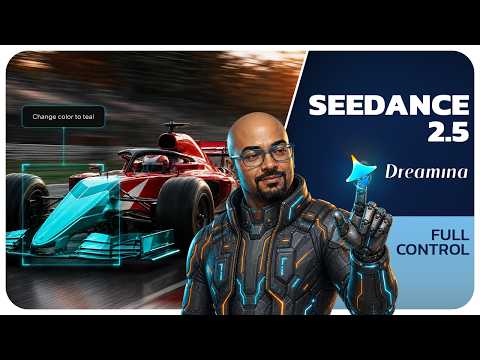
Section 01
ONE MODEL, FULL CONTROL
→ Try Dreamina Seedance 2.5: Dreamina
This course is the complete system behind the video above. Every prompt on these pages is the exact production prompt that made the clips you watched, nothing staged, nothing simplified after the fact. By the end you will be able to run reference driven generations, direct a 30 second single take with timestamps, fix one detail of a clip without regenerating it, output the same scene in another language, and build a finished piece from first frame to final take without leaving one platform.
What actually changed with Seedance 2.5
The honest way to say it: older AI video was a lottery. You wrote a long prompt, you generated, and you hoped. Seedance 2.5 on Dreamina is built around control instead of hope, and it comes down to four upgrades.
1. Omni Reference. The old limit was 12 reference files. Now it is 50 in a single job: up to 30 images, 10 videos, and 10 audio clips. This flips the workflow from describing what you want to showing what you want. Your character sheet carries the look, a video clip carries the camera movement, a music track carries the pacing. The prompt shrinks to a few lines because the references do the talking.
2. Duration. One generation now runs up to 30 seconds, up from 15, which is long enough for a complete story beat with no stitching and no character drift between cuts. And if you need more, Long Video Mode goes up to 3 minutes, and that mode only exists on Dreamina.
3. Real editing. For the first time you can change one part of a finished clip and keep everything else locked, the same take, the same motion, the same lighting. Client wants the product in a different color? You edit it, you do not re-roll it. The full method is on its own page in this course.
4. Native languages. More than ten languages, generated natively with lip sync and aligned subtitles. Not dubbed on top, actually spoken. One video becomes a global video.
The workbench: your first generation
Everything runs in the browser. The path from empty screen to generating is six clicks, and it never changes.
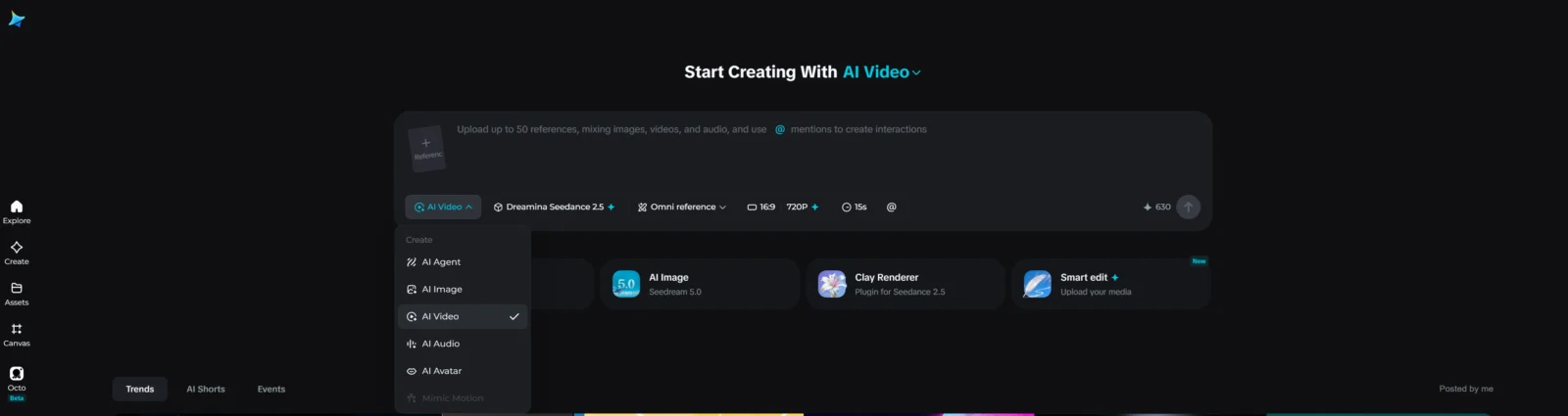
Step 1. Open the Dreamina workspace and click AI Video.
Step 2. Open the model selector and pick Dreamina Seedance 2.5. Check this every single time. The selector remembers your last session, and running an expensive job on the wrong model is the most common beginner loss.

Step 3. Turn on Omni Reference. This is the switch that unlocks the 50 file panel, and it is the heart of everything this course teaches.
Step 4. Set your duration with the slider. It runs from 4 seconds up to 30.
Step 5. Add your references, then tag each one with the @ symbol inside the prompt so the model knows what every file is for.

Step 6. Write the prompt and hit Generate. That is the whole path.
The credits math nobody shows you
This is the part that separates people who control this platform from people who drain their balance in an afternoon. On the plans I tested, a 4 second generation at 720p costs around 168 credits, and a full 30 second take costs 1260. That means one careless 30 second test costs as much as seven short ones.
So work by three rules. First, never test an idea at 30 seconds. Prove the idea short and cheap, then commit the full duration only when the direction works. Second, when you are unsure about a concept, preview it on Seedance 2.0 Mini first. Same model family, a fraction of the cost, and it answers the only question a preview needs to answer: does the idea move the way you imagined. When it does, switch to 2.5 for the final. Third, draft at 720p. Save the resolution spend for a take you already know you are keeping.
Plan the beats on paper before you type them. The timestamp page of this course has a reusable template for exactly that, and it will save you more credits than any other habit here.
How this course is built
The pages follow the same order as the video, one capability per page, each with the full production prompts, the settings, what can go wrong, and the fix.
Page 2 is Omni Reference, showing instead of describing. Page 3 is timestamp control, the 30 second single take. Page 4 is editing without re-rolling. Page 5 is languages, one video going global. Page 6 is the full build, the Water Runner from first frame to final take. Page 7 is the Fix Bank, every wall I hit in production and the exact block of text that got past it.
Start with the next page. Omni Reference is the upgrade that changes how you think about prompting, and everything else in this course builds on it.
Section 02
OMNI REFERENCE
OMNI REFERENCE: SHOW, DON’T DESCRIBE
→ Try Dreamina Seedance 2.5: Dreamina
The clip above was generated with a prompt that is two lines long. No camera description, no lighting paragraph, no mood adjectives. The camera move came from a reference video, the pacing came from a music track, and the character came from a sheet I made in two minutes. That is the entire idea of Omni Reference, and it is the biggest thinking shift on this platform: you stop writing about the shot and you start showing the shot.
The old way, and why it fails
Here is what the same clip demands when you describe everything in words:
A lone desert wanderer walks through a vast canyon at golden hour. He wears a weathered sand colored cloak with a deep hood pulled over his head, a dark scarf covering the lower half of his face, worn leather straps across his chest and a leather satchel at his hip, dust on the fabric. Towering red rock walls rise on both sides of him, a narrow sand path winding between them toward a bright opening of light, haze in the air, long shadows across the ground. He walks at a slow steady pace toward the light. The camera performs one smooth continuous drone orbit around him, circling a full 360 degrees at constant height and constant speed, never stopping, never accelerating, like a motion control rig. Cinematic pacing that builds like a driving percussion soundtrack, steady confident rhythm, rising intensity toward the end. Golden hour lighting, warm rim light on the cloak edges, cool shadows in the canyon depths. Photorealistic, cinematic texture, ultra detailed, sharp focus, stable picture, no morphing, no face visible, no extra characters, no on-screen text, one continuous unbroken shot, no cuts, 16:9.
Almost 200 words, and the model still guesses. Words are instructions the model interprets. References are targets the model matches. That difference is why the reference version wins.
What each reference actually carries

Think of it as three channels. Images carry identity: what the character and the world look like. A video carries motion: how the camera moves. Audio carries rhythm: how the shot is paced. You can load up to 50 files in one job, 30 images, 10 videos, 10 audio clips, but 50 is a ceiling, not a target. This whole demo uses four.
Build the asset kit
Four files, all made without leaving Dreamina.
File 1, the character sheet. AI Image, GPT Image 2, 16:9:
Character reference sheet, one hooded desert wanderer, full body, standing, front three quarter view. Weathered sand colored cloak with a deep hood, dark scarf covering the lower face, worn leather straps and a satchel, dust on the fabric. Neutral warm studio background, soft even lighting, photorealistic, ultra detailed.
The hood and scarf are deliberate. A covered face stays consistent across takes far better than an open one, and it avoids face upload restrictions entirely.
File 2, the scene. Same tool, 16:9:
Vast desert canyon at golden hour, towering red rock walls, a narrow sand path winding between them toward a bright opening of light, haze in the air, long shadows, cinematic wide establishing shot, photorealistic, ultra detailed.
File 3, the camera reference. This is the file that does the magic, and you have three ways to get one. Use any free stock clip from a site like Pexels, use footage from your own phone, or generate one cheaply with Seedance 2.0 Mini, which is what I did. One rule matters more than the source: one continuous camera move, 5 to 15 seconds, no cuts. If you generate it:
ONE SINGLE CONTINUOUS SHOT FOR 8 SECONDS. NO CUTS. ONE UNBROKEN CAMERA MOVE. A lone weathered stone watchtower stands on a grassy cliff edge above the sea, late afternoon light. Grass ripples in waves under the wind. CAMERA: one smooth continuous drone orbit, circling the tower a full 360 degrees at constant height and constant speed, never stops, never accelerates. 8s, 16:9, sharp clarity, stable picture.
Notice the subject is a tower, nothing like the canyon. That is on purpose, and the reason is in the fix list below.
File 4, the pacing track. Any short music clip with a clear beat works: your licensed library, or a generated track. Keep it under 15 seconds, trimmed to the strongest section. The direction that produced mine:
Cinematic desert percussion, driving taiko style drums with deep powerful hits, steady confident rhythm, building intensity, wide epic atmosphere, no vocals
The generation
AI Video, Dreamina Seedance 2.5 selected, Omni Reference on. Upload all four files. Now the tagging: type the @ symbol inside the prompt, a picker opens showing your uploads, select the file, and it drops into the prompt as a chip. Every file gets tagged with its job, that is how the model knows the tower clip is a camera instruction and not a scene request.
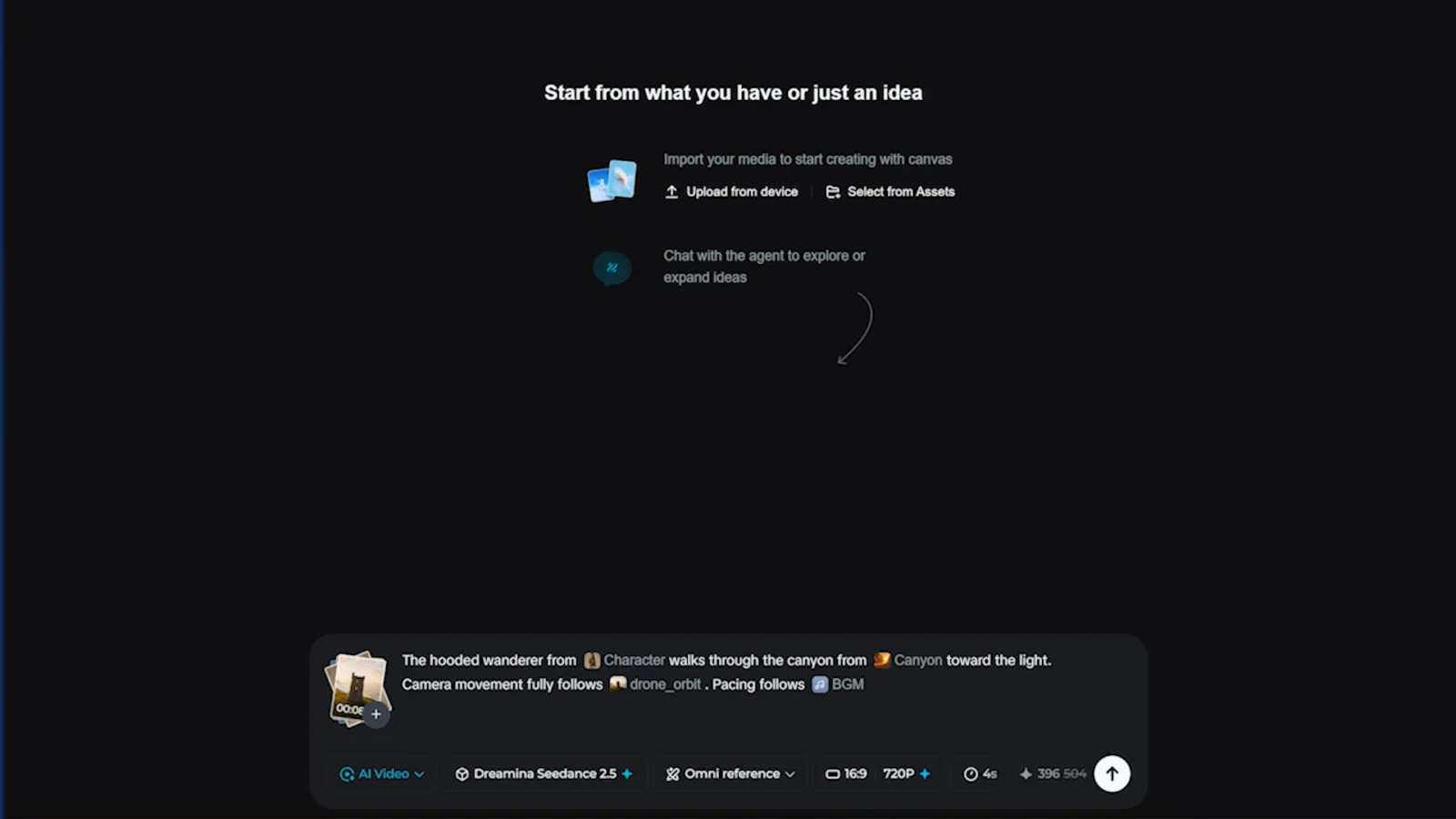
The full prompt:
The hooded wanderer from @[character sheet] walks through the canyon from @[canyon scene] toward the light.
Camera movement fully follows @[orbit clip]. Pacing follows @[music track].
Settings: 16:9, 720p, 10 seconds. Generate.
Judge the result on one thing first: did the camera perform the orbit from the reference. That is the capability being tested. Character detail and lighting vary take to take on every AI model, the control is what you are buying.
When it goes wrong, and the fix
The camera ignores the reference. Your reference clip has cuts or multiple moves in it. Use one clean continuous move, and state the role in words too: camera movement fully follows the clip.
The reference clip’s scene leaks into your shot. A tower shows up in your canyon. This is why my reference subject looks nothing like my scene, and if it still leaks, add one line: use the clip for camera movement only, do not copy its scene or objects.
The character drifts from the sheet. Make the sheet clean: full body, neutral background, one character only. Then name it in the prompt, the wanderer from the sheet, and stop re-describing the outfit in words, competing descriptions make the model average them.
The pacing does nothing. The track is too long or too flat. Trim to 10 to 12 seconds with an obvious beat, and say pacing follows the track.
Everything is muddy. Too many references. Four focused files beat twenty vague ones every time. Add files only when each one has a job.
Next page: Timestamp Control. The 30 second single take, and how to write a prompt like a director’s plan so the story beats land exactly where you put them.
Section 03
TIMESTAMP CONTROL
TIMESTAMP CONTROL: 30 SECONDS, ONE TAKE
→ Try Dreamina Seedance 2.5: Dreamina
The clip above is one generation. Not three clips stitched, one unbroken 30 second take where the car arrives in the first eight seconds, the crew services it in the middle, and it launches out in the last eight, because that is exactly where I scheduled those beats. This page is about the single biggest control upgrade in Seedance 2.5: timestamps inside the prompt. You stop hoping the story lands and you start directing when it lands.
Why this matters
Every AI video model before this gave you six or eight seconds, and long stories meant stitching, and stitching meant seams: the character shifts, the light jumps, the energy resets at every cut. A 30 second single take solves the seams, but 30 seconds of unplanned generation is just a longer lottery ticket. Timestamps are what turn the duration into a story. You write the shot the way an editor would mark a timeline, and the model follows the plan.
Plan on paper first
Before the prompt box, sketch the arc. Three beats is the sweet spot for 30 seconds: a setup, the action, a payoff. Mine was arrive, service, launch.

Two planning rules. Give the middle beat the most seconds, it carries the actual work. And lead every beat with an event verb, something that happens: slides, slams, swarms, launches, erupts, whips. If a beat starts with a description instead of an event, the model treats it as wallpaper and the seconds drift.
Lock the subject first
A 30 second take gives the model 30 seconds to slowly mutate your subject. The lock is a reference image. Mine, made in GPT Image 2, 16:9:
A modern formula style open wheel race car, full side three quarter view, standing in an empty pit lane, bold crimson red and white geometric racing livery with no text and no logos anywhere on the car, glossy carbon fiber details, black wheels with a thin red rim line, bright overcast daylight, sharp focus across the entire car, photorealistic, ultra detailed.

Read that livery line again, because it is a commercial trick worth the whole page: geometric shapes, zero text, zero logos. Three reasons. AI garbles lettering, so no text means no gibberish sponsors ruining takes. Real team liveries are trademarks you cannot publish. And a pure color livery makes the color edit on the next page read instantly. Design your products and props textless whenever you can.
The full production prompt
Omni Reference on, car image attached and tagged, 16:9, 720p, duration 30:
The race car from @[car image] keeps this exact crimson red and white livery throughout.

[0s to 8s] The race car slides into the pit box and stops hard, brakes glowing.
[8s to 22s] The crew swarms in around the car. Tires off, tires on, wheel guns hammering, fast coordinated teamwork.
[22s to 30s] The jack drops, the car launches back out, and the camera whips with it as it accelerates away.

One continuous shot, trackside camera height. Every crew member keeps moving. Realistic motorsport broadcast look, daytime pit lane. SFX: wheel guns, engine revs, crew shouts. No on-screen text, no real team logos.
Walk the anatomy. Line one locks the subject to the reference and pins the livery for all 30 seconds. Three timestamp lines, each one sentence, each led by an event verb, with the middle beat holding 14 seconds because tire work needs room. Then the frame rules: one continuous shot so the model never invents a cut, every crew member keeps moving so the background does not freeze into wax figures, a style anchor, a short sound direction, and the text and logo ban as the final safety net.
The reusable template
Swap any subject into this skeleton, it is the same machine:
The [subject] from @[reference image] keeps [the detail that must not change] throughout.

[0s to 8s] [SETUP: the subject arrives or appears, one event verb, ends in a clear position.]
[8s to 22s] [ACTION: the main work of the shot, the busiest verbs, the most seconds.]
[22s to 30s] [PAYOFF: the subject launches, leaves, or transforms, and the camera reacts.]

One continuous shot, [camera position]. Every person in frame keeps moving. [One line of style]. SFX: [three or four specific sounds]. No on-screen text, no real logos.
A coffee ad: the cup lands, the pour and the swirl, the slide toward camera. A fashion piece: she enters, the turn and the fabric settles, she walks past the lens. Same three rooms, new furniture.
When it goes wrong, and the fix
The beats merge into soup. Too many beats or too few verbs. Hold the line at three beats for 30 seconds, four absolute maximum, one sentence each, event verb first.
A beat lands a second or two off schedule. That is normal, judge the order and the story, not frame-exact timing. Every take is a fresh seed, the plan holds even when the frames differ.
One beat gets swallowed. Usually the payoff, crushed by an overlong middle. Give the dying beat more seconds in the next run, the timestamps are your mixing board.
Sponsor-looking text appears on the car, suits, or trackside boards. Race content is the worst offender for hallucinated logos. The textless livery prevents most of it, the closing ban catches more, and you still scan every take before using it. If one slips through on an otherwise perfect take, do not re-roll, the next page removes it surgically.
The crew freezes like statues. The liveness line is missing. Every person in frame keeps moving is not decoration, it is load-bearing.
Next page: Edit, Don’t Re-Roll. The client wants the car in teal instead of red, and you change it without touching the take, the same motion, the same lighting, one command.
Section 04
EDIT, DON’T RE-ROLL
EDIT, DON’T RE-ROLL: FIX THE TAKE YOU HAVE
→ Try Dreamina Seedance 2.5: Dreamina
Here is the situation that used to kill AI video for client work. The take is perfect. The motion is right, the lighting is right, the crew choreography landed. And the client says: can we see it in teal? The old answer was regenerate everything, new prompt, new lottery, and probably lose the take you loved. The new answer is one command, and the take never moves. This page is that workflow, plus the repairs I actually ran in production that never made the video.
The edit flow
Select your finished take and open the edit option. On the build I recorded, this is Intelligent Edit, and interface labels evolve between versions, you may see the same capability under a slightly different name, the method on this page holds regardless. The edit flow takes three inputs in any combination: a typed command, an optional reference image to guide the change, and optionally a time window so the edit only touches part of the clip.
Edit one: the color swap
The scenario from the video, the pit stop car from red to teal. The command, typed exactly:
Change the car livery from red to teal, keep everything else the same.
That second clause is not politeness, it is half the instruction. Without an explicit lock, edit models drift: they improve lighting you did not ask about, shift the crowd, reinterpret the sky. Keep everything else the same is the fence.
The reference image trick
You can attach an image to guide the change, and here is the trick that makes the result look designed instead of random: do not generate a fresh teal car. Recolor your existing reference still, so the livery geometry matches the take exactly. In GPT Image 2, image edit mode, with the original red car still as input:
Recolor this exact race car livery from crimson red to deep teal. Keep the identical geometric livery pattern, the white sections, the black wheels, the same car, same angle, same pit lane background, same lighting. Change only the red areas to teal. No text, no logos.
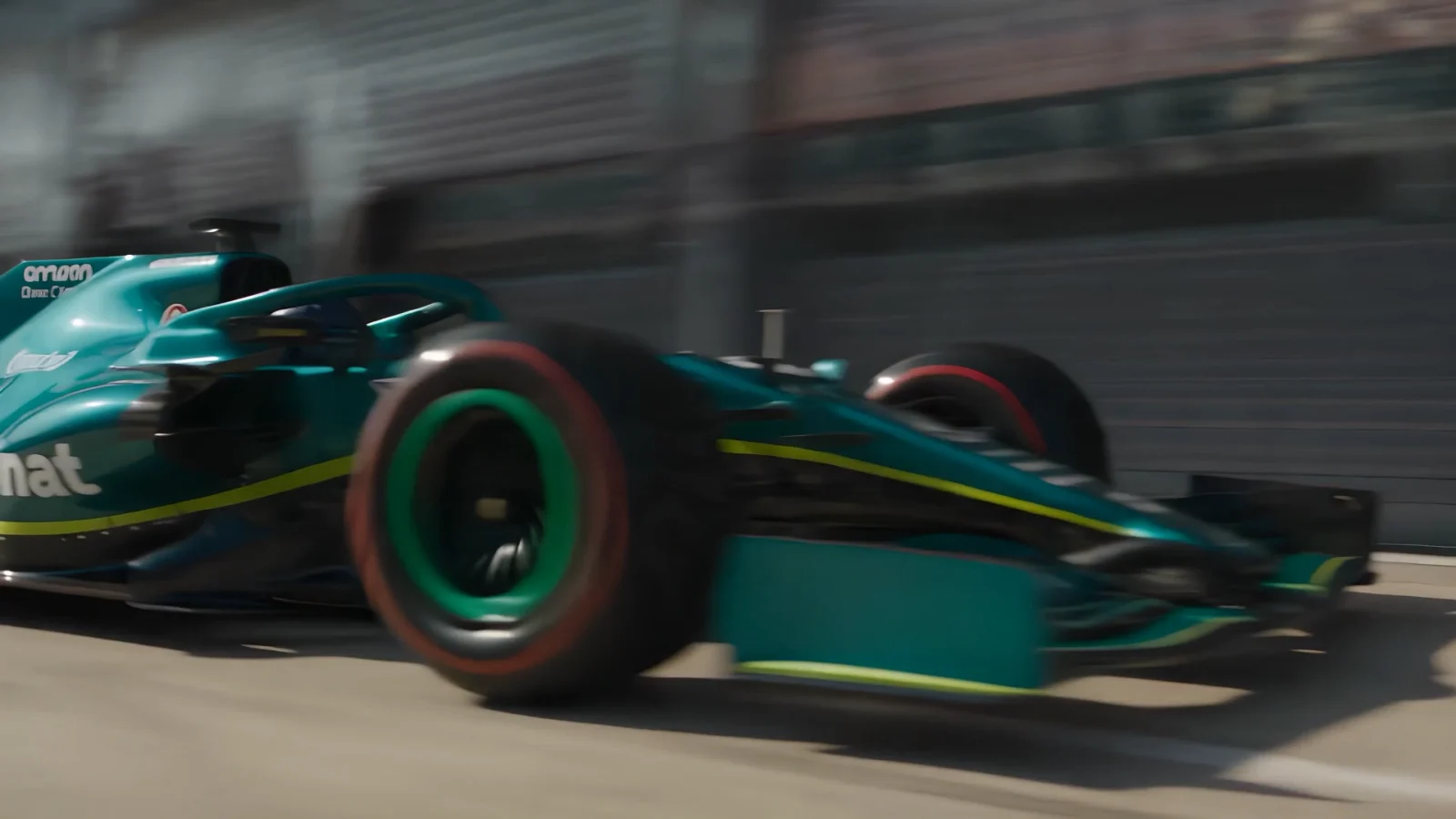
Now the edit model is matching a target where only one variable changed, so only one variable changes in the video. Judge the result the same way: teal car, and everything else frame-identical, same motion, same lighting, same crew. The lock is the demonstration, not the color.
Edit two: the time window
Sometimes the problem is not an object, it is a moment. Ten seconds of a clip need something and the other twenty are already perfect. The method: select the time window and scope the command to it. The template:
From second [X] to second [Y]: [the change you want in that window]. Keep everything before and after unchanged.
The example I tested on the pit stop, thickening the tire smoke only during the service beat, seconds 8 to 22, while the arrival and the launch stayed untouched:
From second 8 to second 22: make the tire smoke heavier in this segment. Keep everything else unchanged.
Object edits control where a change happens. Time windows control when. Between the two you can reach almost any single problem in a take without re-rolling it.
A real repair: the flickering helmet
This happened in production on the exact pit stop take in the video. One crew member’s helmet appeared, vanished, and reappeared across a few seconds, a classic AI consistency glitch, on an otherwise perfect keeper. The old world answer: 1260 credits and pray the next take has no new glitch. The edit answer:
First, scrub the clip and note the exact seconds the flicker spans, then add one second of padding on each side. Second, decide the direction of the fix: lock the helmet ON, not off. Two reasons, real pit crews wear helmets so it reads correct, and repairing the gaps changes fewer frames than removing the object everywhere, and fewer changed frames means less risk of new drift. The command:
From second [X] to second [Y]: the crew member at the [front left wheel] wears his helmet consistently, the helmet stays on his head the entire time, never disappearing. Keep everything else exactly unchanged, same car, same motion, same other crew members.

And the rule that saves you from a subtle trap: if you already made edited versions from the glitched original, redo them from the fixed master. Edits inherit their source. My teal version was born from the flickering take, so the teal version got redone from the repaired one. Downstream copies of a broken master are still broken.
Edit or regenerate: the decision rule
Edit when the take is a keeper and the problem is one element or one moment: a color, a prop, a glitch, a stray logo, a thin patch of smoke. Regenerate when the problem is the take itself: wrong composition, wrong story rhythm, wrong camera. Editing a fundamentally wrong take is polishing the wrong thing. And the sharpest use of the edit flow is removal: AI loves hallucinating sponsor-looking text onto race cars, storefronts, and jerseys, and boxing out an invented logo costs a fraction of a re-roll and keeps you safe to publish.
When it goes wrong, and the fix
The edit leaks outside the target. Lighting shifts, background changes. Your lock clause is missing or vague. Keep everything else exactly the same, every command, every time, and attach the matched reference image for color work.
The edit ignores you. The target is ambiguous, three crew members and you said the crew member. Name the position, the crew member at the front left wheel, or the moment, from second 8 to second 22.
The color changes but reflections keep the old color. Glow and bounce light sometimes lag one edit behind. Run the same command once more on the result, or scope a window on just the reflective seconds.
Two failed edits on the same problem. Stop. The edit model is telling you the change is too big for surgery. Fold the change into the prompt and regenerate, that is the decision rule doing its job.
Next page: One Video, Ten Languages. The same merchant, the same stall, the same line, now in Arabic with native lip sync, and why referencing your own clip is the whole trick.
Section 05
ONE VIDEO, TEN LANGUAGES
→ Try Dreamina Seedance 2.5: Dreamina
Watch the clip above twice. Same merchant, same stall, same lantern light, same line. But the second time, he says it in Arabic, and his lips match the Arabic. He is not a clip with a translated voiceover pasted on top, he is speaking the language. That is native multilingual generation, and for anyone selling to more than one market, it might quietly be the most commercially valuable upgrade in Seedance 2.5.
Why native beats dubbed
The old localization pipeline: translate the script, generate or record a new voice, then fight lip sync, and the mouth never quite agrees with the audio, and every viewer notices even when they cannot say why. Native generation flips the order. The model generates the performance in the target language, so the mouth, the timing, and the sound are born together. Supported languages run past ten, including Spanish, Indonesian, Malay, Thai, Arabic, Portuguese, Vietnamese, Japanese, and Korean. For my audience, India, the Gulf, Indonesia, this is not a novelty feature, it is distribution.
Step one: the base scene
Generate the original in your working language first, and judge it on performance, because this clip becomes the master every language version inherits from. Mine, Dreamina Seedance 2.5, 16:9, 720p, 6 seconds:
A middle aged spice merchant stands behind his stall at a busy night market, warm lantern light, steam and smoke drifting through the frame. He looks at the camera, smiles, and says: "Fresh from the fire. Come and taste." Handheld documentary feel, medium shot. Background vendors and customers keep moving.
Short dialogue on purpose. One line, six seconds. Lip sync quality is easiest to judge, and to get right, on a single clean sentence. Prove the scene short before you localize anything long.
Step two: the language version, and the one move that matters
Here is the entire trick of this page: do not prompt a new Arabic merchant. Reference the clip you already made. Omni Reference on, the English take attached and tagged, 6 seconds:
The same spice merchant, same night market stall, and same framing as @[english merchant clip]. This time he looks at the camera, smiles, and says the same line in Arabic, natural native Arabic speech with accurate lip sync: "Fresh from the fire. Come and taste." Arabic subtitles aligned to his speech at the bottom of the frame. Same warm lantern light, same background movement.
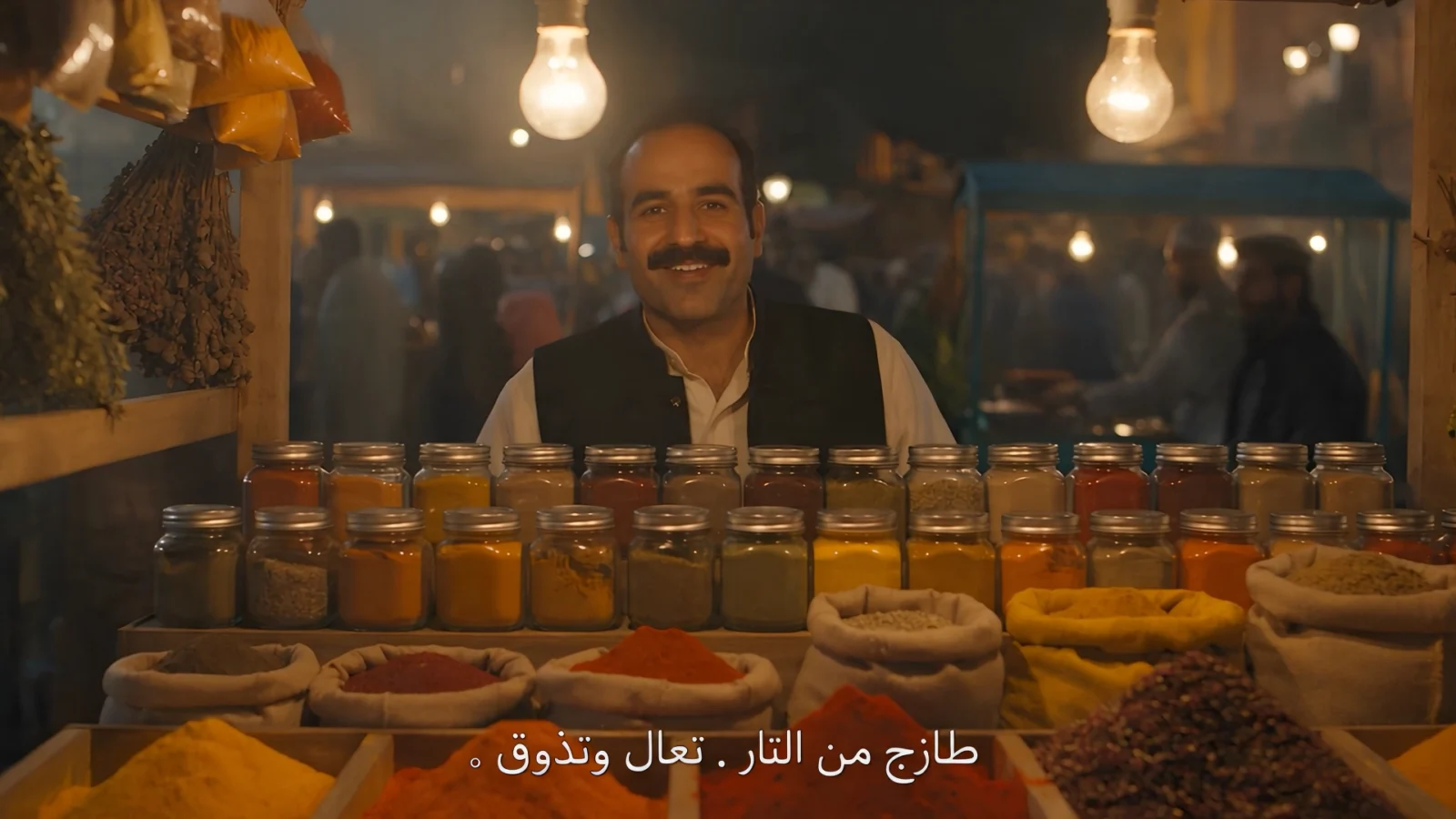
Three details doing the work. The reference clip carries identity, which is why the same man appears instead of a random new merchant, without it you get localization of nobody. The line stays written in English inside the prompt, and the model performs it in Arabic, no translation tool ever touches your pipeline, which also means you can localize into languages you cannot read. And the "same, same, same" phrasing is deliberate repetition: every repeated element is one more anchor holding the scene identical while only the language moves.
Judge it in this order
First, is it the same person at the same stall. That is the localization proof, and if identity broke, nothing else matters. Second, does the mouth move in the rhythm of the speech, watch on mute once, real speech rhythm is visible without sound. Third, subtitles, and treat them as a bonus, not a gate, for the reason below.
The subtitle decision
Asking for subtitles in-frame is worth one attempt, when they render clean you get the full demonstration for free. But generated on-screen text is the least reliable element in any AI video, and in non-Latin scripts it can garble into shapes that a native reader instantly sees as wrong. So the rule: one try with subtitles, and if they garble, regenerate once with the subtitle sentence deleted and add clean subtitles in your editor, Premiere, CapCut, anything, where fonts are perfect by definition. The spoken performance is the feature, the subtitles are packaging, never re-roll a good performance chasing text.
Where this earns money
Run the e-commerce math. One product presenter clip, one good take, then the same scene regenerated in Arabic, Indonesian, Thai, and Spanish: five markets from one shoot that never happened, each version with a presenter who actually speaks the market’s language. The same logic covers course promos, real estate walkthrough intros, restaurant ads, hotel welcomes. And the scale rule as you grow: keep one master per scene, always localize from the master, never from another localization, copies of copies drift, masters do not.
When it goes wrong, and the fix
A different person shows up. The reference is missing or untagged, or you re-described the merchant in words and the descriptions fought the clip. Reference the clip, tag it, and let "the same merchant as the clip" do the describing.
The lips move but the rhythm is mush. The line is too long for the duration. One sentence per 6 seconds is the working ratio, split long copy into multiple short clips instead of cramming.
The wrong language comes out, or an accent of your source language. Say it twice like the prompt above does: "says the same line in Arabic" plus "natural native Arabic speech." Naming the language once is a hint, twice is an instruction.
Subtitles are garbled. Fix is above, drop the subtitle request, keep the performance, add text in the editor. Do not spend credits re-rolling typography.
The scene drifts, different stall, different light. Not enough "same" anchors. Name what must hold: same stall, same framing, same lantern light, same background movement.
Next page: the full build. GPT Image 2 first frame to a finished 30 second single take, the Water Runner, including the cheap preview trick and the audio wall I hit on the way, with the exact block of text that got past it.
Section 06
THE FULL BUILD: THE WATER RUNNER
→ Try Dreamina Seedance 2.5: Dreamina
Everything this course has taught runs through one build on this page. A first frame from GPT Image 2, a reference driven 30 second single take with three timestamp beats, a cheap preview before the expensive commitment, and two production walls with their exact fixes. The result is above: a figure made of water bubbles who starts running before his own body finishes forming, leaps a rooftop gap, and dives back into the puddle he rose from. One generation, thirty seconds, no platform switching anywhere in the chain.
The concept, and why it is built this way
The idea sounds simple: a splash becomes a runner. But the version that works has two design decisions baked in, and they are transferable to any transformation concept you build.
First, the figure forms while already in motion, legs first, sprinting before the upper body finishes assembling. A figure that forms and then starts moving gives you a statue moment, a beat where the video looks like a still image, and statue moments kill transformation clips. Movement during formation means there is never a dead frame.
Second, the ending is a destination, not a fade. He dives into a puddle and becomes splash. Dissolve endings read like the model gave up, physical endings read like the story finished. Give every transformation somewhere to go.

Step one: the first frame, GPT Image 2
The first frame decides more than any other input, because a 30 second take inherits its opening composition for the entire run. Built inside Dreamina, AI Image, GPT Image 2, 16:9:
Night rooftop in heavy rain, city lights glowing in the distance. From a wide rain-flooded puddle, hundreds of water bubbles and droplets rise into the air, swirling upward and gathering into the lower half of a running human silhouette, legs forming first in mid stride, the upper body still loose rising droplets. The figure is made only of clustered water bubbles and droplets with air gaps between them, translucent, streetlight and neon reflections refracting through every drop. Wet rooftop with mirror reflections, rain streaks against the light. Photorealistic, cinematic, sharp detail.
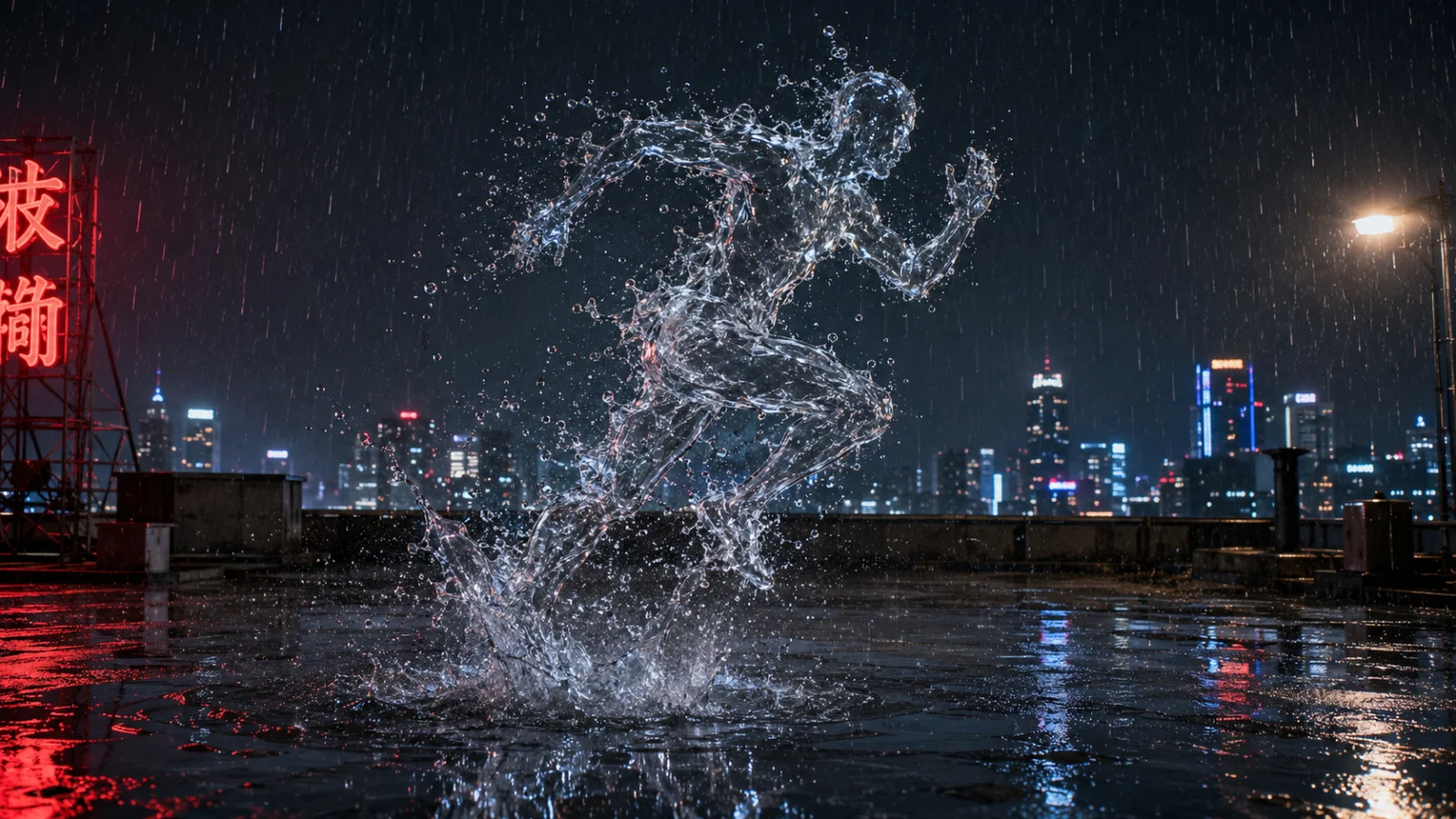
The keeper test is strict: legs clearly mid stride, upper body clearly still assembling. If the frame shows a complete figure, reject it, your formation beat is already dead before the video starts. Budget two to four stills and pick the strongest.
Step two: the cheap preview, Seedance 2.0 Mini
Before committing 1260 credits to a 30 second take, answer the only question that matters for a fraction of the price: does the idea move the way you imagined. Switch the model selector to Seedance 2.0 Mini, attach the first frame, run 10 seconds:
The scene starts from @[first frame image]. Water bubbles rise from the puddle and assemble into a runner who sprints across the rainy rooftop, a translucent silhouette made of clustered droplets, never a solid person. One continuous shot, heavy rain, city light reflections. AUDIO: rain and water sounds only, no human voices, no breathing, no music. No on-screen text.
One preview, no retries, and judge direction only: does the figure read as water in motion. A rough take is fine here, rough is what previews are for. When the direction works, switch the selector back to Dreamina Seedance 2.5 and commit.
Step three: the money shot, Seedance 2.5
Omni Reference on, first frame attached and tagged, 16:9, 720p, duration 30:
The scene starts from @[first frame image]. The figure is made only of clustered water bubbles and droplets with small air gaps between them, a translucent human silhouette, never a solid person, never smooth water skin.

[0s to 10s] Torrential rain hammers the rooftop at night. Water bubbles and droplets rise fast from the flooded puddle and assemble into a runner. His legs form first and he is already sprinting while the rest of his shape is still gathering, droplets streaming into place as he moves.
[10s to 22s] Now fully formed, the bubble silhouette runner sprints through the downpour and leaps the gap between two buildings. At the top of the leap his full shape reads clearly, thousands of droplets holding the silhouette, city lights refracting through them, spray trailing behind.
[22s to 30s] He arcs down and dives headfirst into a wide flooded puddle on the far rooftop. On entry the figure collapses into a burst of splash and scattered droplets, ripples spread, and the puddle settles still. Camera slows to a stop.

One continuous shot, camera tracks alongside at matching speed. Heavy rain, wet mirror reflections, and city lights throughout. The bubble runner stays clearly visible and readable through the downpour.

AUDIO: environmental sounds only. Heavy rain, wind, flowing water, one clean water splash on the dive entry. NO HUMAN VOICES, NO BREATHING, NO GRUNTS, NO GASPS, NO SPEECH, NO SINGING, NO MUSIC, NO VOCAL SOUNDS of any kind. The figure is silent water and makes only water sounds.

No on-screen text.
The anatomy, top to bottom. The material lock opens the prompt and repeats inside beat two, never a solid person is stated twice because a humanoid subject is exactly what the model wants to normalize into a human. Three timestamp beats follow the template from the timestamp page: formation is the setup, the leap is the action with the clearest silhouette moment scheduled at its peak, the dive is the payoff. The visibility line, stays clearly visible through the downpour, exists because heavy rain’s failure mode is burying your hero in grey noise, name the priority and the model protects it. And then the audio block, which has its own story.
The wall I hit: audio moderation
In production, this generation kept getting blocked: the audio may contain inappropriate content. Nothing in the prompt was inappropriate, and here is the mechanism, because you will hit this too on any athletic humanoid subject. The audio engine reads the rendered frames, sees a human shape sprinting and leaping, and auto-generates exertion sounds, breathing, grunts, effort vocals. Vocal-adjacent audio is exactly what safety filters false-positive on. Your visuals trigger audio you never asked for, and the audio trips the block.
The fix is the AUDIO block in the prompt above: lock the soundscape to environmental only and deny every vocal category by name, so there is nothing vocal to generate and nothing to flag. It reads aggressive, capital letters and all, and that is the point, a soft "no voices please" loses to the engine’s instinct to voice a running figure. If it still blocks after two attempts with the lockout, stop burning credits: generate with audio off entirely if the settings allow it, take the visual, and build rain, wind, and the splash from stock SFX in your editor, you are mixing a soundbed in the edit anyway.
Judging the take
Three gates, in order. The formation: legs first, sprinting while assembling, no statue moment. The silhouette: at the top of the leap, the full figure reads clearly as clustered droplets against the city lights, this is the frame that makes people rewind. The dive: visible splash burst on entry, ripples, then stillness. A take that hits all three is a keeper even if a droplet cluster flickers somewhere, perfection is not the bar, the three beats are. Budget four to six takes at full duration and stop at the first that clears all gates.
Variation: the splash concept
The simpler sibling of this build, one impossible moment instead of a formation arc: a splash bursts from the puddle, for one instant it reads as a runner mid stride, the figure holds, sprints, leaps, and on landing releases back into water, scattering outward instead of diving. Same first frame approach, same beat template, swap the formation beat for the splash moment and the dive for a landing release. Run the same audio block, the same visibility line, the same material lock. Two concepts, one machine.
Next page: the Fix Bank. Every wall from this entire production, moderation blocks, flickering objects, garbled text, drowned subjects, merged beats, in one page of copy-paste fixes.
Section 07
THE FIX BANK
→ Try Dreamina Seedance 2.5: Dreamina
Every fix on this page earned its place in real production, on the exact video this course is built from. Nothing here is theoretical. The format is the same all the way down: the symptom, why it happens, and the block of text or the move that fixes it. Bookmark this page, it is the one you will come back to at 2am.
1. Blocked: "the audio may contain inappropriate content"
Why: your visuals are triggering it, not your words. The audio engine reads the rendered frames, and a human figure doing anything physical, running, leaping, fighting, lifting, makes it auto-generate exertion sounds: breathing, grunts, effort vocals. Vocal-adjacent audio is what moderation filters false-positive on. The block fires even when your prompt contains nothing wrong.
Fix: deny the vocals by category so there is nothing to flag. Paste this as the audio section of any physical-action prompt:
AUDIO: environmental sounds only. [Your scene sounds, for example: heavy rain, wind, flowing water, one clean splash.] NO HUMAN VOICES, NO BREATHING, NO GRUNTS, NO GASPS, NO SPEECH, NO SINGING, NO MUSIC, NO VOCAL SOUNDS of any kind.
Escalation rule: two blocked attempts with the lockout in place, stop. Generate with audio off if the settings allow, keep the visual, build the soundbed from stock SFX in your editor. Never burn a third set of credits arguing with a filter.
2. An object flickers, appears, disappears, reappears
Why: long takes give the model room to lose track of small objects, helmets, glasses, props, straps. It is the classic consistency glitch, and it loves otherwise perfect keepers.
Fix: repair, never re-roll a keeper. Scrub and note the exact seconds the flicker spans, add one second of padding each side, then edit with the object locked ON, present, not removed, because filling gaps changes fewer frames than erasing everywhere, and fewer changed frames means less new drift:
From second [X] to second [Y]: the [person or object, named by position] keeps the [object] consistently, it stays [on/in place] the entire time, never disappearing. Keep everything else exactly unchanged.
And the inheritance rule: if you already made edited versions from the glitched original, redo them from the repaired master. Edits inherit their source, downstream copies of a broken take are still broken.
3. On-screen text is garbled, subtitles, signs, labels
Why: generated typography is the least reliable element in AI video, and non-Latin scripts garble hardest. A native reader spots wrong Arabic or Thai instantly.
Fix: one attempt with text requested, and if it garbles, regenerate once with the text request deleted, keep the performance, and add the text in your editor where fonts are perfect by definition. Never re-roll a good take chasing typography, text is packaging, the performance is the product.
4. The hero disappears into the atmosphere
Why: you asked for drama, torrential rain, thick fog, heavy snow, sandstorm, and the model delivered so much of it that your subject drowned in grey noise. Atmosphere and subject compete for the same pixels.
Fix: one line that names the priority, pasted after your atmosphere description:
The [subject] stays clearly visible and readable through the [rain/fog/snow] at all times.
If a take still buries the hero, that line takes the blame, not your concept. Re-roll, do not redesign.
5. Timestamp beats merge into soup
Why: too many beats, or beats that describe instead of act. Descriptions are wallpaper, the model spreads them anywhere. Events are anchors, they land where scheduled.
Fix: three beats per 30 seconds, four absolute maximum, one sentence each, and the first word after the timestamp is an event verb: slides, swarms, launches, erupts, dives, collapses. If a beat starts with "the scene is" or "the mood feels," rewrite it until something happens.
6. One beat gets swallowed
Why: usually the payoff, crushed by an overweight middle beat. The model spends the seconds where the action density is.
Fix: the timestamps are your mixing board. Give the dying beat more seconds in the next run, and cut the sentence of the beat that dominated. Judge beat order and story, never frame-exact timing, every generation is a fresh seed and a beat landing two seconds late is normal, a beat missing is not.
7. The edit leaks outside its target
Why: edit models improve things you did not ask about, lighting, background, sky, unless fenced.
Fix: every edit command ends with the fence, no exceptions:
Keep everything else exactly the same, same motion, same lighting, same [background/other people].
For color changes, attach a recolored version of your own reference still as the guide, matched geometry means the model sees exactly one variable to change. If two attempts at the same edit both fail, the change is too big for surgery: fold it into the prompt and regenerate, that is the edit-versus-regenerate line doing its job.
8. Sponsor-looking logos appear from nowhere
Why: the model learned from real footage, so race cars, jerseys, storefronts, and stadium boards attract hallucinated brand marks. On sponsored work this is not cosmetic, publishing someone else’s trademark is a real problem.
Fix, three layers: design textless, geometric liveries and plain packaging give logos nowhere to land. Ban it in the prompt, the closing line "No on-screen text, no real logos." And scan every keeper before use: if a mark slipped onto an otherwise perfect take, box it out with a targeted edit, removal is the cheapest edit there is.
9. A different person shows up in a continuation or language version
Why: identity lives in the reference, not in your memory of the last generation. No reference tagged, no identity carried.
Fix: reference the clip or sheet, tag it with @, and let "the same [person] as @[reference]" do the describing. Then anchor what must hold, same stall, same framing, same light, every repeated "same" is another nail. And never re-describe the person in words next to a reference, competing descriptions make the model average them into someone new.
10. The balance evaporated and the week is not over
Why: testing ideas at full duration. A 30 second take costs around 1260 credits at 720p, roughly seven short tests, and an unproven idea at 30 seconds is a 1260 credit coin flip.
Fix, the three-rule discipline from page one, because it is the fix: prove ideas short and cheap first. Preview uncertain concepts on Seedance 2.0 Mini, same family, fraction of the cost, direction check only. Draft at 720p and spend resolution only on confirmed keepers. Credits do not reward courage, they reward sequencing.
The quick diagnosis table
Blocked before output: audio moderation, fix 1. Output exists but one object misbehaves: flicker repair, fix 2. Text wrong: fix 3. Subject invisible: fix 4. Story order wrong: fixes 5 and 6. Edit went sideways: fix 7. Unwanted brands: fix 8. Wrong person: fix 9. Wrong balance: fix 10.
The three rules that prevent most of this
Lock what must not change, in writing, every time, subjects to references, edits behind fences, scenes with "same" anchors. Lead every beat with an event verb, action anchors, description drifts. And sequence your spending, short before long, Mini before 2.5, 720p before anything, keepers before polish.
That is the course. Build something, and when you hit a wall this page does not cover, post it in the community, the Fix Bank grows from real production, yours included.