

Section 01
One Photo, Full Campaign
Try insMind free (you get free credits to start): https://www.insmind.com/utms/7da96409c0f54a1a95c01f924f2ca276
What You’ll Build
One product photo becomes a complete launch campaign: a cinematic 30 second hero ad built with Seedance 2.5, plus a full UGC content set built with the four AI UGC Skills. Everything happens inside one platform, the insMind Creation workspace, in the browser. By the end of this course you can run the same system on any product, including your own.
The System: Two Lanes
Every real launch needs two kinds of content, and this course builds both from the same photo.
- The craft path. One product photo, three keyframes, one Seedance 2.5 prompt. Output: a one shot cinematic hero ad for the homepage and YouTube. This lane is where the prompting skill lives.
- The easy path. The same photo through the four AI UGC Skills: Realistic Try-On, Multi-size Try-on, Partial Try-On, and Voiceover Videos. Output: vertical UGC videos for TikTok, Reels, and the product page. Guided workflows, upload, pick, generate, almost no prompt work.
The Workspace
Everything runs at insmind.com/creation. Three tabs on top: Agent, Image, and Video. The tool row below, and the four AI UGC Skills on the home screen. The Image tab with GPT Image 2 builds every still in this course. The Video tab with Seedance 2.5 builds the hero ad. The Skills build everything else.
The Credits Math, Read This Before Generating
- Images are cheap. 15 credits each with GPT Image 2. Generate freely, pick the keepers.
- Video is the spend. My 30 second hero test at 480P cost just over 2000 credits. Resolution and duration drive the price.
- The discipline: test every video prompt at 480P first. Lock the motion. Only then run the final at 720P. Never burn a final on an untested prompt.
- If one detail is wrong on an otherwise good take, fix that region through the chat instead of regenerating the whole clip. It is the single biggest credit saver on the platform.
How This Course Runs
Pages 2 and 3 build your stills: the concept binder, the product photo, and the three keyframes. Page 4 is the hero ad, the full prompt and the Seedance 2.5 rules that make a one shot commercial possible. Pages 5 to 8 walk the four AI UGC Skills one by one with the exact settings. Page 9 is the Fix Bank: every wall I hit in this production and the exact fix, so you do not pay for the same lessons twice.
Work in order. The product photo from Page 2 is the reference every other page depends on.
Next: Page 2, The Concept Binder and the Product Photo.
Section 02
The Campaign Plan
Plan Before You Prompt
Most AI campaigns fail before the first generation, because there was never a campaign, just prompts. Planning costs paper. Generating costs credits. This page is the full planning system used for VELA, four steps, and at the end you run the same four for your own product.
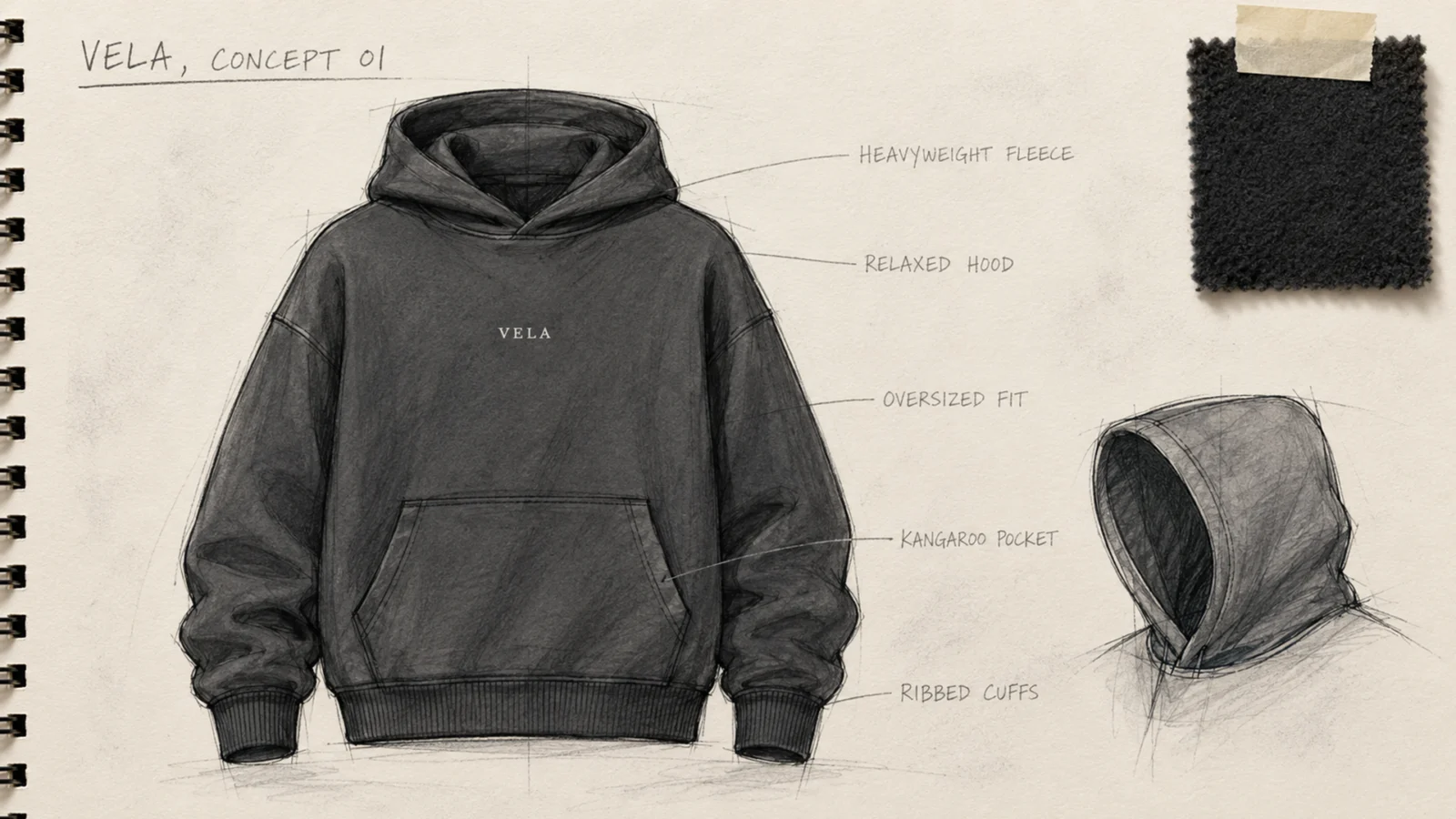
Step 1: Define the Product
Before anything renders, the product gets decided at this level of detail: an oversized heavyweight charcoal hoodie, relaxed hood, kangaroo pocket, ribbed cuffs and hem, one small white VELA wordmark on the center chest. Nothing vague survives this step. Lock five things on paper: the product type, the material, the fit, the exact brand mark and where it sits, and the colour. Every prompt in this course gets easier because these five answers already exist.

Step 2: The Launch Plan, Two Lanes
The whole campaign on one sheet. One product photo at the center, branching into two lanes. The top lane is the hero ad: one cinematic 16:9 film for the homepage and YouTube, the craft path, built with Seedance 2.5. The bottom lane is the UGC set: vertical 9:16 videos for TikTok, Reels, and the product page, the easy path, built with the four AI UGC Skills. Two kinds of content, one source photo. This sheet is the map for every page that follows.
Step 3: The UGC Shot List, Four Clips, Four Jobs
The hero ad gets a storyboard, the UGC lane gets a shot list. Before touching the Skills, decide what each clip is for:
- The lifestyle clip. One creator wearing the product in its natural world, the street for VELA. Built with Realistic Try-On. Job: the product page hero and the first feed post.
- The size range. The same garment on two or more body types, one clip per model. Built with Multi-size Try-on. Job: the size guide and the "will it fit me" objection.
- The detail clip. A close up on exactly where the product is worn, the craftsmanship shot. Built with Partial Try-On. Job: the premium proof, what zooming into a photo cannot do.
- The talking clip. A creator holding the product and saying why it works, spoken like a phone video. Built with Voiceover Videos. Job: the actual ad, TikTok, Reels, and paid placements.
Four clips, zero overlap. Start from the jobs, not the Skills: what does the product page need, what does the ad account need, then match each need to the Skill that manufactures it. A campaign is not "some UGC videos," it is specific clips with specific work to do.
Step 4: Storyboard the Hero Ad, Three Beats
The hero ad gets three panels before it gets a prompt: the macro rain open on the fabric, the Still Point where the storm stops mid air around the walking model, and the spotlight finish on the wordmark. One arrow underneath all three, because the whole ad is one unbroken shot. These three beats become the three keyframes on the next page, and on Page 4 the video prompt calls them by name. The ad you plan is the ad you get.
Now Plan Yours
Run the same four steps for your own product before moving to Page 3:
- Product definition: type, material, fit, brand mark and placement, colour. Five answers, written down.
- Two lanes: what is your hero ad for, and where does your UGC live. Name the destinations.
- Shot list: the four clips above, rewritten for your product. Keep the jobs, change the world.
- Three beats: your detail open, your one memorable moment in the middle, your brand finish. If the middle beat does not feel like something people would rewatch, plan a better one before spending a single credit on it.
Twenty minutes of this replaces hours of regenerating videos that were never going to be right.
First, the Product Photo, the Ground Truth
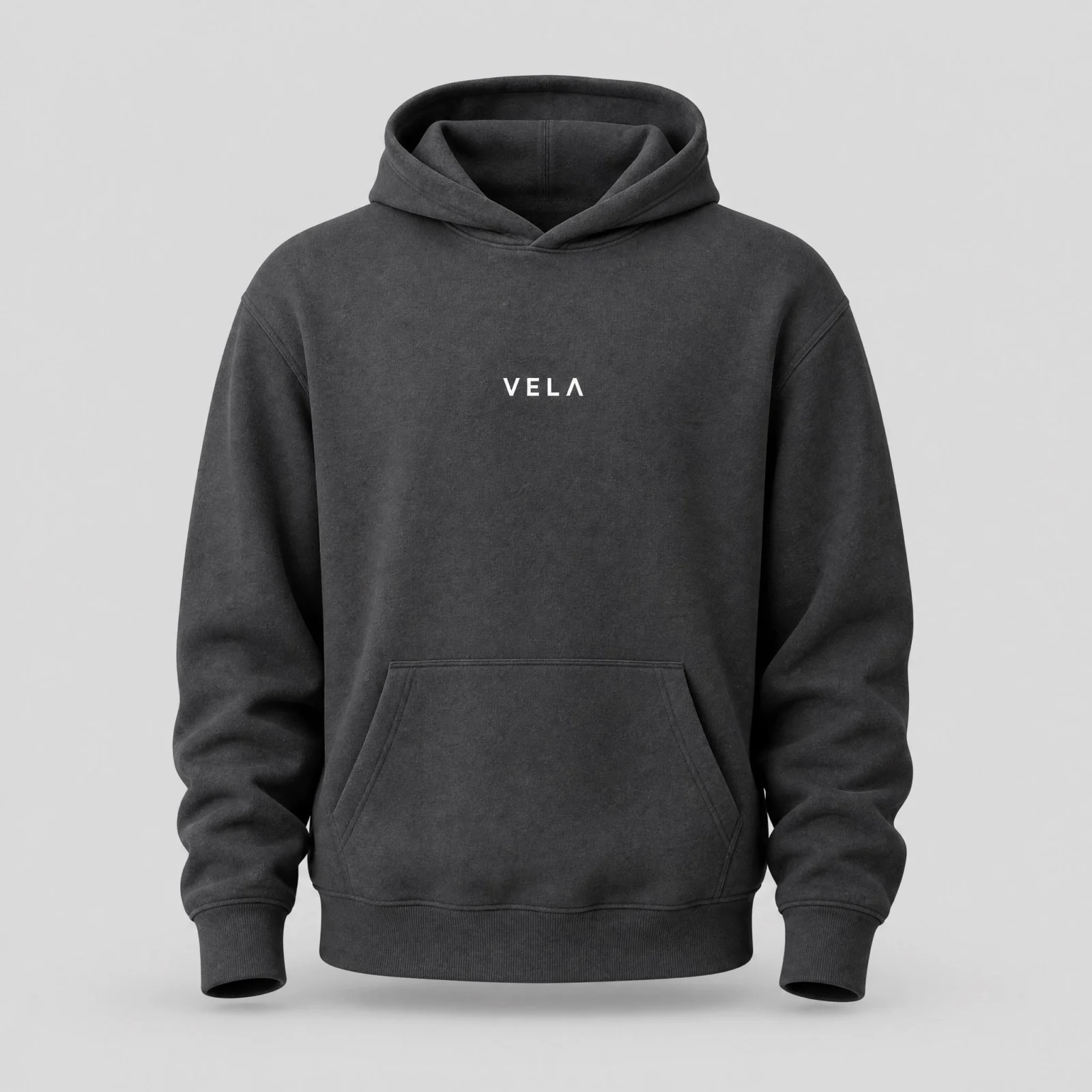
The plan is done, now the building starts, and it starts with the most important image in the course. Every keyframe, every Skill, and the hero ad reference this photo for colour, fit, and the wordmark. Select Image, model GPT Image 2, aspect square.
Premium heavyweight charcoal grey hoodie on an invisible ghost mannequin, front facing, hood relaxed, small white VELA wordmark printed on the center chest in a clean modern sans serif, e-commerce studio product photography, soft even diffused lighting, clean light grey seamless background, soft natural shadow under the garment, sharp cotton fleece texture with visible knit detail, premium apparel catalog quality. The chest text reads exactly VELA, no other text, no tags, no logos, no distortion.
Make it yours: swap VELA and the garment description for your own brand and product. Keep the last sentence with your exact brand name in it, spelling the text out is what keeps AI wordmarks clean. If a generation comes back perfect except the wordmark, do not regenerate: select the image and type in the chat, change the chest text to read exactly VELA. Keeper check: wordmark exact, one hood and two sleeves, real fleece texture, clean background. This photo carries the whole course.
Section 03
The Three Keyframes

What You’ll Create
The three frames that direct the hero ad. A hero ad does not need twenty scenes. It needs three strong frames: the detail shot, the energy shot, and the brand shot. On Page 4, the Seedance 2.5 prompt calls each of these by its job, so what you build here is not decoration, it is the camera path.
The Rule That Makes This Work
Select the product photo as the reference before generating every frame. That is what keeps the hoodie identical across all three: same charcoal, same fit, same wordmark. Skip the reference and you get three similar hoodies instead of one product, and the hero ad will drift between them.
Frame 1: The Detail Shot
The opening composition. Fabric at macro distance, the wordmark just entering frame.

Frame 1: Extreme close up of the charcoal hoodie fabric from the reference, VELA wordmark partially visible, dramatic side light, dark background, cinematic product photography, 16:9
Frame 2: The Energy Shot
The mid journey. A model wearing the product, movement in the fabric, the world established. This frame decides your hero ad’s model, so pick the take where the person looks right, you will be seeing them for 30 seconds.
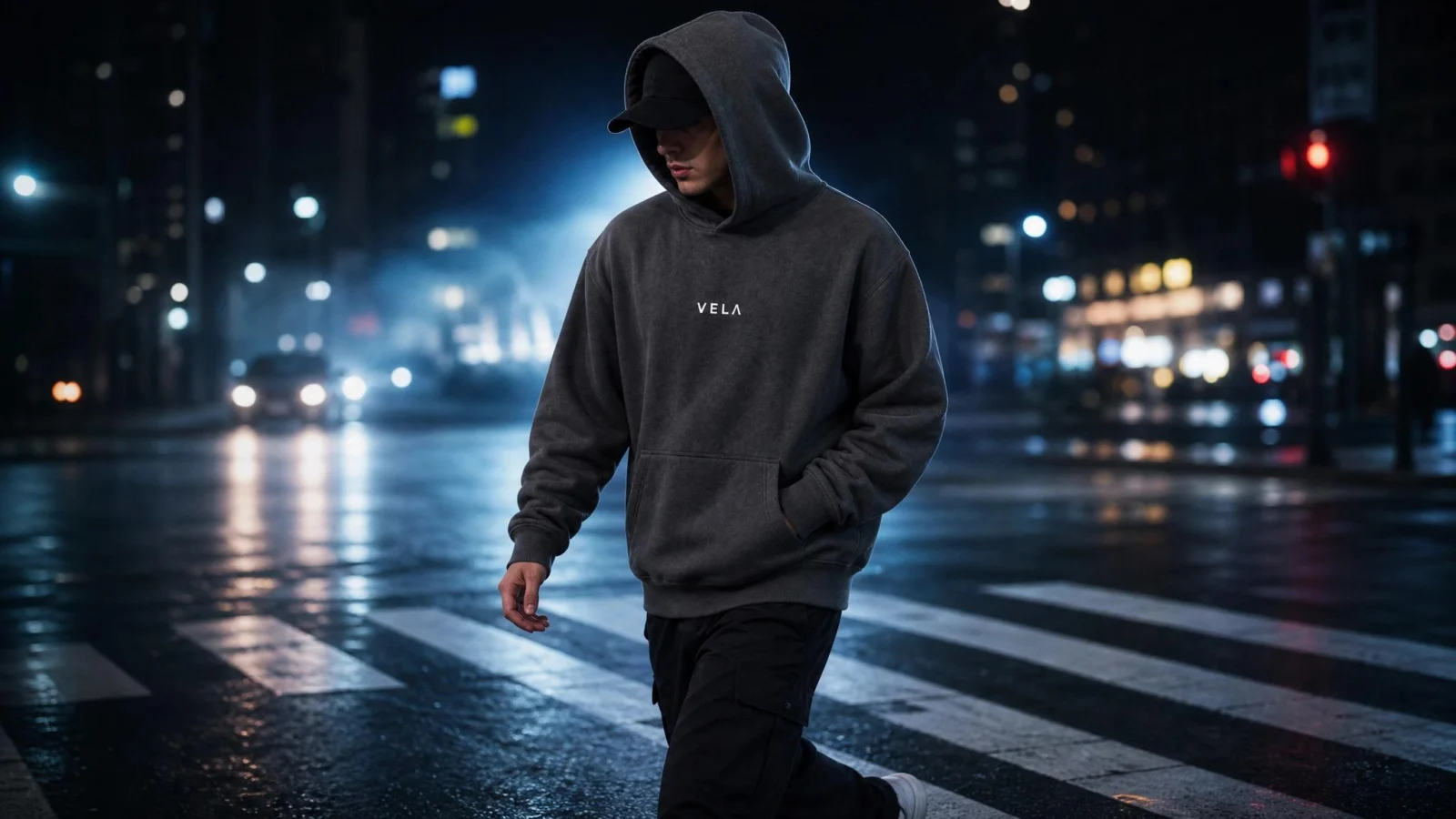
Frame 2: A model wearing the VELA hoodie from the reference, hood up, mid stride on a night city street, fabric in motion, cool rim light, cinematic, 16:9
Frame 3: The Brand Shot
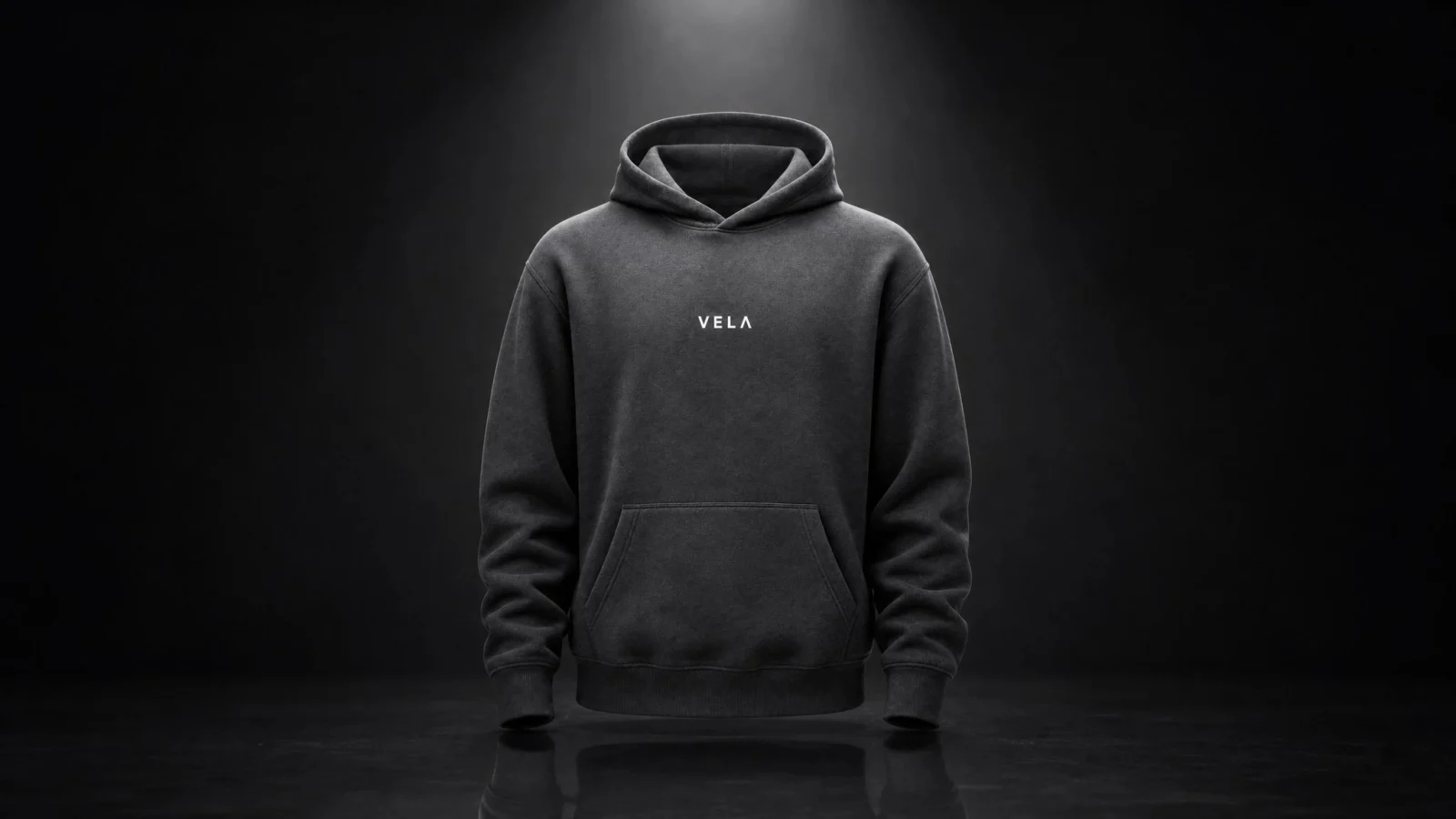
The ending composition. The product alone, wordmark front and center, the frame the whole ad resolves onto.

Frame 3: The VELA hoodie from the reference upright and centered, wordmark catching the key light, dark studio, single spotlight, premium brand hero shot, 16:9
Why These Three Shapes
Detail, energy, brand is a complete commercial arc in three images: prove the quality up close, show the product alive in the world, end on the name. It works for a hoodie, a watch, a drink, a chair. When you swap products, keep the three jobs and change only the world around them.
Working Notes
- Generate a few takes per frame and pick the ones that feel right. Same prompt, different outputs, that is how these models work.
- Keep all three frames in 16:9. The hero ad is widescreen, and frames in the wrong ratio fight the camera path.
- If a frame comes back square, select it and type in the chat: modify this image to 16 by 9 aspect ratio. No regeneration needed.
- Keeper check per frame: Frame 1 shows real knit texture with the wordmark edge readable. Frame 2 is unmistakably the same garment as the product photo, worn by a natural looking model. Frame 3 has the wordmark crisp under the light.
You now hold four images: the product photo and three keyframes. That is the entire input for a 30 second commercial.
Next: Page 4, The Hero Ad: One Shot, 30 Seconds.
Section 04
Finished VELA hero ad
What You’ll Create
A 30 second cinematic commercial in one single generation. One unbroken shot: macro on the fabric in the rain, the storm stopping mid air around the walking model, a full orbit through the hanging droplets, and a resolve onto the spotlight brand shot. Built from the four images you already have and one prompt.
The Settings, In Order
Select Video. Model: Seedance 2.5. Mode: Omni Reference, this is what lets one video follow multiple reference images. Aspect ratio: 16:9. Resolution: 480P for testing, 720P for the final. Duration: 30 seconds. Audio: ON, the clip comes back with sound already in it.
Attach the four references in this exact order: the product photo, Frame 1, Frame 2, Frame 3. The order matters because the prompt assigns each image a job. Where you see a bracket in the prompt, type @ and tag that image.
The Full Production Prompt
16:9 horizontal widescreen, wider than tall, NOT vertical. One single continuous cinematic hero commercial for the VELA hoodie, 30 seconds, ONE UNBROKEN SHOT, NO CUTS. The timestamps below are pacing for one continuous camera move, never cut points, the camera flows through every boundary.
References: the product lock is [tag your product photo], the hoodie colour, fit, and white VELA chest wordmark must match this photo at all times. The opening composition is [tag Frame 1]. The mid journey man and outfit is [tag Frame 2]. The final composition is [tag Frame 3].
0-5s: extreme macro on the charcoal fleece matching Frame 1, heavy night rain, droplets BEADING on the knit and rolling off, the white VELA wordmark edge catching light, camera begins a smooth pull back.
5-12s: the camera sweeps low: the hooded man from Frame 2 WALKS toward camera through a torrential neon downpour, calm and unhurried, volumetric rain shafts under the streetlights, every drop EXPLODING off his shoulders while his pace never changes.
12-14s: thunder STRIKES and the entire downpour stops mid air around him, thousands of droplets hanging motionless, glittering in the neon.
14-22s: he keeps walking through the hanging rain untouched, the only thing moving in the frame, while the camera ORBITS him once through the motionless droplets, drops sliding past the lens, the VELA wordmark razor sharp at center frame.
22-27s: still mid stride, the street DISSOLVES to black around him, the hanging rain falling away into darkness, one continuous move, no cut.
27-30s: he stops in a void studio matching Frame 3 as a single overhead spotlight FLARES on, camera settles tight on his chest, the VELA wordmark crisp in the key light.
CAMERA: one continuous move across all 30 seconds, macro pull back, low sweep, one full orbit, rise and settle, smooth motion control, never stops, never cuts.
CONSISTENCY: same man, same hoodie, same white VELA wordmark from the product photo in every second of the shot.
BGM: dark minimal cinematic electronic score, a low tense pulse building under the rain from 0s, the music cutting to near silence with the frozen rain at 12s, one crystalline shimmer, then a deep confident bass groove blooming through the orbit from 14s, rising with the dissolve and resolving on one final powerful hit exactly as the spotlight flares at 27s.
SFX: roaring rain on fabric and street, a sharp thunder crack at 12s, faint glassy ticks as droplets slide past the lens, near silence in the void studio.
Photorealistic water and fabric physics, coherent anatomy, ultra sharp, cinematic texture, stable picture.
DO NOT: cuts, scene changes, morphing, face distortion, blurred or altered wordmark, on screen text, the man pausing or standing still before the studio, camera stopping, stutter, handheld shake, whip pans.
The Seedance 2.5 Rules, Why the Prompt Is Built This Way
- Timestamps now work. On Seedance 2.0 they caused instability, on 2.5 they are the main pacing control. Give every beat its own time range, whole seconds, no gaps in the timeline.
- Timestamps direct pacing, not cuts. Left alone, the model treats each range as a new shot. Declaring ONE UNBROKEN SHOT at the top and repeating that the camera flows through every boundary is what turns the ranges into one take.
- Every reference gets a named job. Which image locks the product, which opens, which ends. The model follows references far better when each one has an assignment instead of arriving as a mood board.
- Start with the format lock. The first line forces horizontal. Without it, vertical outputs slip through even when the interface says 16:9.
- One camera idea. A single continuous move described once beats five competing camera instructions.
- One impossible thing. The frozen rain is the entire spectacle, and it works because everything else is grounded. Stack two impossible things and both get rendered halfway.
- Watch the trap words. Never write suspended or frozen for a slow beat, you get a paused video. Write hanging motionless, keeps walking, never fully stopping, and put freeze frame and camera stopping in the DO NOT list.
The Story Logic, So You Can Swap Products
The structure is: prove the material up close, put the product in a hostile world it handles calmly, stop the world while the product keeps going, resolve on the brand. For a watch, time stops around it. For a drink, the splash hangs mid pour. Keep the skeleton, change the world.
Credit Discipline
Test at 480P first, always. Judge the test on four things: the freeze reads as hanging droplets, the man never stops walking before the studio, the orbit is one move with no hidden cut at the timestamp seams, and the wordmark holds. Only when all four pass does the 720P final run. And if one region misses on an otherwise perfect take, fix it in the chat: keep everything unchanged and describe only the area to correct. A region fix costs a fraction of a regeneration.
Next: Page 5, Skill 1: Realistic Try-On, where the prompting ends and the easy path begins.
Section 05
Skill 1: Realistic Try-On
What You’ll Create
A vertical lifestyle video of a realistic AI creator wearing your product, without a model, a location, or a photoshoot. This is the first of the four AI UGC Skills, and the moment the course switches from the craft path to the easy path: no prompts from here on, just upload, pick, and generate.
Where It Lives
The four AI UGC Skills sit on the Creation workspace home screen: Realistic Try-On, Multi-size Try-on, Partial Try-On, and Voiceover Videos. Click Realistic Try-On and a guided panel opens. No prompt box anywhere on it, every decision is a dropdown.
The Setup, Exactly As Used
- Product images: upload the product photo from Page 2, and only that. The panel asks for multi-angle images for stable results, and if you want a true second angle, generate a back view of your product in the canvas for 15 credits. What you should never do is feed it styled scene shots like the keyframes, dark graded images drag the garment colour away from your catalog ground truth.
- Model region, skin tone: your choice, the defaults are fine.
- Gender: Male, to match the hero ad’s model world. Pick whatever fits your brand.
- Makeup: No Makeup.
- Age group: Young Adult.
- Background: Urban Street Shoot. Open this dropdown and look, there are several lifestyle environments, studio, street, cafe, outdoor. Pick the one that matches your brand’s world, the try-on should live where the hero ad lives.
- Video aspect ratio: 9:16. UGC is vertical. The hero ad owns widescreen, the Skills own the phone screen, that split is the campaign.
- Video duration: 5 seconds.
- Extra notes: leave it empty on the first run. An empty notes field is the whole point of this Skill, the guided workflow does the work.
Generate. The Skill opens a results window with the job summary and the create button, run it and let it finish.
Judging the Output
Look at the creator first: natural face, natural pose, natural lighting, no stiff AI look, clean hands. Then the product: unmistakably yours, colour matching the product photo, wordmark carrying if your garment has one. The test is simple, would a real clothing brand post this clip. If yes, it is a keeper.
If It Drifts
When the garment comes back the wrong shade or the wordmark garbles, that is when Extra notes earns its place. One line on the retry: keep the hoodie charcoal grey with the white VELA chest wordmark exactly as in the product photo. Swap in your own product’s colour and text. One retry with that line fixes most drift.
What This Replaces
A model booking, a location, a shoot day, and an edit. For a small clothing brand, this Skill alone is product page content on demand: run it once per colourway, once per season, whenever the feed needs something new.
Next: Page 6, Skill 2: Multi-size Try-on, same product on different bodies.
Section 06
Skill 2: Multi-size Try-on
What You’ll Create
The same product on different body types. This is the Skill that answers the question every clothing customer actually asks: how does it fit on someone shaped like me. One product photo in, a size range out, and for a clothing brand this one matters more than any other Skill on the platform.
The Setup, Exactly As Used
- Product images: the product photo from Page 2, and only that. Same rule as Skill 1, the clean catalog shot is the ground truth, never the styled scene shots.
- The models: this is the heart of the panel. You can configure two or more characters with different body sizes. I set up two models, one male and one female. Walk the options and build the range that matches your customer base, two is the minimum that reads as a range, three reads as a size chart.
- Video aspect ratio: 9:16, vertical, same as every Skill output in this campaign.
- Everything else: defaults are fine. Extra notes stays empty on the first run.
Generate, confirm in the results window, and let it run.
One Thing To Know Before You Judge the Output
The Skill generates one video per model, not one video with both models together. The card icon suggests a shared frame, the output is separate clips. That is actually the better behaviour for real use: a clothing brand wants one clean clip per size for the product page, and side by side comparisons get built in the edit, two vertical clips next to each other is exactly the size range shot.
Judging the Output
This Skill lives or dies on garment integrity, so look at the hoodie itself before anything else. It should fit every body correctly: the fabric falls where it should fall, seams sit where seams sit, nothing warps, nothing stretches, nothing breaks. Then the consistency check: same charcoal, same wordmark, same garment on both bodies, it must read as one product in two sizes, not two similar hoodies. Then the people: natural faces, clean hands, believable proportions.
If One Model Fails
When one clip in the set passes and the other warps, keep the pass and rerun. And if the garment drifts on the retry, the Extra notes line from Page 5 works here too: keep the hoodie charcoal grey with the white VELA chest wordmark identical on every model.
Where This Fits In a Real Campaign
Product page, size guide section, and the ad set. Different body types in the creative is not just inclusivity, it is conversion: customers buy when they can see themselves in the product, and this Skill manufactures exactly that sight, on demand, from one photo.
Next: Page 7, Skill 3: Partial Try-On, the detail shot, and the jewelry demo.
Section 07
Skill 3: Partial Try-On
What You’ll Create
The detail shot. Partial Try-On generates a close up video focused on exactly the part of the body where your product is worn, with a model wearing it. For jewelry, that is the neck or the ear. For a watch, the wrist. For a hoodie, the chest. It is the Skill built for products whose entire value lives in the details.
Why This Demo Uses Jewelry
The best test of a detail Skill is a detail product. Gold filigree is harder to keep consistent than a flat wordmark, so for this walkthrough we create a jewelry set first, then put it on a model. If the Skill holds intricate gold work, it holds anything. And it proves the bigger point of this whole course: the system works for any product, you are never locked to one brand or one category.
Step 1: Create the Product
Model GPT Image 2 in the canvas. This is the full production prompt for the gold set, and it doubles as a masterclass in product photography prompting, palette locks and light direction included:
luxury product photograph of a 22 karat yellow gold necklace and matching earrings.
THE OBJECT: traditional handcrafted gold jewellery, intricate filigree and bead work, solid warm yellow gold with a soft satin polish, tiny mirror-bright facets catching light along the edges, completely unbranded, no hallmarks, no logos, no engraved text anywhere.
SET: the necklace draped over a rounded bust form wrapped in deep espresso brown velvet, the earrings resting beside it on the same velvet, one corner of aged bone-white silk entering the frame for contrast.
LIGHT: one large soft key light from the upper left like a north-facing window, a thin warm rim light tracing the gold's outline, gentle falloff into shadow, no harsh reflections, no blown highlights, the gold glows rather than glares.
PALETTE LOCK: deep espresso velvet ground, warm gold as the only bright element, bone silk as the single quiet accent. No other colors introduced.
COMPOSITION: the necklace is the hero at center, earrings lower right as the supporting pair, generous breathing room around the pieces, nothing cropped.
FINISH: shot on a 100mm macro lens at f8, everything on the jewellery tack sharp, velvet texture softly resolved, editorial jewellery catalog grade, composed like a piece someone at the top of their field labored over, 4:5.
Step 2: The Skill Setup, Exactly As Used
- Product images: the gold set image you just generated, and only that.
- Wear part: where the product is worn. For the necklace, the neck. The dropdown covers the wear points, pick the one that matches your product.
- Wear relation: Wear.
- Camera shot: Close-up. This is the detail advantage itself, keep it.
- Model options: pick your model, defaults are fine elsewhere.
- Video aspect ratio: 9:16. Duration: 5 seconds.
Generate, confirm in the results window, let it run.
Judging the Output
Zoom in and compare against the product image you made in Step 1. Same gold, same filigree, same bead work, same craftsmanship. The product staying consistent between your source image and the worn close up is the entire point of this Skill, if the details morph, retry. Then the model check: natural skin, natural pose, the product sitting on the body the way the real thing would.
Swapping Products
The pairing rule: match the wear part to the product. Rings and watches to the hand and wrist, earrings and necklaces to the ear and neck, garments to the chest or full torso options. Whatever you sell, create the clean product image first, that image is the ground truth the close up gets judged against.
Next: Page 8, Skill 4: Voiceover Videos, the talking UGC clip and the agent fix method.
Section 08
Skill 4: Voiceover Videos
What You’ll Create
The talking clip. A presenter style UGC video with a realistic AI creator holding your product and talking about it to camera, voice, lip sync, and shots included. This is the Skill that finishes the campaign: the hero ad builds the brand, the try-ons show the fit, and this one does the selling.
The Setup, Exactly As Used
- Product images: the product photo from Page 2, and only that.
- The presenter: pick your model from the dropdowns, ethnicity, gender, age, makeup. I used a female presenter here after male models in the try-ons, real campaigns rotate creators and the range reads as a real brand.
- Background: open the dropdown and pick the world that fits your product. Skip the beauty environments unless you sell beauty, a lifestyle or indoor setting reads native for most products.
- Video aspect ratio: 9:16. Duration: 10 seconds, the longer duration gives the clip room for multiple shots, which is where this Skill shows off.
- The script, two ways. Leave Extra notes empty and the Skill writes its own script from your product image. Or paste your own, which is what I did for the final take:
This is the VELA hoodie and I have been wearing it nonstop. Heavyweight, premium, perfect fit. Rain or cold, it just works. VELA.
Short lines, spoken rhythm, product name twice. Write yours the way a person talks in a phone video, not the way a website reads.
Judging the Output
Play it start to finish, uninterrupted, twice. First pass for the shots: same creator’s face in every shot, product staying in frame, the clip holding together like it was filmed in one session. Second pass for the voice: natural delivery, clean lip sync, and if you let it write its own script, check every claim it made about your product, you own what the video says.
The Agent Fix Method, Learn This One
Sometimes the Skill recognises your script but does not use it, or the video comes back with an issue, no voice, a wrong line, a broken moment. Do not regenerate from scratch. In the results window there is a chat on the right: tell the agent exactly what went wrong, ask it to redo with your script, and it creates a new version with the fix. This works for this Skill and for any video on the platform, any mistake, chat it, describe it, and it updates. It is the difference between fighting the tool and directing it.
Where This Fits In a Real Campaign
This clip is the ad. Try-ons and detail shots support the product page, the talking clip is what runs on TikTok, Reels, and in paid placements, because a person saying why they love the product outperforms a product spinning in space every single time. One product photo, one script, and the campaign has a spokesperson.
Next: Page 9, The Fix Bank, every wall this production hit and the exact fix.
Section 09
The Fix Bank.
Every wall this production actually hit, with the exact fix that worked. Nothing theoretical, all of it happened while building the campaign you watched. Hit a wall this page does not cover, the fixes below teach the pattern: describe the problem to the platform instead of regenerating and hoping.
Fix 1: The video came back vertical when you set 16:9
The aspect setting can get overridden on video generations. The fix is in the prompt, not the settings: open with the format lock line, 16:9 horizontal widescreen, wider than tall, NOT vertical, as the very first words. If the interface pops up a confirmation before generating, restate 16:9 there too. The prompt wins where the dropdown loses.
Fix 2: The wordmark or text came back wrong on a perfect image
Do not regenerate. Select the image on the canvas and type in the chat: change the chest text to read exactly VELA. Swap in your own text. The words correct, the image stays, 15 credits saved.
Fix 3: One detail is wrong on an otherwise perfect video
Region edit instead of re-roll. In the chat, keep everything unchanged and describe only the area to fix: keep the man, the background, the camera movement, and the colour grading unchanged, fix only the distorted wordmark area, restoring it to match the product photo. A region fix costs a fraction of a full regeneration and protects everything already working.
Fix 4: Your script got recognised but ignored in a Skill
It happens, the summary shows your script and the video speaks something else, or nothing. Open the chat in the results window, tell the agent it did not use your script, paste the script again, and ask it to redo. The regeneration comes back on script. This chat repair works on any video issue on the platform, not just scripts.
Fix 5: Slow motion turned into a paused video
Trap words. Suspended and frozen make the model freeze the frame instead of hanging the objects. Write it the productive way: droplets hanging motionless, he keeps walking, never fully stopping. And keep freeze frame, complete stop, and stutter in your DO NOT list so the failure is banned by name.
Fix 6: The one shot came back with hidden cuts
Timestamps alone read as a shot list. Declare ONE UNBROKEN SHOT, NO CUTS at the top, state that the timestamps are pacing for one continuous camera move, and repeat that the camera flows through every boundary. The difference between a montage and a oner is those three sentences.
Fix 7: The product drifted dark or changed colour in a Skill
The uploads were teaching it the wrong lesson. Feed Skills the clean catalog product photo only, never styled scene shots, dark graded images drag the garment with them. If drift survives that, one line in Extra notes on the retry: keep the hoodie charcoal grey with the white VELA chest wordmark exactly as in the product photo.
Fix 8: The generation hangs at 99 percent or fails outright
The progress number is decorative, not a diagnosis. Give it time, and if it fails, run it again, the platform recovers. Never judge a prompt off a failed run, judge it off a completed one.
Fix 9: Credits disappearing faster than expected
Video is the spend, and resolution plus duration set the price. The discipline that saves a production: images freely, video tests at 480P, finals at 720P only after the motion locks, and region edits instead of re-rolls. Sequence the spending, cheap before expensive, always.
The Pattern Behind All Nine
The platform is conversational. Almost every fix above is the same move: select the thing, describe the problem, let the agent correct it. Regeneration is the last resort, not the first instinct. Direct the output, do not gamble for it.
That is the course. One photo, a full campaign, and now the repair kit to keep it running. Build something with it.